 Back to Docusign.com




Trending Topics: Latest from our forums (December 2025)
Here are some of the latest popular questions that developers asked in the Docusign Community for the month of December 2025.
How to send email to signer after request a signature through your app (embedded signing)
Summary: The developer is using embedded signing to embed Docusign eSignature in their own app. When the user has finished signing, the developer wants that user to receive a confirmation email indicating that they have completed the envelope.
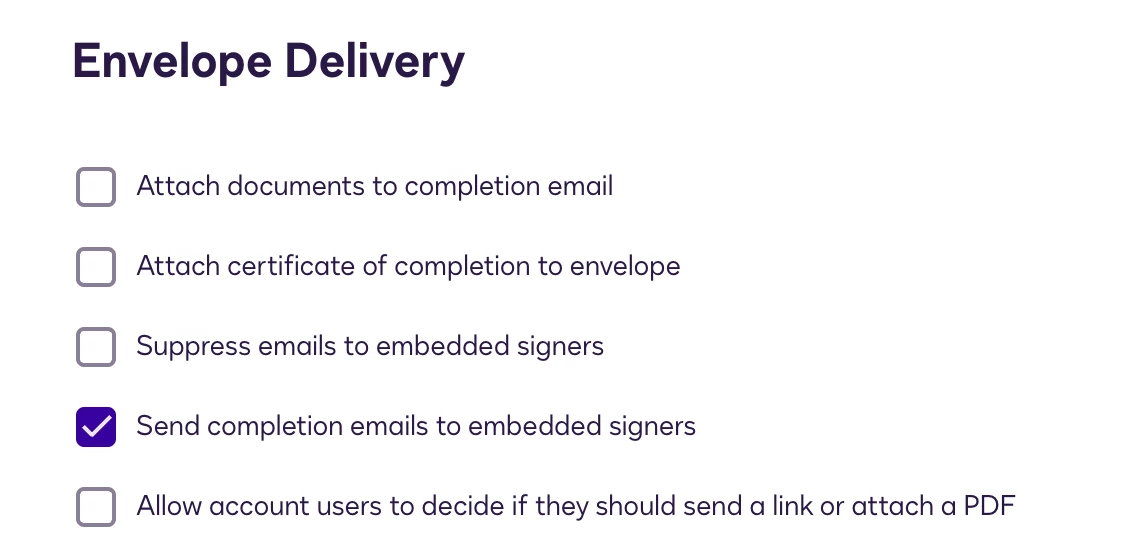
Answer: To ensure that embedded signers receive emails when they have finished signing, edit the Signing Settings in your account. Turn off the setting Suppress emails to embedded signers, and turn on Send completion emails to embedded signers. You can find these settings under Envelope Delivery.
Get envelope deliver failure status API
Summary: The developer is trying to use the eSignature REST API to determine when envelope delivery fails. They are trying to get this information from the envelope object's status property, but even when envelope delivery fails, the status is Sent.
Answer: When envelope delivery fails, that information will be reflected in the recipient details rather than on the envelope itself. To get this information, call the EnvelopeRecipients:list endpoint.
Embedded SenderView returnUrl not working
Summary: The developer is embedding the sender view in their app to allow users to edit and send envelopes. When the envelope is sent, the app is not redirecting to the URL that the developer expects.
Answer: The URL that the app redirects to is defined by the EnvelopeViews:createSender request's returnUrl property. The developer was running into issues because they had set the return address to the integration key's redirect URI, which determines where the browser redirects after authentication.