Conversation Starter
March 5, 2024
Solved

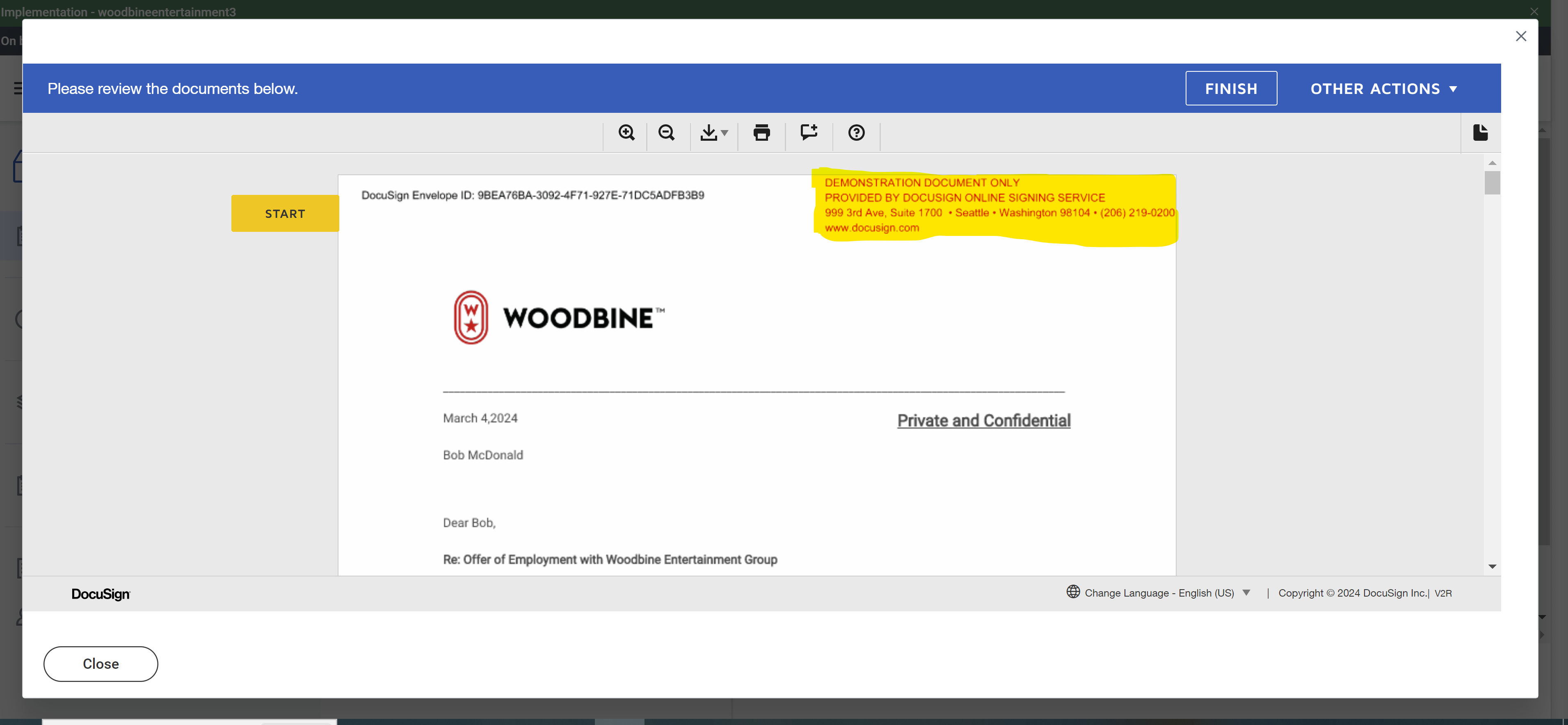
We are integrating DocuSign with workday testing tenant, while we are testing on offer letter encountered following questions.

  • March 5, 2024
  • 16 replies
  • 864 views
  1. I would like to ask if it is because we authenticated DocuSign developer account to our testing tenant with my credentials, it shows up my name on top(Highlighted)


  2. Is it because we are in our testing phase and using developer account it is giving  Demonstration document only on top of page in offer letter?
     

Best answer by nathaly.monge

Hello @Kalyan Teja ,


If you found my response to be a useful solution to your question, please mark it as the best answer by clicking “Select as Best” to make it easier for other users to find.


Best regards,

Nathaly | Docusign Community Moderator
"Select as Best" below if you find the answer a valid solution to your issue!

16 replies

Conversation Starter
June 11, 2024

May I be advised on how is it going to be in the production tenant?

Will I have to use DocuSign enterprise account to authenticate with workday production tenant?

Please advise. 

Docusign Employee
June 12, 2024

Hello @Kalyan Teja ,


Thank you for reaching back and apologies for the late reply.


To integrate Workday with Docusign, an integration key is needed which means that a developer account is needed to get the key (developer accounts are free) after that you would need an account plan that allows API keys, once you go through the go-live process you would need to add the Docusign credentials and it should connect fine: Promote Integration Keys to a Live Production Account


  1. Create a Docusign Account: If you haven't already, create a Docusign account. You can sign up for a developer account to use in your sandbox environment.
  2. Generate API Integration Key: In your Docusign account, generate an API integration key. This key will be used to authenticate your Workday integration with Docusign.
  3. Create a Docusign User for Integration: Create a dedicated Docusign user specifically for the integration with Workday. This user will be used for technical purposes, such as handling eSignatures within Workday.
  4. Configure Docusign Integration Settings in Workday: In your Workday environment, configure the Docusign integration settings. This involves entering the DocuSign API integration key, specifying the Docusign user credentials created for integration, and setting up other necessary parameters.
  5. Ensure Docusign Account Permissions: Confirm that the Docusign user account used for integration has the necessary permissions to perform the required actions within DocuSign, such as sending envelopes.
  6. Activate Docusign Integration Features: Check if there are any specific features or settings that need to be activated in your Docusign account to enable seamless integration with Workday. This information can be found in Docusign's integration documentation or support resources.
  7. Verify Redirect URIs: Ensure that the redirect URIs configured in Docusign match the ones specified in your Workday integration settings. 
  8. If you encounter issues during the configuration or face authentication problems, please refer to the Integrator Workday for more detailed information.


Best regards,

Nathaly | DocuSign Community Moderator
"Select as Best" below if you find the answer a valid solution to your issue!

Conversation Starter
July 9, 2024

I hope this message finds you well. I Configured DocuSign in IMPL tenants and sandbox before and it worked as expected until last weekend refresh. I'm currently experiencing an issue while trying to authenticate our DocuSign enterprise account with the Workday sandbox. Specifically, in the "Confirm Account ID" step, the account ID is not populating despite multiple attempts to re-authenticate.
 Looking forward for your assistance.


Docusign Employee
July 10, 2024

Hello @Kalyan Teja ,


Thank you for reaching back.


Could you please confirm if you have reached out to Workday already?

I ask this because they serve as front-line support. The DocuSign Support Team does not own the integration or have information about the architecture of the integration, therefore, it is beyond our knowledge if you can capture the link within Workday.


Best regards,

Nathaly | DocuSign Community Moderator
"Select as Best" below if you find the answer a valid solution to your issue!

Conversation Starter
July 31, 2024

Hi,

I have attached the document of how I configured DocuSign Integration in workday sandbox and tested, it is working as expected.

My questions are:

  1. I followed same procedure and configured DocuSign Integration in workday production and as it is live environment we are unable to test it out. I would like to know if integration is going to be worked in workday production tenant as it is configured same as sandbox and I can see DocuSign enabled in production tenant and I can see the prod tenant in DocuSign enterprise account. I do not see anything in apps and keys
    1. My second question is after every refresh of workday sandbox from workday prod on Fridays the DocuSign integration is getting reset in workday sandbox instead of it being enabled since it is enabled in workday prod.

       
Docusign Employee
August 1, 2024

Hello @Kalyan Teja ,

Thank you for reaching back.

The Friday credential reset is correct, you will need to reestablish in Workday sandbox after every refresh, same with any other implementation tenants. The connection is a little different than other integrations, it is established within the Edit Tenant Setup Business Process task to connect the account. Additionally, have  ensure the review document setup within the business processes has the ESign by Docusign integration selection as it may not have migrated over from Sandbox if the account was not connected yet in Production. I'd recommend you reach out to Workday with a case if you are not experiencing the expected connection for document tasks since Workday can access their tenant and help with the troubleshooting. 
Best regards,

Nathaly | DocuSign Community Moderator
"Select as Best" below if you find the answer a valid solution to your issue!


