Conversation Starter
March 5, 2024
Solved

We are integrating DocuSign with workday testing tenant, while we are testing on offer letter encountered following questions.

  • March 5, 2024
  • 16 replies
  • 864 views
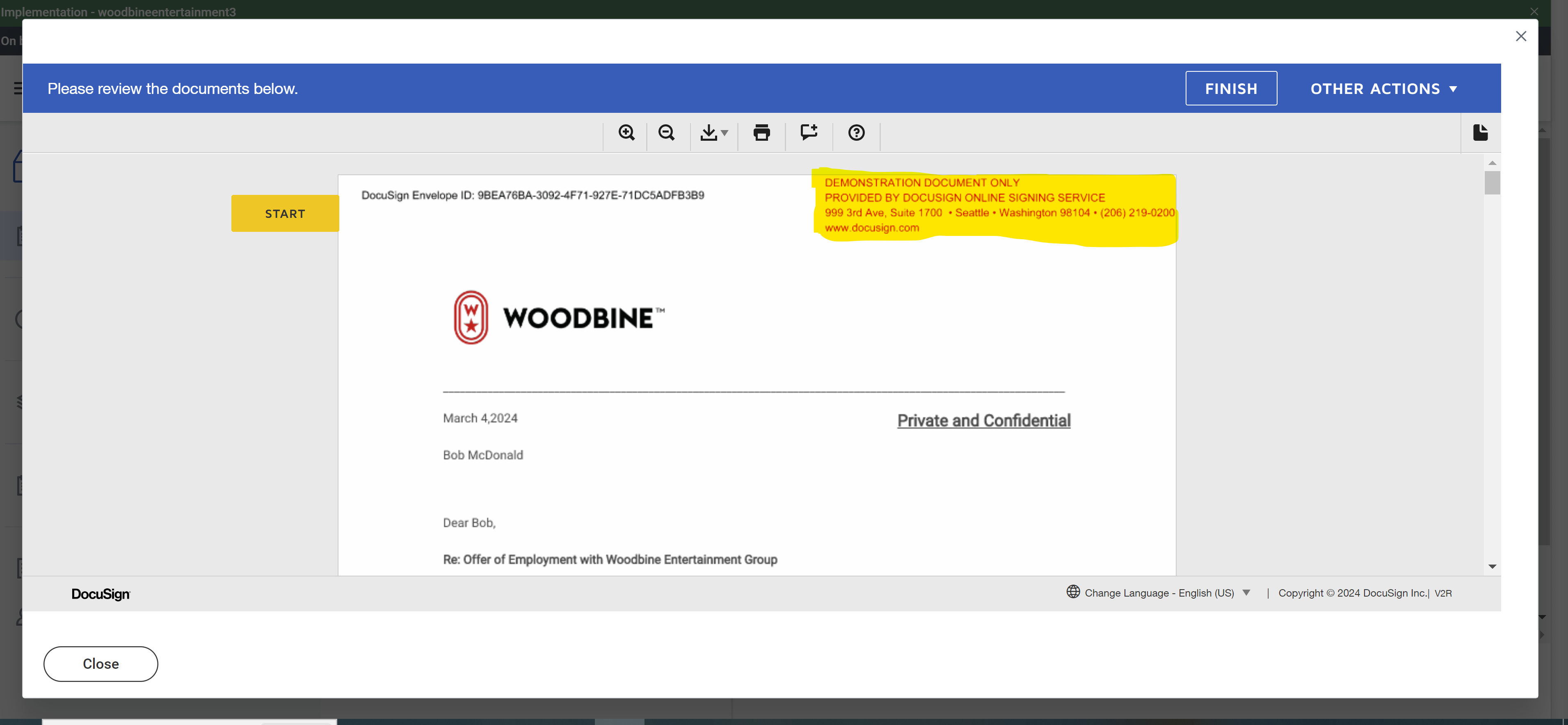
  1. I would like to ask if it is because we authenticated DocuSign developer account to our testing tenant with my credentials, it shows up my name on top(Highlighted)


  2. Is it because we are in our testing phase and using developer account it is giving  Demonstration document only on top of page in offer letter?
     

Best answer by nathaly.monge

Hello @Kalyan Teja ,


If you found my response to be a useful solution to your question, please mark it as the best answer by clicking “Select as Best” to make it easier for other users to find.


Best regards,

Nathaly | Docusign Community Moderator
"Select as Best" below if you find the answer a valid solution to your issue!

16 replies

Docusign Employee
March 5, 2024
  1. The reason that your name appears in this location on the document is that you are signed into DocuSign with your account.  This may be because the developer account is in your name or because you are logged into the developer account, or because when the integration was set up it was done with your email account address.  
    It is possible to make this come from a more generic address, such as from administrator@woodbine.com but you would need an Enterprise Pro account, claim your domain (e.g. @woodbine.com) and set this up.  
    2. Yes.  In a production account this message would not be displayed
Conversation Starter
March 6, 2024

I would like to further ask about the 1st question:

1.My name at the top will just be showing for the test build correct? In the final build(production) that won’t be present?

2.If nothing specific is required in the final build(production) were it currently shows my name that will be blank in the final build, correct? 

Please advice.

Thanks in advance!

Docusign Employee
March 6, 2024

Hi Kalyan,

  1. There will be a name there from whoever was the sender of the document - as is the person logged into the DocuSign account and clicked send.  With that said, per my last post, if you have a generic email address e.g WoodbineAdmin@woodbine.com, it would say from WoodbineAdmin, or if you have an Enterprise Pro Account plan and claim your domain you can also genericize the ‘from’
    2. Per #1 here - No.  It still will have a ‘from’ but larger organizations tend to genericize it by claiming their domain

    ​​​​​​​
Docusign Employee
March 21, 2024

Hello @Kalyan Teja ,


If you found the provided response to be a useful solution to your question, please mark it as the best answer by clicking “Select as Best” to make it easier for other users to find.


Best regards,

Nathaly | DocuSign Community Moderator
"Select as Best" below if you find the answer a valid solution to your issue!

Conversation Starter
April 15, 2024

Hello,


May I know how to change DocuSign Sandbox Administrator Email Address?


Thanks in advance!

Docusign Employee
April 16, 2024

Hello @Kalyan Teja ,


Thank you for reaching back.


The email address would either need to be changed by the admin directly by going to:


  1. Click on profile image in the DocuSign account: Change Your Email Address
  2. Select "Manage Profile" from the dropdown menu.
  3. The My Profile site will open.
  4. Update your email address in the Email Address section.
  5. If required, log in to authenticate your account.
  6. Select "CONTINUE" and enter your new email address.
  7. Click on "SEND CODE".
  8. A confirmation email with a verification code will be sent to your new address.


Other wise, what can be done would be to open a new account with the correct email address and transfer any needed documents as mentioned in the following article: How can an administrator change a user's email address?


If you found the provided response to be a useful solution to your question, please mark it as the best answer by clicking “Select as Best” to make it easier for other users to find.


Best regards,

Nathaly | DocuSign Community Moderator
"Select as Best" below if you find the answer a valid solution to your issue!

Conversation Starter
April 18, 2024

Thank you for your support!


My other question is:


Some of the hiring managers are not getting ‘Don’t Accept’ button under ‘eSign by DocuSign’.


May I know why is that?


Docusign Employee
April 19, 2024

Hello @Kalyan Teja ,


Thank you for reaching back.


That doesn’t look like the normal DocuSign interface, would that be Workday?


If it is Workday, I would recommend you reach out to them, as the integration is own by them and would be better suited to assist you.


Best regards,

Nathaly | DocuSign Community Moderator
"Select as Best" below if you find the answer a valid solution to your issue!

Docusign Employee
May 3, 2024

Hello @Kalyan Teja ,


If you found my response to be a useful solution to your question, please mark it as the best answer by clicking “Select as Best” to make it easier for other users to find.


Best regards,

Nathaly | Docusign Community Moderator
"Select as Best" below if you find the answer a valid solution to your issue!

Conversation Starter
May 28, 2024

Hi,

I have configured DocuSign to our testing tenants during our workday implementation and it works alright.


Thankyou for your support.

May I please be advised on how is it going to be in the production tenant?

Will I have to use DocuSign enterprise account to authenticate with workday production tenant?

Please advise.


