I want to set some condition based on the status of the specifict envelop I sent via PowerAutomate in the same flow.
If is signed: Update to SharePoint
If is waiting for signature: Wait/Send reminder
If is declines: Send email + additional actions
Thanks you and best regards.
Best answer by nick9one1
Hi LuisS
I also had this requirement and resolved it differently. I completely agree that the list envelopes should have an ID filter. But there might be another way to do this.
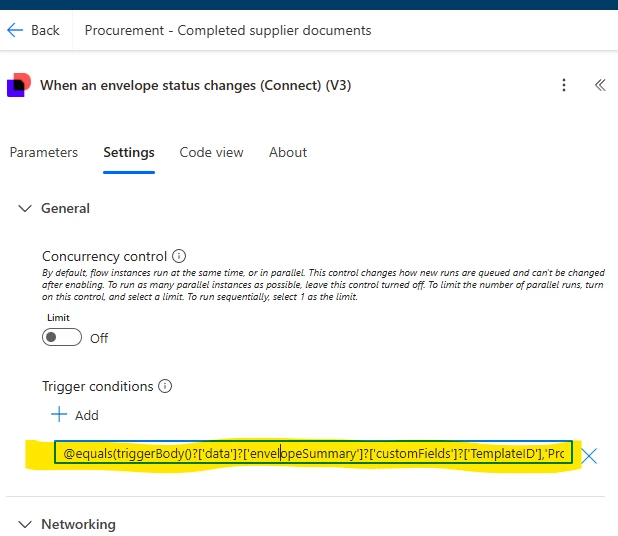
use the trigger ’When an envelope status changes (Connect) (V3)’
in the settings of the trigger you can set some conditions to cause it to trigger.
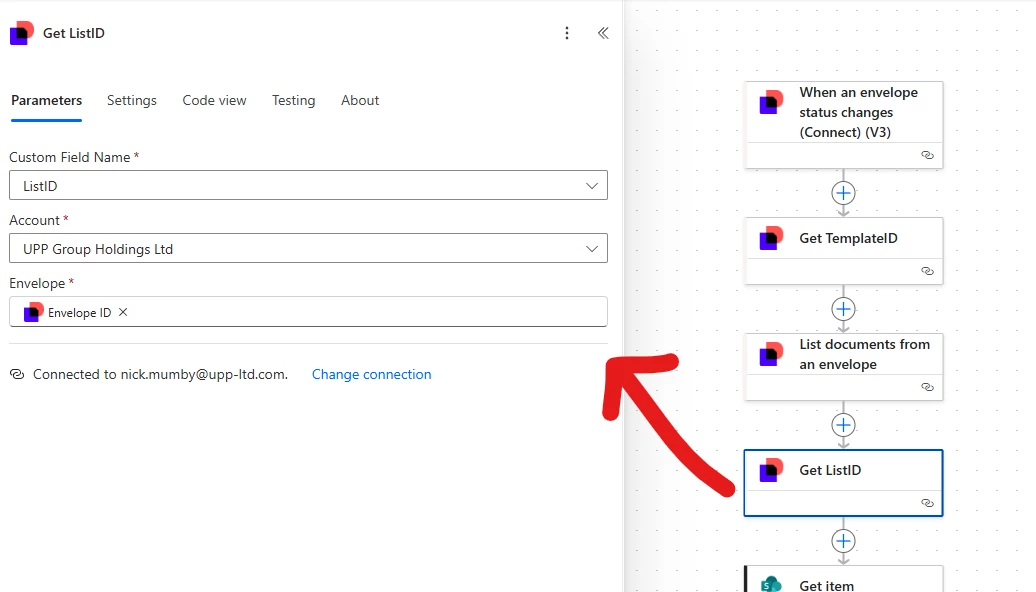
In my scenario I have a SharePoint list that triggers envelopes to be sent when uses fill in a form. The envelopes have a few custom fields
The templateID is static and used so that the power automate flow only triggers for envelopes sent from my form.
the flow then uses the other custom fields to find the row in the SharePoint list that this envelope belongs to.
Hello @LuisS Thank you for reaching out, and welcome to the Docusign Community! We appreciate your question and assure you that we are fully committed to providing you with the best service possible.
To query the status of envelopes in Power Automate, you can use the List envelopes action. This action allows you to filter and retrieve envelopes based on specific criteria, including their status.
I hope this helps. If you spot anything else or have questions we can help with, don’t hesitate to reach out.
If you found the response to be a useful solution to your question, please mark it as the best answer by clicking “Select as Best” to make it easier for other users to find. Thank you!
Best regards,
Ma. Cassandra | Docusign Community Moderator
"Select as Best" below if you find the answer a valid solution to your issue
Hello @LuisS Thank you for reaching out, and welcome to the Docusign Community! We appreciate your question and assure you that we are fully committed to providing you with the best service possible.
To query the status of envelopes in Power Automate, you can use the List envelopes action. This action allows you to filter and retrieve envelopes based on specific criteria, including their status.
I hope this helps. If you spot anything else or have questions we can help with, don’t hesitate to reach out.
If you found the response to be a useful solution to your question, please mark it as the best answer by clicking “Select as Best” to make it easier for other users to find. Thank you!
Best regards,
Ma. Cassandra | Docusign Community Moderator
"Select as Best" below if you find the answer a valid solution to your issue
Hi Cassandra,
Thank you for your reply, however that don’t work for what I need.
I need to get the status of the envelop that I sent in the same flow, based on the envelop id, to go trough a different branch based on that status, that means I need to retrive continuosly till it change, but in the same flow, not as a trigger but as a action type “Get envelope status”.
Hello @LuisS Unfortunately, the Docusign Trigger is an account-wide listener, meaning it is designed to poll all envelopes for a status change to start your workflow. There isn't a Docusign supported that would work for your use case. Our guidance is to have a total of 3 workflows.
One to send the envelope.
One with a trigger condition set for the specific status of 'Declined' to send your follow-up actions.
How are you? I'm checking in to see if you still need assistance. If yes, kindly reply here with more context or confirm if the issue has been resolved.
If you run into any problems, we're happy to help with those here. Wishing you a smooth rest of your day!
Sincerely,
Ma. Cassandra | Docusign Community Moderator
If this helped, feel free to Like👍and click "Best Answer"
I need to get the status of an envelop based on the envelop ID inside the smae flow to be able to continue, basically I need to flow to check continuosly the status till is rejected or signed take different brancn the flow that works based on all the previous steps before the envelop is created.
Hello @LuisS I’m sorry to hear that the issue isn’t resolved yet. If the details above do not help, please get in touch with your Account Team for further assistance.
Sincerely,
Ma. Cassandra | Docusign Community Moderator
If this helped, feel free to Like👍and click "Best Answer"
I also had this requirement and resolved it differently. I completely agree that the list envelopes should have an ID filter. But there might be another way to do this.
use the trigger ’When an envelope status changes (Connect) (V3)’
in the settings of the trigger you can set some conditions to cause it to trigger.
In my scenario I have a SharePoint list that triggers envelopes to be sent when uses fill in a form. The envelopes have a few custom fields
The templateID is static and used so that the power automate flow only triggers for envelopes sent from my form.
the flow then uses the other custom fields to find the row in the SharePoint list that this envelope belongs to.
You can login or register as either a Docusign customer or developer. If you don’t already have a Docusign customer or developer account, you can create one for free when registering.