Solved

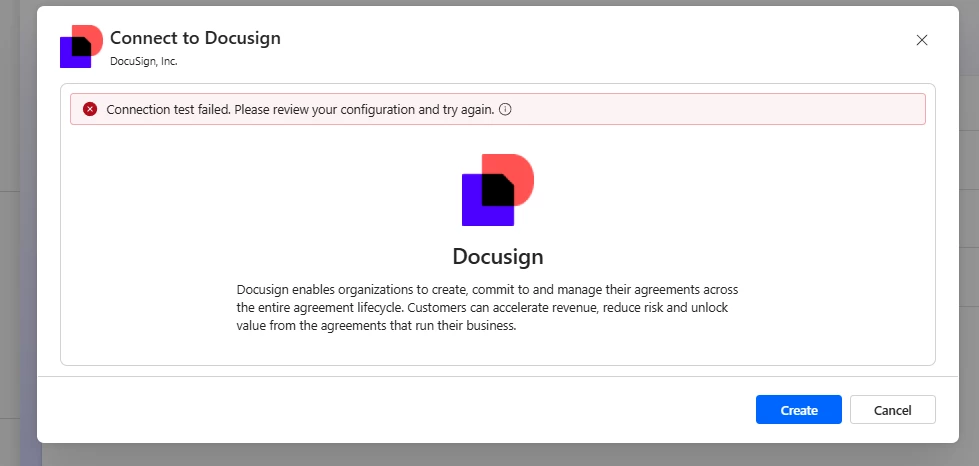
DocuSign Connector - Test Connection Failed

  • June 21, 2026
  • 16 replies
  • 232 views

Forum|alt.badge.img+1

Hi,

I’m new to using Docusign connector in one of my flows in Power Automate. I cannot create the connection, it says Connection Test Failed. Please review your configuration and try again., but through the Portal I can login our account.


Is anyone having the same issues? Thanks in advance
 

Best answer by Noralynn.Niduaza

Hello Everyone!


A similar post here in Community has an update from one of the affected users. They have mentioned that it is already working on their end, and it seems like the issue is with the Microsoft system itself and not with Docusign. It is currently being worked on and might take a week to be fully resolved across all regions.

Kindly take a look at this post for more information. https://community.docusign.com/microsoft-32/not-able-to-create-connection-on-power-automate-for-docusign-27201


Best regards,

Noralynn | Docusign Community Moderator

If this helped. Feel free to Like👍and click "Best Answer."


16 replies

Forum|alt.badge.img+7

Hi ​@TERENA,


We appreciate you reaching out to the Docusign Community and are delighted to have you join us.

I sincerely apologize for the recent experience and the error you encountered. I’ll be glad to help you!

At this time, an internal ticket has already been created STRATEGIC-833, as this may be related to a potential bug. Our engineering team is actively investigating and working to determine the root cause.

To ensure your specific situation is properly addressed, we recommend submitting a Support Case. 👉 Open a support case

Our support team may need to perform additional troubleshooting and gather further details, which will also assist Engineering with their investigation.


Thank you for your patience and understanding.


Best regards,

Noralynn | Docusign Community Moderator

If this helped. Feel free to Like👍and click "Best Answer."


Forum|alt.badge.img+1
  • Author
  • Conversation Starter
  • June 22, 2026

Hi ​@Noralynn.Niduaza , thanks for the info. However, do you have estimated target time of fixing? This has to be a high priority fix. 


Forum|alt.badge.img
  • Active Voice
  • June 23, 2026

Hi

We received the same issue. We have been using power automate to capture envelope status changes, all of a sudden our flows are not getting triggered anymore and upon checking it says that the connection is broken. when we try to reconnect, the test connection has failed. Can you please inform us whether this is production bug or just some configuration in our end that needs adjustment?

Thanks.


Forum|alt.badge.img+7

Hi ​@TERENA,


I appreciate your response.

At this time, our engineering team is actively investigating. While we do not currently have an estimated time for resolution, the issue has been raised with high priority. Once you have submitted a case, the internal bug case will be linked to your case ID, and you can monitor the status through your account manage cases. Open a case in the Docusign Support Center  

Updates will be provided as soon as more information becomes available.

Thank you for your patience and understanding in this matter.


Best regards,

Noralynn | Docusign Community Moderator


Forum|alt.badge.img+7

Hi ​@Many Rivers,


Thank you for bringing this to our attention. We understand the impact this issue is having on your workflows and apologize for the inconvenience. I’m glad to help you with this.

An internal ticket, STRATEGIC-833, has already been created and is being investigated, as this may be related to a potential bug. To help with the investigation and ensure your case is properly tracked, we recommend submitting a Support Case and including details such as the affected flow information, screenshots of the error, and any troubleshooting steps already performed.

👉 Open a support case

Thank you for your patience and understanding in this matter.


Best regards,

Noralynn | Docusign Community Moderator

If this helped. Feel free to Like👍and click "Best Answer."


Forum|alt.badge.img
  • Active Voice
  • June 25, 2026

Hi ​@Noralynn.Niduaza 

We have reported this issue and requested for support. Upon checking the bug status is now Closed, but we are still experiencing the same issue.
 

***INFORMATION REMOVED DUE TO PII**


Does anyone else still have the same issue?

Regards


Forum|alt.badge.img

The bug is NOT FIX


Forum|alt.badge.img+1
  • Author
  • Conversation Starter
  • June 25, 2026

@Many Rivers Yup, still got the error too.. I tried to add connection just now.


Forum|alt.badge.img
  • Active Voice
  • June 25, 2026

Thanks for your confirmation ​@destroyer341 & ​@TERENA . I wonder if you have also reached out to DocuSign Support directly. If yes, how did you guys try to get in touch with them?


I have tried to by submitting support request as suggested (because that’s the only way that we know on how we can contact them on such issue), however their response is very limited considering how long this issue has been happening. We have now been affected for almost 2 weeks without clear clarification ​@Noralynn.Niduaza 


Forum|alt.badge.img
  • Newcomer
  • June 25, 2026

No, this is not fixed yet and it is absolutely infuriating. I am already starting to shop around for other e-signature solutions with powerautomate. 


Forum|alt.badge.img+7

HI ​@Many Rivers,


Thank you for your response and for the update.

I reviewed the case ID you provided and confirmed that one of our support specialist has already shared additional details regarding the progress of the investigation.

We sincerely apologize for the inconvenience this issue has caused. Please rest assured that the matter is actively being worked on and is currently treated with high priority.

We appreciate your patience and understanding while our team continues to address this issue. 


Best regards,

Noralynn | Docusign Community Moderator


Forum|alt.badge.img+7

Hello Everyone!


Thank you for the update and for letting us know that the issue is still occurring.

We sincerely apologize for the inconvenience this has caused. I checked internally and can confirm that the bug investigation is still in progress.

To help us provide you with the latest information, could you please send the case ID via private message? This will allow me to review the case and check for any updates or responses from our Microsoft team. If no case ID yet, we recommend submitting a Support Case and including details such as the affected flow information, screenshots of the error, and any troubleshooting steps already performed. 👉 Open a support case

Thank you for your patience and understanding. I look forward to hearing from you.


Best regards,

Noralynn | Docusign Community Moderator


Forum|alt.badge.img+7

Hello Everyone!


A similar post here in Community has an update from one of the affected users. They have mentioned that it is already working on their end, and it seems like the issue is with the Microsoft system itself and not with Docusign. It is currently being worked on and might take a week to be fully resolved across all regions.

Kindly take a look at this post for more information. https://community.docusign.com/microsoft-32/not-able-to-create-connection-on-power-automate-for-docusign-27201


Best regards,

Noralynn | Docusign Community Moderator

If this helped. Feel free to Like👍and click "Best Answer."


Forum|alt.badge.img+1
  • Author
  • Conversation Starter
  • June 25, 2026

Hi ​@Noralynn.Niduaza  ​@Many Rivers 

This is now working on my side. I just created a connection now. My tenant location is in Australia. 🙂

Thanks.


Forum|alt.badge.img
  • Active Voice
  • June 25, 2026

Hi ​@Noralynn.Niduaza  ​@Many Rivers 

This is now working on my side. I just created a connection now. My tenant location is in Australia. 🙂

Thanks.

Hi ​@TERENA ​@Noralynn.Niduaza 

Thanks for sharing this info. Yes, I have just now checked that the connection is fixed. I am also in Australia. There is a little change on the trigger, although the former trigger still works fine 🤞🏻


Forum|alt.badge.img+7

Hello Everyone!


Thank you for the update, and I’m glad everything is working as expected now! 😊

If anything else comes up or you hit another roadblock, don’t hesitate to reach out here in the Community.

Wishing you a smooth rest of your day! 😍


Best regards,

Noralynn | Docusign Community Moderator


