 Back to Docusign.com




Agreement Template Builder (DocGen) -- allow recipient Fields (not just sender Fields) to enable the recipient to complete a dynamic table and other recipient fields prior to signature
Business Case: Our attestation process for sustainability programs (Carbon, Methane) includes data collection of farming practices for a specific calendar year, with signature /approval of the data collection (the attestation). We have been working with ATB, but we cannot seem to pre-populate the dynamic tables with a subset of the sender fields and prompt the recipient to complete the missing information (highlighted in yellow).
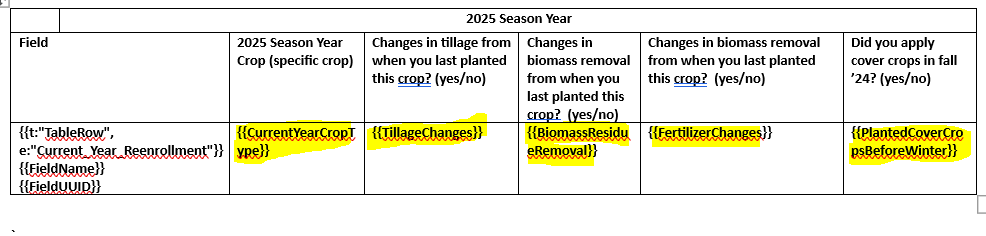
Ask: We believe the Template Assistant could be updated with a drop list choice that indicates that the DocGen Field is either a senderField or recipientField. This would also exist in dynamic tables (currently only simple text is supported).
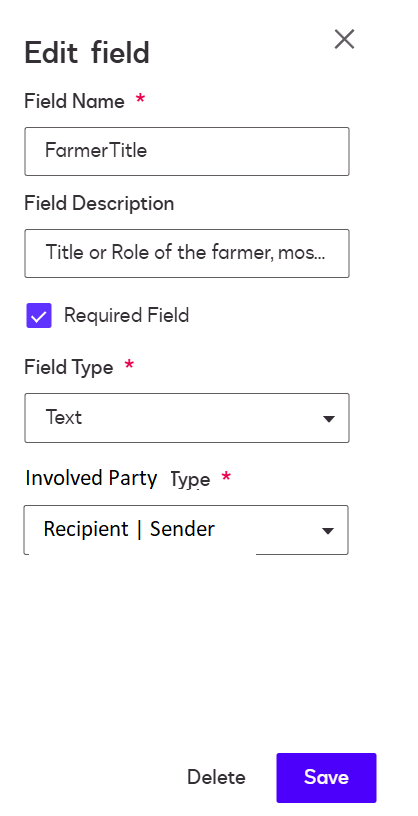
When recipientField is selected, the recipientId property is added to the JSON.
{
"docGenFormFields": [
{
"documentId": "6331379d-67fc-4957-9c05-451e6f629627",
"docGenFormFieldList": [
{
"label": "RetailerName",
"type": "TextBox",
"required": "False",
"name": "RetailerName",
"value": "Harvest States Coop"
},
{
"label": "FarmerBusinessDBAName",
"type": "TextBox",
"required": "False",
"name": "FarmerBusinessDBAName",
"value": "Crops R Us"
},
{
"label": "FarmsteadName",
"type": "TextBox",
"required": "False",
"name": "FarmsteadName",
"value": "Grandmas Farm",
"description": "The name of the farmstead"
},
{
"label": "FarmerEmail",
"type": "TextBox",
"required": "False",
"name": "FarmerEmail",
"value": "stnieman@landolakes.com"
},
{
"label": "Current_Year_Reenrollment",
"type": "TableRow",
"required": "True",
"name": "Current_Year_Reenrollment",
"rowValues": [
{
"docGenFormFieldList": [
{
"label": "FieldName",
"type": "TextBox",
"required": "True",
"name": "FieldName",
"value": "Davis"
},
{
"label": "FieldUUID",
"type": "TextBox",
"required": "True",
"name": "FieldName",
"value": "daa0fa1b-bb5d-42df-a9d2-244b3bfe71bb"
},
{
"label": "CurrentYearCropType",
"type": "TextBox",
"required": "True",
"name": "CurrentYearCropType",
"value": "",
"recipientId": "1"
},
{
"label": "TillageChanges",
"type": "TextBox",
"required": "True",
"name": "TillageChanges",
"value": "",
"recipientId": "1"
},
{
"label": "BiomassResidueRemoval",
"type": "TextBox",
"required": "True",
"name": "BiomassResidueRemoval",
"value": "",
"recipientId": "1"
},
{
"label": "FertilizerChanges",
"type": "TextBox",
"required": "True",
"name": "FertilizerChanges",
"value": "",
"recipientId": "1"
},
{
"label": "PlantedCoverCropsBeforeWinter",
"type": "TextBox",
"required": "True",
"name": "PlantedCoverCropsBeforeWinter",
"value": "",
"recipientId": "1"
}
]
},
{
"docGenFormFieldList": [
{
"label": "Field",
"type": "TextBox",
"required": "True",
"name": "Field",
"value": "Nelson 40"
},
{
"label": "FieldUUID",
"type": "TextBox",
"required": "True",
"name": "FieldName",
"value": "fd0ba46a-567f-4215-8686-273b98ee36b6"
},
{
"label": "CurrentYearCropType",
"type": "TextBox",
"required": "True",
"name": "CurrentYearCropType",
"value": "",
"recipientId": "1"
},
{
"label": "TillageChanges",
"type": "TextBox",
"required": "True",
"name": "TillageChanges",
"value": "",
"recipientId": "1"
},
{
"label": "BiomassResidueRemoval",
"type": "TextBox",
"required": "True",
"name": "BiomassResidueRemoval",
"value": "",
"recipientId": "1"
},
{
"label": "FertilizerChanges",
"type": "TextBox",
"required": "True",
"name": "FertilizerChanges",
"value": "",
"recipientId": "1"
},
{
"label": "PlantedCoverCropsBeforeWinter",
"type": "TextBox",
"required": "True",
"name": "PlantedCoverCropsBeforeWinter",
"value": "",
"recipientId": "1"
}
]
},
{
"docGenFormFieldList": [
{
"label": "Field",
"type": "TextBox",
"required": "True",
"name": "Field",
"value": "Greenbelt"
},
{
"label": "FieldUUID",
"type": "TextBox",
"required": "True",
"name": "FieldName",
"value": "fd0ba46a-567f-4215-8686-273b98ee36b6"
},
{
"label": "CurrentYearCropType",
"type": "TextBox",
"required": "True",
"name": "CurrentYearCropType",
"value": "",
"recipientId": "1"
},
{
"label": "TillageChanges",
"type": "TextBox",
"required": "True",
"name": "TillageChanges",
"value": "",
"recipientId": "1"
},
{
"label": "BiomassResidueRemoval",
"type": "TextBox",
"required": "True",
"name": "BiomassResidueRemoval",
"value": "",
"recipientId": "1"
},
{
"label": "FertilizerChanges",
"type": "TextBox",
"required": "True",
"name": "FertilizerChanges",
"value": "",
"recipientId": "1"
},
{
"label": "PlantedCoverCropsBeforeWinter",
"type": "TextBox",
"required": "True",
"name": "PlantedCoverCropsBeforeWinter",
"value": "",
"recipientId": "1"
}
]
}
]
}
]
}
]
}Attempts:
If we don't use the docgen API endpoints and Use the template from the portal, a CSV is prompted.
If we do populate sender fields with the farmer's arable field names, the CSV prompt is no longer an option. We tried omitting the dynamic table, and the upload option is not presented to the recipient.
We tried the WebForms, thinking the WebForm may prompt the recipient row-by-row, but it seems that WebForms currently does NOT support ATB templates.
Adding recipient tabs are not possible with the dynamic table as xy coordinates are not returned with the PUT call, therefore we don't know where to place the tabs in the cells of the dynamic table.
PUT {{baseUrl}}/v2.1/accounts/{{accountId}}/envelopes/{{envelopeId}}/docGenFormFields