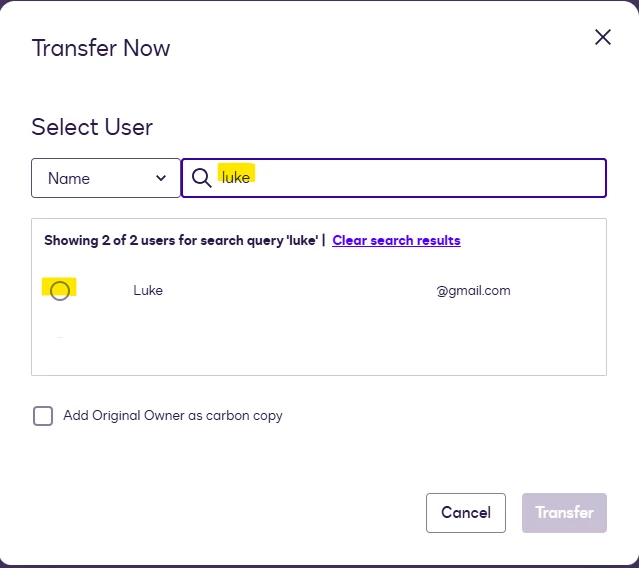
Can someone help? As admin (with full rights), I can select Transfer envelope but when prompted to select targeted user, no user is displayed so I can’t select the target…
Thanks for reaching out here in the Docusign Community—great to have you here! I understand it can be a bit confusing when a user doesn’t immediately appear on the transfer page. Often, this is just a matter of how the search field registers input.
To help the system recognize the user, please try typing the name or email and then pressing the “Enter” key on your keyboard. This step should prompt the user to appear as a selectable option so you can proceed with the transfer.
If you have already tried this, or you are referring to a different issue, don’t hesitate to let us know. We’re here to help get this sorted out for you.
Best Regards,
— Luke | Docusign Community Moderator If this helped, mark it as “Best Answer” so others can find it too!
Thanks for reaching out here in the Docusign Community—great to have you here! I understand it can be a bit confusing when a user doesn’t immediately appear on the transfer page. Often, this is just a matter of how the search field registers input.
To help the system recognize the user, please try typing the name or email and then pressing the “Enter” key on your keyboard. This step should prompt the user to appear as a selectable option so you can proceed with the transfer.
If you have already tried this, or you are referring to a different issue, don’t hesitate to let us know. We’re here to help get this sorted out for you.
Best Regards,
— Luke | Docusign Community Moderator If this helped, mark it as “Best Answer” so others can find it too!
Thank you for your response! You are most certainly welcome. Sure, let me know if the issue still persists once you follow the full instructions provided in the article.
In addition, you may also check your Users page (Admin tab > on the left panel, go to Users) to see if the name and email address of the user you are trying to input are active on the account. View or Edit a User
This might be an extra step, but it is essential for transferring envelopes.
Thank you! Let me know if you have any further questions. We’re here to help!
Best Regards,
— Luke | Docusign Community Moderator If this helped, mark it as “Best Answer” so others can find it too!
I have checked instructions shared last week and confirm this is exactly what I’m doing. The target user is indeed active. Despite all this, I still can’t transfer any envelope owned by a specific user to a targeted one (both being active)
Not sure what else I can check or do as, to recap:
As Admin, I have full access
Both the user currently owning the envelope and the targeted one are active
I’m doing exactly what is described in the step-by-step instructions but still no user is displayed (attaching 2 screenshots)
Thank you for getting back to me. I apologize if the user is still not appearing as an option even after following the steps given in the article.
Let's try the other envelope transfer route. Instead of going to the Custody Transfer page, please follow these steps:
Go to the Admin tab.
On the left panel, go to Users.
Locate the user where the envelope is currently located.
Click on Actions > Transfer Envelopes.
You will be routed to the transfer envelope page.
Select the envelopes that need to be transferred.
Select Transfer now.
Instead of the name, use the email address. Kindly type the full email address of the user you want to transfer the envelopes to, then press Enter (you can also use the name if the option still doesn't appear).
Proceed with the Transfer.
If the provided steps still didn't work, you may do this in a different browser or by logging in in incognito mode.
Let us know if the issue still occurs after following these steps. We're here to help.
Best Regards,
— Luke | Docusign Community Moderator
If this helped, mark it as "Best Answer" so others can find it too!
Thank you for continuing to share details regarding the issue.
At this stage, we believe it would be best to open a formal support case so our team can investigate this further. This type of technical behavior is often best diagnosed and configured during a live screen-share session with one of our support representatives, which allows us to see exactly what you are experiencing in real time.
You can login or register as either a Docusign customer or developer. If you don’t already have a Docusign customer or developer account, you can create one for free when registering.
You can login or register as either a Docusign customer or developer. If you don’t already have a Docusign customer or developer account, you can create one for free when registering.
 Back to Docusign.com