 Back to Docusign.com




Trending Topics: Latest from our forums (February 2026)
Here are some of the latest popular questions that developers asked in the Docusign Community and on Stack Overflow for the month of February 2026.
Docusign Inbox and Embedded Signing
Summary: The developer is trying to implement hybrid signing to enable their customers to sign either directly through Docusign with remote signing or embedded in their own application. They want to be sure that regardless of what the signer chooses, the completed envelope will then be available in the UI of the signer’s Docusign account. The developer was not seeing the envelopes in the signer’s account after signing, and shared the following code to debug:
Signer" => new Signer
{
  Email = pEmail,
  Name = pName,
  RecipientId = pID,
  RoutingOrder = pSigningOrder,
  ClientUserId = pPerson_ID,
  EmbeddedRecipientStartURL = "SIGN_AT_DOCUSIGN"
}
Answer: The developer has the right approach in setting the embeddedRecipientStartURL property to SIGN_AT_DOCUSIGN. However, if they include the ClientUserId property in their request, the recipient will be treated as an embedded signer, and the envelope will not be visible in their account. The developer needs to remove ClientUserId from their request to make the envelope visible in the UI.
Fetch signatory status (who signed / who’s pending / countersign) from Docusign to Ironclad metadata for reporting
Summary: The developer has built an integration where Ironclad sends agreements to Docusign for signature. They want to receive updates on whether recipients have completed the envelope and to sync that information back to Ironclad.
Answer: The best solution here would be to use Docusign Connect to send updates through a webhook listener that can then be received by the Ironclad system.
I am trying to create an API JWT integration
Summary: The developer wants to create an integration using JSON Web Token (JWT) Grant authentication. When configuring their integration key, they see the following UI that does not explicitly provide an option for JWT authentication.
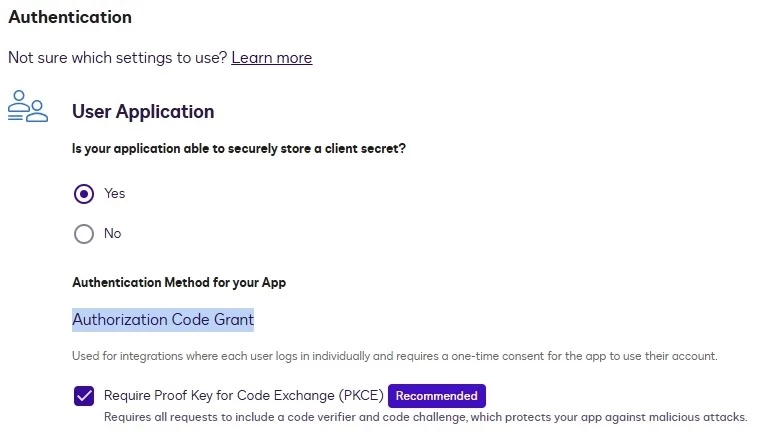
Answer: Although this UI does not explicitly mention JWT authentication, you can set JWT authentication by selecting Yes under Is your application able to securely store a client secret. Then add an RSA key pair in the Service Integration section. Do not check the Require Proof Key for Code Exchange (PKCE) option.