Question

I send 3 documents in a DS envelope - Offer Letter (signatures) Non Disclosure Agreement (Signatures) Benefits Overview no signatures or field completion required.

  • April 20, 2026
  • 2 replies
  • 27 views

Forum|alt.badge.img+2

 send 3 documents in a DS envelope - Offer Letter (signatures) Non Disclosure Agreement (Signatures) Benefits Overview no signatures or field completion required.

Candidates are saying they cannot see the last document which is a one page benefit summary.  I have no idea why, unless it is because that doc requires no signatures it is just informational?  

Has anyone else had this?

2 replies

Forum|alt.badge.img+3
  • Community Moderator
  • April 21, 2026

Hello ​@LISAKAYFRY

Thanks for reaching out here in the Docusign Community—great to have you here! I understand how important it is for your signers to have full visibility of all documents within your Envelope. Don't worry, we'll do our best to help!

To ensure your recipients can view all documents correctly, please try the following troubleshooting steps:

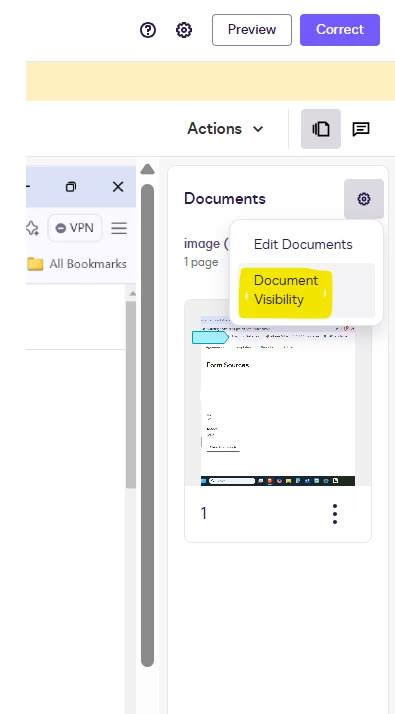
  • Check if the Document Visibility setting is enabled: This is often the root cause. Try to correct the Envelope, and check whether Document Visibility is set up on the account and enabled in your editor. If so, the system automatically hides documents from signers who do not have specific fields assigned to them. This may be why your signers cannot view the specific document. Please check this article for a more detailed step: Set Document Visibility 
     
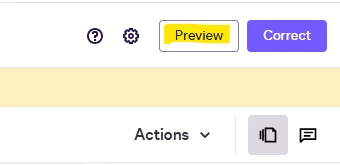
  • Use the Preview section: Locate the Envelope on your account, click on the ellipse button, correct the Envelope, and click on the Preview button. This lets you see exactly what your signer sees when they open the Envelope.


  • Test with a Copy: Make a copy of the Envelope and test sending it to yourself. If you can view the benefit summary as a signer, your recipients should be able to as well. Check this link for a more detailed step: Copy Envelopes


Note: If Document Visibility is the cause of the issue, you can resolve this by assigning fields to your signers on the document, or contact your Administrator to turn off the Document Visibility under Admin > Signing settings.


If you found the response to be a useful solution to your question, please "like" and mark it as the best answer by clicking "Select as Best" to make it easier for other users to find. Thank you!

Feel free to follow up if anything's unclear—we're here to help!


Best regards,

Luke | Docusign Community Moderator

If this helped, mark it as "Best Answer" so others can find it too!


Forum|alt.badge.img+3

Hello ​@LISAKAYFRY

I hope you are doing well. 

I am following up to see if you had a chance to review our last message or if you still require assistance. 

Feel free to let us know if you have any additional questions. We’re here to help! 

Best Regards, 

— Luke | Docusign Community Moderator

If this helped, mark it as “Best Answer” so others can find it too!