Solved

Tabs value overwritten when recipient opens document

  • December 11, 2025
  • 5 replies
  • 66 views

Forum|alt.badge.img+1

Hi, 

I have a weird behaviour I do not understand. I’m using the envlope-API to create an envelope based on a template (/restapi/v2.1/accounts/{{accountId}}/envelopes). My destination is the development tenant. 

For this API Call I use the following request body 

{
"templateId": "{{templateId}}",
"emailSubject": "Subject set by API",
"emailBlurb": "Mailbody set by API",
"templateRoles": [
{
"email": "Some.Name@test.com",
"name": "Some Name",
"roleName": "signer",
"tabs": {
"companyTabs": [
{
"value": "test Company 1",
"tabLabel": "atb.docusignFields.label-company <id>",
"locked": "true"
},
{
"value": "test Company 2",
"tabLabel": "atb.docusignFields.label-company <id>",
"locked": "true"
}
]
}
}
],
"status": "sent"
}

With this I receive a HTTP.201 Created. 

The call GET /restapi/v2.1/accounts/{{accountId}}/envelopes/{{envelopeId}}/documents/1/tabs then shows the values set in the previous POST Call.
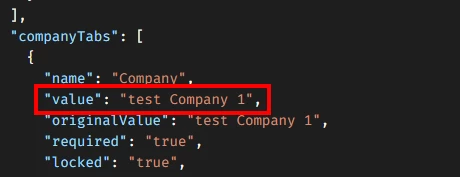
 

However, as soon as the recipient (role “signer”) clicks on “Review Document” in the mail received, the value changes to “redceiver_test” (in the API and within the document)


Why? What am I doing wrong? 

Weirdly I found a workaround. When I first POST /restapi/v2.1/accounts/{{accountId}}/envelopes without the tabs and status “created” (to create a Draft)

{
"templateId": "{{templateId}}",
"emailSubject": "Subject set by API",
"emailBlurb": "Mailbody set by API",
"templateRoles": [
{
"email": "Some.Name@test.com",
"name": "Some Name",
"roleName": "signer"
}
],
"status": "created"
}

and then changing the envelope created via PUT  /restapi/v2.1/accounts/{{accountId}}/envelopes/{{envelopeId}}/recipients/1/tabs

(Hint: I got the tabId via GET /v2.1/accounts/{{accountId}}/envelopes/{{envelopeId}}/documents/1/tabs; however, these IDs seems to change from envelope to envelope, therefore I did not include them in my previous API Call)

{
"textTabs": [
{
"value": "test Company 1",
"locked": "true",
"tabLabel": "atb.docusignFields.label-company <id>",
"tabId": "<tabId>"
},
{
"value": "test Company 2",
"locked": "true",
"tabLabel": "atb.docusignFields.label-company <id>",
"tabId": "<tabId>"
}
]
}

And then sending the envelope by changing the status to sent via 

PUT /restapi/v2.1/accounts/{{accountId}}/envelopes/{{envelopeId}}

{
"status": "sent"
}

the document contains the correct values… Even after the recipient reviews the document.


Where does the value change to “redceiver_test” comes from in the first place? 


Thanks in advance, 

best wishes,

Julian

Best answer by Michael.Rave

@Julian Tunke

The company tag is pulled from the user's Docusign profile and can't be set via the API. If the user has no account, it stays empty. It seems your test recipient has "redceiver_test" saved in their profile settings. The observed behaviour is as designed. If you want to pre-fill them, simply change them to a text field.

Regarding the purple sender fields: These are meant for manual entry during the Web UI sending process and need a different payload when the envelope is created via API, as ​@Ivan.Dinkov has replied above.

It might be easier using recipient text fields assigned to the "signer" and setting them to "read-only" instead. You can still pre-fill these via the API like the company name and the recipient won't be able to edit them.

Let me know if you need further clarification!

5 replies

Ivan.Dinkov
Docusign Employee
Forum|alt.badge.img+7
  • Docusign Employee
  • December 12, 2025

Hi ​@Julian Tunke 

It is very hard to say what went wrong without seeing the full API log with all the calls and their payloads

Considering you are getting tab data from GET “documents/1/tabs” it means in your template you have document prefill tabs . Where in your envelope creation call you are adding recipient tabs

I believe there might be confusion between signer and document tabs which act as tabs but behave differently .

Prefill tab whose value is set by the sender and inserted to a document prior to sending its envelope to its recipients. These tabs are visible to all recipients during signing, but cannot be edited by them. 

I’d suggest after envelope creation making a GET envelope call to retrieve all tabs (signer and document)

restapi/v2.1/accounts/account_id/envelopes/envelope_id?include=recipients,tabs,documents 


I hope this helps


Best
Ivan D


Forum|alt.badge.img+1
  • Author
  • New Voice
  • January 5, 2026

Hi ​@Ivan.Dinkov , 

thank you for your answer and sorry for the late reply due to holiday season. 

I read you answer, but I do not fully understand. 

Yes, I created the tabs for the receiver (role “signer”).

I can see and edit these values like mentioned in my initial post. 

Reason for that is, that I created fields for the sender as well, but I do not understand how I can fill these varialbes. 


Calling /restapi/v2.1/accounts/{{accountId}}/envelopes/{{envelopeId}}/documents/1/tabs only showing the Company-Tabs. The same is true for restapi/v2.1/accounts/account_id/envelopes/envelope_id?include=recipients,tabs,documents and /restapi/v2.1/accounts/{{accountId}}/templates/{{templateId}}/documents/1/tabs. 


So, how do I get a grasp on these fields? How to fill in values for this while creating/sending the envelope via API using this template?


Thanks in advance, 

best wishes,

Julian


Ivan.Dinkov
Docusign Employee
Forum|alt.badge.img+7
  • Docusign Employee
  • January 5, 2026

Hi ​@Julian Tunke 


Have a look at this guide https://developers.docusign.com/docs/esign-rest-api/esign101/concepts/tabs/prefilled-tabs/


Regards
Ivan D


Michael.Rave
Docusign Employee
Forum|alt.badge.img+19
  • Docusign Employee
  • Answer
  • January 5, 2026

@Julian Tunke

The company tag is pulled from the user's Docusign profile and can't be set via the API. If the user has no account, it stays empty. It seems your test recipient has "redceiver_test" saved in their profile settings. The observed behaviour is as designed. If you want to pre-fill them, simply change them to a text field.

Regarding the purple sender fields: These are meant for manual entry during the Web UI sending process and need a different payload when the envelope is created via API, as ​@Ivan.Dinkov has replied above.

It might be easier using recipient text fields assigned to the "signer" and setting them to "read-only" instead. You can still pre-fill these via the API like the company name and the recipient won't be able to edit them.

Let me know if you need further clarification!


Forum|alt.badge.img+1
  • Author
  • New Voice
  • January 5, 2026

Thanks a lot, this information was missing for me. Especially the one where this “redceiver_test” came from. 
Now with the text fields in read-only mode I have a simple solution I can work with :-) 

Best wishes,

Julian


