 Back to Docusign.com



Prefill template variables before sending an envelope
Hello,
I’m currently trying to understand the eSignature API (I’m new to docusign). Our UseCase is to
- create a template for a document we want to send out to customers for signature
- This template should contain “variables” that needs to be pre-filled before sending out to the signee (e. g. a Customer ID or Name)
- Sending should work via API.
I created a template with several variables (I just put random variables for testing inside, they do not make sense)
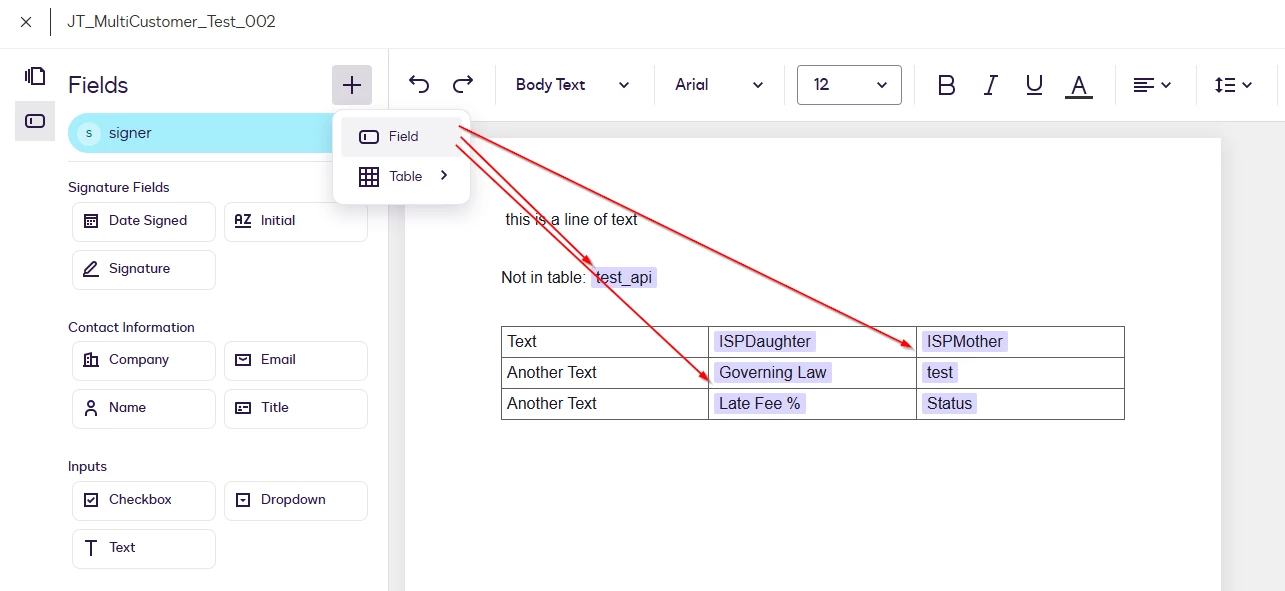
Within my API Call I am able to send out an envelope with the help of a template by
{
    "templateId": "{{templateId}}",
    "emailSubject": "Subject set by API",
    "emailBlurb": "Mailbody set by API",
    "templateRoles": [
        {
            "email": "Some.Name@test.de",
            "name": "Some Name",
            "roleName": "signer"
        }
    ],
    "status": "sent"
}
However, I am not able to “prefill” the variables of an template.
Does anyone know how I can include the variables defined in the template into my “creating an envelope”-API-Call?
Or are we not licensed for this? Because when I try to call the getEnvelopeDocGenFormFields-API (getEnvelopeDocGenFormFields | REST API | Docusign) I receive the error "DocGen document not allowed. Account does not enable AllowDocGenDocuments setting.". But I am not sure If I’m on the right track with this API…Because when I’m sending via the UI I get a form to fill these variables

There I thought, when I’m able to do it via UI, I should be able via API as well, or?!
Thanks and best wishes,
Julian