Thank you for reaching out, and welcome to the Docusign Community! We appreciate your question and assure you that we are fully committed to providing you with the best service possible.
I understand you can select the corner where you should be able to drag the corner out to resize, but it does nothing. I sincerely apologize for this. Let’s work together to get this sorted out.
I just have some additional questions to better understand the situation:
Has the issue occurred before?
Is the issue happening using different browsers/incognito?
Have there been any changes to the account settings or subscription recently?
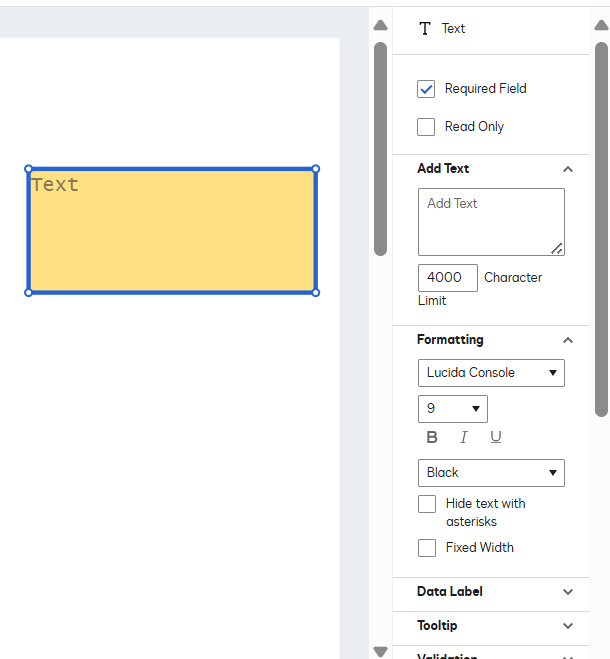
Did you set the "Fixed Width" checkbox on that field text? "Fixed width" is a parameter setting on a text field (field properties) that, if enabled, will limit the information added to the size of the DocuSign field, and it cannot expand if the text box is smaller than the allowed characters. Your option is to disable "fixed width" on the fields or expand the text box size to accommodate more characters.
Text formatting (Text field properties) would include all the tags shown when changing the Text Fonts, such as Size and Style. This doesn't include the resizing of a field, but it does affect the size of the text. If you do not see this option, it might be due to a backend setting not being enabled, which could be because of your plan. A support agent can help to determine if that is the case or if it is supported on your plan and best is to create a case to know this.
To open a support case in the Docusign Support Center, go to the "Get Support" section and select "Open a Support Case.” Log in using your Docusign credentials and select a case subject. If you have multiple Docusign accounts, choose the appropriate account to continue. Open a case in the Docusign Support Center.
Note: Some advanced features and options are supported only in specific Docusign plans. Your account plan might not support some of the options discussed in this help topic. Contact your account administrator for more information about which options are available for your account. Or, visit our Plans and Pricing web page for more details on the features included with your plan. Compare eSignature plans & pricing.
Feel free to let us know if you need any more help with this. Thank you!
Best regards,
Melanie | Docusign Community Moderator
"Select as Best" below if you find the answer a valid solution to your issue.
How are you? I'm checking in to see if you still need assistance. But if the solution provided helped you resolve the issue or pointed you in the right direction, please click Best Answer ✅"so others can find it too.
Let us know if we can help with anything else. Wishing you a smooth rest of your day!
Regards,
Melanie | Docusign Community Moderator If this helped, feel free to click "Best Answer"!
So, like many others, I started with a free trial. What I learned from your support staff is the free trial is a Pro account. When I signed up, I signed up for an entry level plan as I wasn’t that busy (but have since upgraded) and when that happened the ability to resize text boxes disappeared for some reason. So your tech support team was able to reactivate that capability. I don’t know if that just was a glitch or if resizing text boxes is a feature for higher plans, which seems ridiculous as that is one of the features I use the most (on 100% of my envelopes)
So, hopefully its a glitch going from free to a subscription and hopefully it can get fixed because I needed to delay a transaction because it took about 24 hours to resolve.
Hi Melanie, as yet another glitch, none of your responses have the ability to mark as “Best Answer” so sorry I cannot mark that off. I did like the response you gave that actually worked and that was to reach out to support.
Plus this community assistance is not really of help. It took you 8 days to respond to my post, which for folks doing business is like a lifetime. If you want folks to use this service as the first line of defense, then answering in a few hours is more aligned with customer expectations. At the most 24 hours, but even that, when we are working to get documents signed is a really, really long time to wait.
Thank you for the update. We sincerely apologize for the inconvenience you've experienced and the delayed response from the Community. Thank you for your feedback, and this is well noted.
Glad to hear that our Support team was able to resolve the issue. Despite this, I hope the rest of your day is filled with positivity. Thank you, and please always take care :)
You can login or register as either a Docusign customer or developer. If you don’t already have a Docusign customer or developer account, you can create one for free when registering.
You can login or register as either a Docusign customer or developer. If you don’t already have a Docusign customer or developer account, you can create one for free when registering.
 Back to Docusign.com