Thank you for reaching out, and welcome to the Docusign Community! We appreciate your question and assure you that we are fully committed to providing you with the best service possible.
I understand you can select the corner where you should be able to drag the corner out to resize, but it does nothing. I sincerely apologize for this. Let’s work together to get this sorted out.
I just have some additional questions to better understand the situation:
Has the issue occurred before?
Is the issue happening using different browsers/incognito?
Have there been any changes to the account settings or subscription recently?
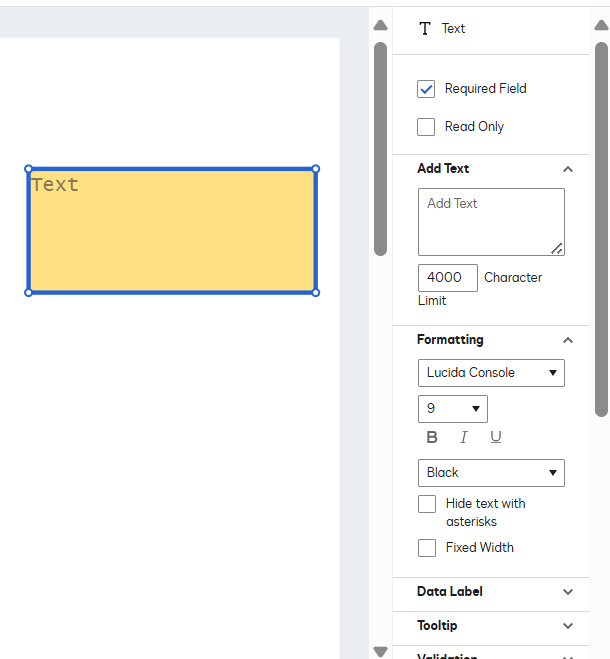
Did you set the "Fixed Width" checkbox on that field text? "Fixed width" is a parameter setting on a text field (field properties) that, if enabled, will limit the information added to the size of the DocuSign field, and it cannot expand if the text box is smaller than the allowed characters. Your option is to disable "fixed width" on the fields or expand the text box size to accommodate more characters.
Text formatting (Text field properties) would include all the tags shown when changing the Text Fonts, such as Size and Style. This doesn't include the resizing of a field, but it does affect the size of the text. If you do not see this option, it might be due to a backend setting not being enabled, which could be because of your plan. A support agent can help to determine if that is the case or if it is supported on your plan and best is to create a case to know this.
To open a support case in the Docusign Support Center, go to the "Get Support" section and select "Open a Support Case.” Log in using your Docusign credentials and select a case subject. If you have multiple Docusign accounts, choose the appropriate account to continue. Open a case in the Docusign Support Center.
Note: Some advanced features and options are supported only in specific Docusign plans. Your account plan might not support some of the options discussed in this help topic. Contact your account administrator for more information about which options are available for your account. Or, visit our Plans and Pricing web page for more details on the features included with your plan. Compare eSignature plans & pricing.
Feel free to let us know if you need any more help with this. Thank you!
Best regards,
Melanie | Docusign Community Moderator
"Select as Best" below if you find the answer a valid solution to your issue.
Thank you for reaching out, and welcome to the Docusign Community! We appreciate your question and assure you that we are fully committed to providing you with the best service possible.
I understand you can select the corner where you should be able to drag the corner out to resize, but it does nothing. I sincerely apologize for this. Let’s work together to get this sorted out.
I just have some additional questions to better understand the situation:
Has the issue occurred before?
Is the issue happening using different browsers/incognito?
Have there been any changes to the account settings or subscription recently?
Did you set the "Fixed Width" checkbox on that field text? "Fixed width" is a parameter setting on a text field (field properties) that, if enabled, will limit the information added to the size of the DocuSign field, and it cannot expand if the text box is smaller than the allowed characters. Your option is to disable "fixed width" on the fields or expand the text box size to accommodate more characters.
Text formatting (Text field properties) would include all the tags shown when changing the Text Fonts, such as Size and Style. This doesn't include the resizing of a field, but it does affect the size of the text. If you do not see this option, it might be due to a backend setting not being enabled, which could be because of your plan. A support agent can help to determine if that is the case or if it is supported on your plan and best is to create a case to know this.
To open a support case in the Docusign Support Center, go to the "Get Support" section and select "Open a Support Case.” Log in using your Docusign credentials and select a case subject. If you have multiple Docusign accounts, choose the appropriate account to continue. Open a case in the Docusign Support Center.
Note: Some advanced features and options are supported only in specific Docusign plans. Your account plan might not support some of the options discussed in this help topic. Contact your account administrator for more information about which options are available for your account. Or, visit our Plans and Pricing web page for more details on the features included with your plan. Compare eSignature plans & pricing.
Feel free to let us know if you need any more help with this. Thank you!
Best regards,
Melanie | Docusign Community Moderator
"Select as Best" below if you find the answer a valid solution to your issue.
I don’t have the formatting or data label dropdown settings even available. I recently purchased the $120 / annual subscription.
I’ve resized basic text boxes before on random documents, but haven’t used the program enough to say whether the issue has been common or not. I’m trying to make a new hire package template with (7) documents.
Sounds like it could be a plan issue. I can’t even make a support case with my current plan which for a paying customer doesn’t sit well with me.
Thank you for getting back to me. Rest assured, the best way to resolve your issue is to create a case for an expert review. We are unable to provide information about your plan on this public forum. Please follow this article on how to create a case: Open a case in the Docusign Support Center.
If you are still having some issues creating a case, please send me a private message (click my name to see my profile > click Send Message) . Please include the following details in your message:
Name:
Email linked to your account:
Account Number:
Let me know if you need further assistance. Thank you!
Best regards,
Melanie | Docusign Community Moderator
"Select as Best" below if you find the answer a valid solution to your issue.
I’m waiting on a Docusign person to respond to my ticket. They said there is a back end setting that is disabled that is possibly causing the issue but haven’t gotten back since I gave them permission to proceed with the fix.
“We realized the "Data Filed Size" is disabled within the account and that could be affecting”
Thank you for reaching out, and a warm welcome to the Docusign Community! We are absolutely delighted to have you here and can't wait to share our knowledge with you. I am sorry to hear about the issue with being unable to resize the text field after the account update. Let's work together to sort this out.
May you please perform the following troubleshooting:
Check if the browser needs to be updated.
Log out and Log back into the account.
Clear history and cache/cookies and set it to "All time."
Try a different browser(s).
Try to use Incognito.
Is the issue the same with a different device?
I look forward to hearing back from you. Thank you!
Best regards,
Melanie | Docusign Community Moderator
"Select as Best" below if you find the answer a valid solution to your issue.
I have the exact same problem!!! I started with a free trial and signed up for a plan. Now I cannot adjust text box sizes when using templates or when sending envelopes. Super frustrating.
I’ve done all troubleshooting including trying on Brave and Chrome and the issue persists across both browsers. Reluctant to clear 500 cookies from my browser per your recommendation but tried everything else.
HELP!!! I need to use my DocuSign now and this is a CRITICAL capability to be able to use
Thank you for reaching out to the Docusign Community!
I am really sorry about the issue with being unable to resize text fields. This may be due to a backend setting that has not been activated, or potentially related to your subscription plan. A support agent can assist in determining whether this is the case or if it is indeed supported under your plan, so it would be advisable to create a support case for clarification.
To open a support case in the Docusign Support Center, go to the "Get Support" section and select "Open a Support Case.” Log in using your Docusign credentials and select a case subject. If you have multiple Docusign accounts, choose the appropriate account to continue. Open a case in the Docusign Support Center.
Note: Some advanced features and options are supported only in specific Docusign plans. Your account plan might not support some of the options discussed in this help topic. Contact your account administrator for more information about which options are available for your account. Or, visit our Plans and Pricing web page for more details on the features included with your plan. Compare eSignature plans & pricing.
Feel free to let us know if you need any more help with this. Thank you!
Best regards,
Melanie | Docusign Community Moderator
"Select as Best" below if you find the answer a valid solution to your issue.
You can login or register as either a Docusign customer or developer. If you don’t already have a Docusign customer or developer account, you can create one for free when registering.
You can login or register as either a Docusign customer or developer. If you don’t already have a Docusign customer or developer account, you can create one for free when registering.
 Back to Docusign.com