Thank you for reaching out, and a warm welcome to the Docusign Community! We are absolutely delighted to have you here and can't wait to share our knowledge with you.
I understand that you have a paid Docusign plan, but you are receiving a message that says you do not qualify for support. I'm truly sorry for the inconvenience this has caused you. Please know that I am here to help and will do everything I can to assist you.
Just to confirm, do you happen to have multiple Docusign accounts? If so, please ensure you are logged in to the paid account when creating a case. Kindly also send us the step-by-step process you did before you got the error message and a screenshot of the issue ( Please conceal any Personally Identifiable Information as this is a public forum)
Sharing basic troubleshooting steps that resolves most common technical issues:
Check if the browser needs to be updated.
Log out and Log back into the account.
Clear history and cache/cookies and set it to "All time."
Try a different browser(s).
Try to use Incognito.
Different Internet network such as on a mobile device using data with Wi-Fi disabled.
Try a different device.
Enable/disable VPN if applicable.
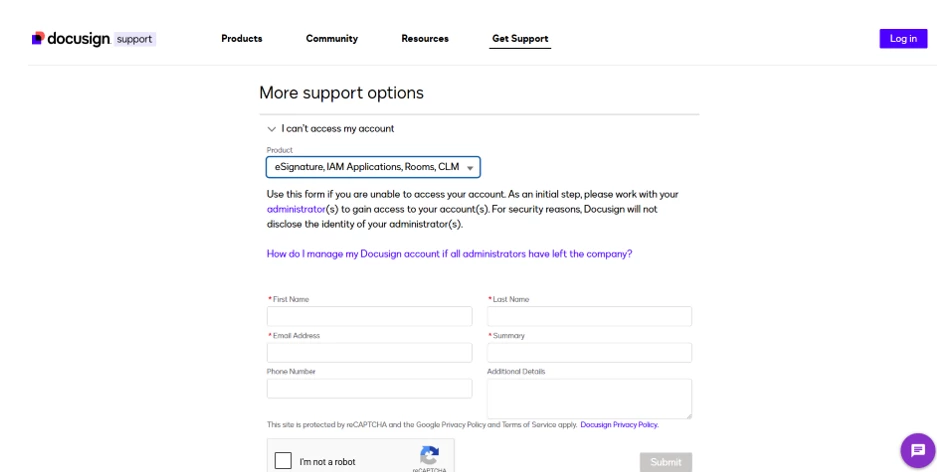
Meanwhile, the workaround for creating a case is to use the bottom part of the page, which allows you to submit a case without logging in to your account. If the issue persists after following the troubleshooting steps, it is necessary to create a case so that DocuSign support can review the account on the back end to see what’s causing the message. Link: Get Support
I hope this is helpful. If you found the response to be a useful solution to your question, please mark it as the best answer by clicking “Select as Best” to make it easier for other users to find. Let us know if you need further assistance. Thank you!
Best regards,
Melanie | Docusign Community Moderator
"Select as Best" below if you find the answer a valid solution to your issue.
Thank you for reaching out, and a warm welcome to the Docusign Community! We are absolutely delighted to have you here and can't wait to share our knowledge with you.
I understand that you have a paid Docusign plan, but you are receiving a message that says you do not qualify for support. I'm truly sorry for the inconvenience this has caused you. Please know that I am here to help and will do everything I can to assist you.
Just to confirm, do you happen to have multiple Docusign accounts? If so, please ensure you are logged in to the paid account when creating a case. Kindly also send us the step-by-step process you did before you got the error message and a screenshot of the issue ( Please conceal any Personally Identifiable Information as this is a public forum)
Sharing basic troubleshooting steps that resolves most common technical issues:
Check if the browser needs to be updated.
Log out and Log back into the account.
Clear history and cache/cookies and set it to "All time."
Try a different browser(s).
Try to use Incognito.
Different Internet network such as on a mobile device using data with Wi-Fi disabled.
Try a different device.
Enable/disable VPN if applicable.
Meanwhile, the workaround for creating a case is to use the bottom part of the page, which allows you to submit a case without logging in to your account. If the issue persists after following the troubleshooting steps, it is necessary to create a case so that DocuSign support can review the account on the back end to see what’s causing the message. Link: Get Support
I hope this is helpful. If you found the response to be a useful solution to your question, please mark it as the best answer by clicking “Select as Best” to make it easier for other users to find. Let us know if you need further assistance. Thank you!
Best regards,
Melanie | Docusign Community Moderator
"Select as Best" below if you find the answer a valid solution to your issue.
Thank you for taking the time to troubleshoot. I understand it didn't work, but rest assured, the best course of action is to create a case. This will allow a Docusign expert to take a closer look at the issue. The workaround for creating a case is to use the bottom part of the page, which allows you to submit a case without logging in to your account. Link: Get Support
Let me know if you need further assistance. Thank you!
Best regards,
Melanie | Docusign Community Moderator
"Select as Best" below if you find the answer a valid solution to your issue.
I hope you are doing well. If you found my response to be a useful solution to your question, could you please click the "Best Answer ✅" button at the bottom of the post? It helps other community members who might have similar questions. Also, let me know if you still need further assistance with this. Thank you!
Best regards,
Melanie | Docusign Community Moderator
"Select as Best" below if you find the answer a valid solution to your issue.
Thank you - but I am having precisely the same problem, and Docusign’s website seems to have been updated to eliminate the form you are describing since you wrote the post.
I have the same bizarre interaction: I’m logged in, I’m told I need a paid plan, I follow the links to ‘upgrade’ to a paid plan, but the system gives me an error because I’m already on a paid plan… Docusign, please help! I’m a new user with a time sensitive issue!
Thanks for reaching out to the Docusign Community!
Yes, the option provided in this post has now been updated. If you are on a free plan, you can use the chat option. However, if you’re on a paid plan, I recommend logging in directly to the support page, where you’ll find an option to request a callback or email.
I hope this helps clarify things. Let me know if you need further assistance.
Thanks for clarifying. Could you please try the following instead: after logging in, select the Manage Case tab. From My Accounts, make sure you are logged in to the correct account, then choose New Case to submit a request.
If possible, could you also share a screenshot of your screen? You may also share the details of your concern here so we can see if the community can help.
You can login or register as either a Docusign customer or developer. If you don’t already have a Docusign customer or developer account, you can create one for free when registering.
You can login or register as either a Docusign customer or developer. If you don’t already have a Docusign customer or developer account, you can create one for free when registering.
 Back to Docusign.com