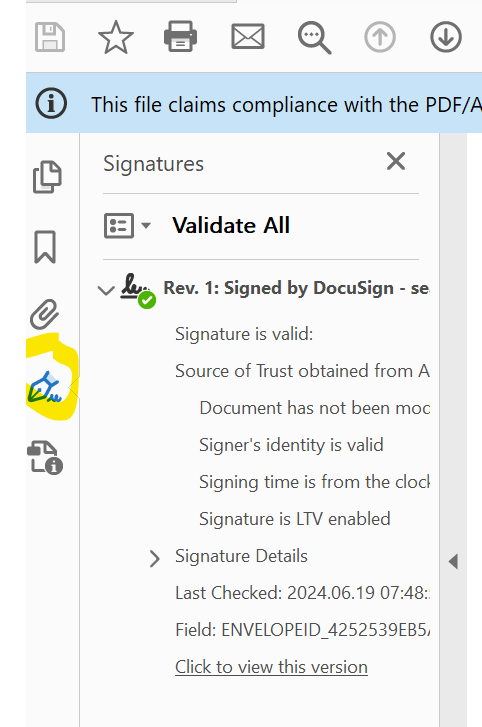
I received a PDF document already signed by email from a third party. It contains a DocuSign Envelope ID number. How can I verify the veracity of this signature?
When you open a DocuSign completed envelope in Adobe Reader, you can verify that the document has not been tampered with by using the signature validation feature next to the signature icon. Here’s how this process works and what it involves:
Steps to Verify a DocuSign Completed Envelope in Adobe Reader
Open the Document:
Launch Adobe Reader and open the completed document.
Signature Panel:
On the right-hand side or top toolbar, you’ll see a signature icon (a pen or a ribbon). Click on this icon to open the signature panel. This may also automatically open when you open a document with signatures.
Signature Details:
Within the signature panel, you’ll find detailed information about the digital signature. Click on the signature to view the details.
Validation Status:
Adobe Reader will check the validity of the signature against the certificate authority that issued the signing certificate. You will see a message such as:
"Signed and all signatures are valid": This indicates that the document has not been tampered with since it was signed, and the signatures are authentic.
"Signature is valid, but...": This may suggest the document is valid but could have minor issues, such as untrusted certificates.
"Signature is invalid": This indicates the document has been altered after signing, or there’s an issue with the signature.
Welcome to the DocuSign Community! Your feedback is highly valued. If you find my response helpful, please give it a "Like" and consider marking it as the "Best Answer" to assist others with similar issues.
Each distinct DocuSign envelope should produce a unique Envelope ID and Certificate of Completion.
Finding the same Envelope ID or signature block on two different contracts strongly indicates manipulation
The definitive proof of a valid DocuSign transaction lies in the Certificate of Completion and verifying the Envelope ID directly with DocuSign’s records. If those don’t align with what appears on the contract, it’s very likely the document was altered outside of DocuSign.
Translate
Welcome to the DocuSign Community! Your feedback is highly valued. If you find my response helpful, please give it a "Like" and consider marking it as the "Best Answer" to assist others with similar issues.
To find the Certificate of Completion and verify the Envelope ID in DocuSign, start by checking your DocuSign envelope in the Manage area (if you’re the sender) or follow the link in your completion email (if you’re a signer). The Certificate of Completion—often appended to the signed PDF or downloadable separately—will display the Envelope ID and important audit trail details. If anything appears irregular, or if you can’t find the certificate, contact the sender or DocuSign Support for further assistance.
Translate
Welcome to the DocuSign Community! Your feedback is highly valued. If you find my response helpful, please give it a "Like" and consider marking it as the "Best Answer" to assist others with similar issues.
I found this in the contracts. Finding the same envelope ID or signature block in two different contracts strongly indicates manipulation. I want to know how I can have the contracts reviewed and have you certify to me if it is correct, so I can take legal action against this company.
Please help me by sharing the link so I can do this.
Welcome to the DocuSign Community! Your feedback is highly valued. If you find my response helpful, please give it a "Like" and consider marking it as the "Best Answer" to assist others with similar issues.
I want to open a case and for some reason it's not giving access, to open a case and I really need that.
You need to be logged in into your account to open a case.
Translate
Welcome to the DocuSign Community! Your feedback is highly valued. If you find my response helpful, please give it a "Like" and consider marking it as the "Best Answer" to assist others with similar issues.
I want to open a case about a signature, of some documents that a company sent me and I want that signature to be analyzed. And I haven't been able to.
because when I give it a chance two selections appear and I don't know which one exactly, to choose.
Since a certificate of completion is not embedded in the document itself, it’s very easy to forge a document that will look legitimate. Let’s say, the document requires signatures of two parties - you and another party, You want to forge it. So, you just insert a picture of the other party’s signature copied from a legitimate document AND create a DocuSign signature field for yourself. Then you sign it with your own digital signature. Viola - this document will appear as “digitally signed” and legitimate! After that you can present it in a court, etc., and no one will ask you for a completion certificate - everyone will believe it (Adobe Acrobat will show that it’s digitally signed, that the signature has been verified and that the document has not been altered). Keep in mind that Adobe Acrobat DOES NOT verify the signatures of every signing party, it only verified the digital signature of the signing authority (in this case, DocuSign) with which the document is signed (because the document IS NOT signed with the digital signatures of each party). This means that you ABSOLUTELY need to see the Certificate of Completion to make sure that the document was signed with valid parties. And you CANNOT trust the Certificate of Completion that you did not receive directly from DocuSign because it can also be easily forged (just make a PDF that looks like a certificate of completion, add a picture of the other party to it and and digitally sign it with your own signature).
You can login or register as either a Docusign customer or developer. If you don’t already have a Docusign customer or developer account, you can create one for free when registering.
You can login or register as either a Docusign customer or developer. If you don’t already have a Docusign customer or developer account, you can create one for free when registering.
 Back to Docusign.com