Dear all, In some contracts registered by our partners, the Docsing system is displaying the name of the former manager, C***** B**** da C****, in the signature certificate. I need you to remove C***** B**** da C****'s name so it doesn't appear in the certificate generated for the documents, as the data has already been changed within the platform. There are two certificates that display this error, and I've attached one of them.**attachment removed**
signature certificate
Best answer by Ma.Cubio
Hello
Thank you for reaching out, and welcome to the Docusign Community! We appreciate your question and assure you that we are fully committed to providing you with the best service possible.
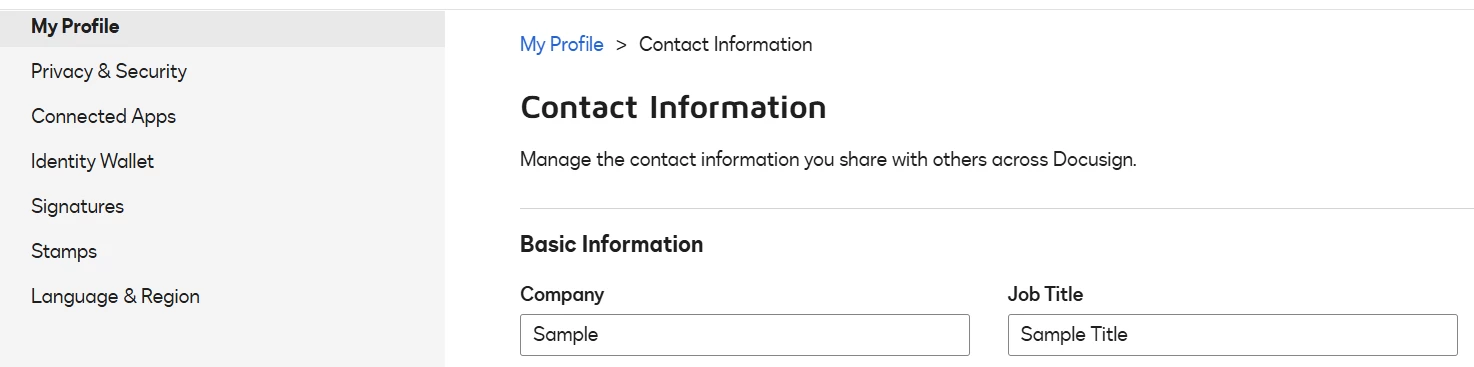
I just wanted to confirm if your Company name under your Profile has already been updated. If not, please log in to your account, go to your Initials in the upper right corner, click “Manage Profile,” update your Company name, and click Save below.

If you found the response to be a useful solution to your question, please “like” and mark it as the best answer by clicking “Select as Best” to make it easier for other users to find. Thank you!
Sincerely,
Ma. Cassandra | Docusign Community Moderator
If this helped, feel free to Like👍and click "Best Answer"
Sign up
Already have an account? Login
You can login or register as either a Docusign customer or developer. If you don’t already have a Docusign customer or developer account, you can create one for free when registering.
Customer Login/Registration Developer Login/RegistrationDocusign Community
You can login or register as either a Docusign customer or developer. If you don’t already have a Docusign customer or developer account, you can create one for free when registering.
Customer Login/Registration Developer Login/RegistrationEnter your E-mail address. We'll send you an e-mail with instructions to reset your password.
Back to Docusign.com




