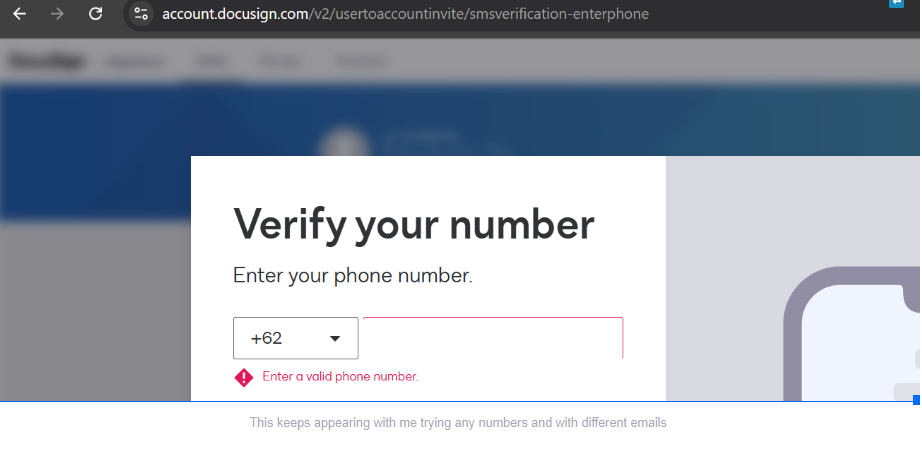
One of DocuSign team representative suggested me this, “ I've received the same feedback from others as well and what worked for them was to use our app. We're still looking into this issue to figure out what's the problem. But for now, do try accessing it again via our app. I believe our mobile app works as well.”
Hint to the support folks: Your frontline tech support people won’t be able to resolve this, and no amount of first-tier troubleshooting will get this to work for your end-users. You will have to escalate this issue to the team in DocuSign’s internal IT that handles identity verification service integration. The thing that is verifying phone numbers is probably throwing out VoIP phone numbers.
My company uses Zoom Phone. Those numbers sometimes aren’t validated because they are somehow denoted as “computer generated” and could belong to spammers, the same way a spammer can set up a “free” phone service by going to google voice and creating one in minutes if they have a valid gmail account. I have had mine bounced out a few times already as have other people here. I’m trying to sign up for a dev account. I DO NOT want sales pitch calls coming to my personal cell phone because I gave it to your software to validate a number for two factor one time.
I’m an upper tier troubleshooter at a university, and I see this sort of thing frequently, but since I’m not in a “developer” role in the identity services team in my org, I don’t know the right terms you should tell your identity verification integrators. I just recognize when there is dysfunctional communication happening in an org’s IT and get frustrated by it. Particularly when escalation isn’t happening and it needs to, because I deal with that a lot at my job.
We also can’t register to DocuSign because of this. We tried several phone numbers setting different formats but none works. When I go to the developer tools from your server i got a error saying You need to enable Javascript to run this app
Javascript is enabled and i tried Chrome, Mozilla and Brave, i dont know what else to try but everything shows that the problem is in your server
How are you? I hope you are doing well and we apologize for not getting back to you sooner. It appears your issue was addressed via Support case, correct?
I'm just checking in to see if you still need any help, and we'll gladly help you with any questions you may have. Have a great day!
Best regards,
Melanie | Docusign Community Moderator
"Select as Best" below if you find the answer a valid solution to your issue
I have the same problem with a US phone number being told I need to “Enter a valid phone number.” Since this is trying to perform an SMS verification to send a code, my guess is that it wants a cell number, which is not stated as a requirement to create the account. Our business office phones do not support SMS and I don’t have a business cell number. I am hesitant to use my personal cell number, as I don’t want it tied to our corporate Docusign account.
I have even received “Your developer account is ready” emails, but of course, I don’t have a password and there is no account when I try to log in.
My account team was not able to assist so turned it over to customer support on day two. On day three, support contacted me to authorize them to proceed with the support request. So far, I am not impressed.
I am encountering this same issue as well. Above and beyond the frustration with this issue is the fact that the “Enter a valid phone number” error message is incredibly opaque, providing no explanation for what exactly is going wrong.
I sincerely apologize for the inconvenience this issue has caused. Did Docusign support help you resolve, or do you need help with the follow-up? Please let me know.
Hello @Nonprofit_Zach,
My sincere apologies for the inconvenience. I just have some questions:
Have you tried entering the phone number either without spaces,/or without dashes? It is worth trying both, as the two options work in different scenarios.
Could you also try adding the country code to the actual number? For example, +63 +63 000 000
Does this issue persist if you re-try using a different network, device, and browser? Sometimes, network or device-specific issues can cause such problems, and trying on a different setup can help isolate the issue.
Let us know if you need further assistance. Thank you!
Best regards,
Melanie | Docusign Community Moderator
"Select as Best" below if you find the answer a valid solution to your issue
@Melanie.Panguito I have tried the number with/without spaces, with/without dashes, and with/without the country code (which is +1 in this case). I have tried using a different computer and browser, but a different network is not a realistic option.
You can login or register as either a Docusign customer or developer. If you don’t already have a Docusign customer or developer account, you can create one for free when registering.
You can login or register as either a Docusign customer or developer. If you don’t already have a Docusign customer or developer account, you can create one for free when registering.
 Back to Docusign.com