Question

Problem changing admin email address for account with only one seat

  • November 27, 2025
  • 11 replies
  • 88 views

Forum|alt.badge.img+1

Hello,


I recently purchased a DocuSign plan “Standard” for our company.

I purchased it with my email address, but I won’t be the one signing in the future, hence I wanted to change the admin/login email from mine to the one of the user who will be the signee.


I logged into acount.docusign.com/me with my email address, started the process to change the email address, and received the confirmation code to the new email address.
Upon entering this code, I receive the following error message.
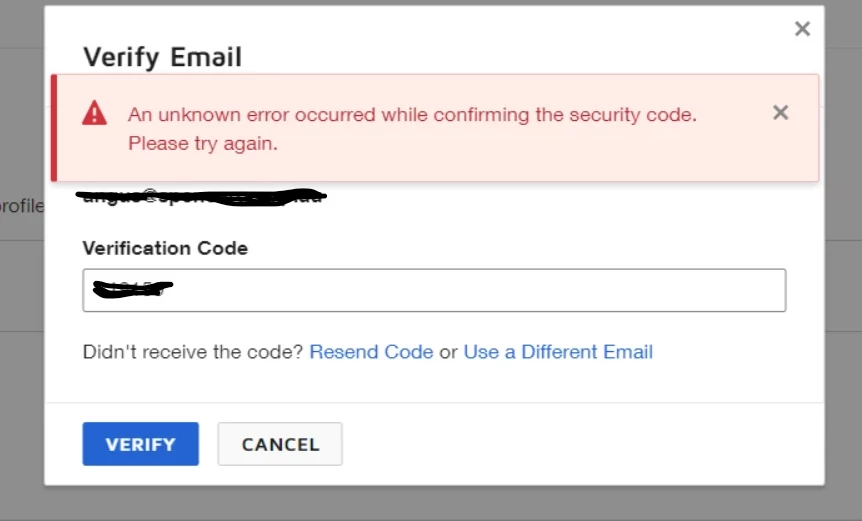
 

The same issue was already raised in this forum last year.

I tried all the troubleshooting suggestions mentioned in that thread but no luck.


Creating a new admin user is no option, as I would have to buy an additional seat but only require one for our organization.


Please support. Thanks.

11 replies

Forum|alt.badge.img+13
  • Community Moderator
  • November 28, 2025

Hello ​@DUT069 

Thank you for reaching out, and welcome to the Docusign Community! We appreciate your question and assure you that we are fully committed to providing you with the best service possible. 

We appreciate you following the troubleshooting steps in the related post, and I’m sorry that it didn’t resolve your issue. Rest assured, I’m here to help.
To verify, please provide me with the new email address you are trying to update via private message. Is the existing email address the same as the one you use here in the community?
May you also confirm if you can still access the old email?


If you found the response to be a useful solution to your question, please “like” and mark it as the best answer by clicking “Select as Best” to make it easier for other users to find. Thank you!

Sincerely,

Ma. Cassandra | Docusign Community Moderator
If this helped, feel free to like 👍 and click "Best Answer."


Forum|alt.badge.img+1
  • Author
  • New Voice
  • December 1, 2025

Hello ​@Ma.Cubio,


thanks for your quick reply.

As requested, I have reached out to you via private message.


Forum|alt.badge.img+13
  • Community Moderator
  • December 1, 2025

Hello ​@DUT069 
Thank you for providing the details. Upon checking, the error you’re receiving is due to the reason that the new email address you would like to associate with the account has an existing free account. You must create a support case to request the real-time cancellation of the free account, then try to process the update once it is cancelled. 

If you found the response to be a useful solution to your question, please “like” and mark it as the best answer by clicking “Select as Best” to make it easier for other users to find. Thank you!

Sincerely,

Ma. Cassandra | Docusign Community Moderator
If this helped, feel free to like 👍 and click "Best Answer."


Forum|alt.badge.img+1
  • Author
  • New Voice
  • December 3, 2025

Hello ​@Ma.Cubio,


we actually created this free account only after we had encountered this error. Hence, this cannot be the reason.

I also just tried to transfer the account to my private email, and encounter the same issue.


Forum|alt.badge.img+13
  • Community Moderator
  • December 3, 2025

Hello ​@DUT069 
Thank you for the information, and I apologize that the issue remains unresolved. I would like to confirm if you have already created a support case for this issue.
If yes, please send me the case number via private message. Thank you.


Sincerely,

Ma. Cassandra | Docusign Community Moderator
If this helped, feel free to like 👍 and click "Best Answer."


Forum|alt.badge.img+1
  • Author
  • New Voice
  • December 4, 2025

Dear ​@Ma.Cubio,


as far as I can see, I can only open support cases by upgrading my paid plan to Business Pro.

Hence the reason I reached out via the community function.

Please guide me into how to open a support case with my current paid subscription.


In regards to the Free Account for the email I was trying to get the account transferred to, I closed the account yesterday (no support needed, as the option to close the account was given in the settings).


Forum|alt.badge.img+13
  • Community Moderator
  • December 4, 2025

Hello ​@DUT069 
It’s nice to know that you’re able to close the free account on your end. By the way, you don’t need to upgrade your plan to Business Pro to create a case; as long as you have a paid account, you can submit a case so an expert can help you further.
Simply log in to your paid account and click on support or click on 👉 Open a Support Case.

Relevant article:
Change Your Email Address
 

If you found the response to be a useful solution to your question, please “like” and mark it as the best answer by clicking “Select as Best” to make it easier for other users to find. Thank you!


Sincerely,

Ma. Cassandra | Docusign Community Moderator
If this helped, feel free to like 👍 and click "Best Answer."


Forum|alt.badge.img+1
  • Author
  • New Voice
  • December 8, 2025

Dear ​@Ma.Cubio,


thanks for this tip. I tried opening up a support ticket within 24h after opening the account, and back then it told me I would have to upgrade to another account type.

I tried again and now the option to submit a case is there.

I will try getting a solution this way.


Thanks again!


Forum|alt.badge.img+13
  • Community Moderator
  • December 8, 2025

Hello ​@DUT069 
Once you create a support case, you can share it with me via private message so I can follow up for you.


Sincerely,

Ma. Cassandra | Docusign Community Moderator


Forum|alt.badge.img+1
  • Author
  • New Voice
  • December 9, 2025

Hi ​@Ma.Cubio,


the support agent was already able to fix the issue. Seemed to be something on the backend.


Forum|alt.badge.img+13
  • Community Moderator
  • December 9, 2025

Hi again, ​@DUT069 !

That’s great to hear—glad things are working now. If anything else comes up or you hit another roadblock, don’t hesitate to reach out here in the Community.

Wishing you a smooth rest of your day!


Ma. Cassandra | Docusign Community Moderator


