Legacy User
March 19, 2019
Solved

Option to add a template to an envelope is missing

  • March 19, 2019
  • 12 replies
  • 1078 views

I'm trying to create and envelope with multiple templates in it.

When I create a new envelope, the only options for adding documents from are Box, Dropbox, Google Drive and OneDrive.

Ideas?

TIA
Best answer by Community Expert

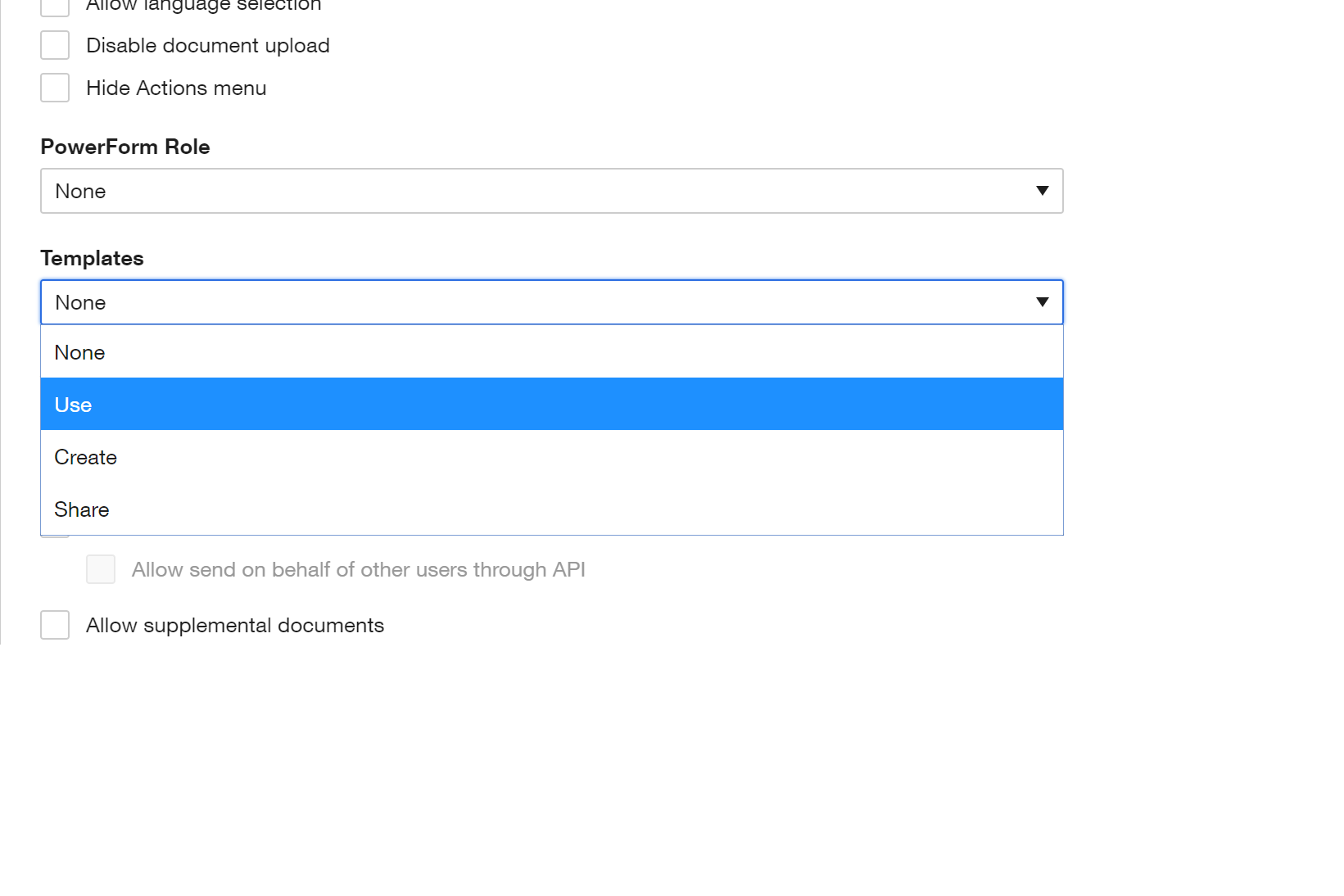
This is likely a Permission Set issue. Inside the Permission Set is a dropdown for Templates, as seen in the uploaded screenshot. If your Permission Set associated to your DocuSign User does not have at minimum, the "Use" for Templates, then you would not be able to apply or Use a Template during envelope creation. Talk to your DocuSign Admin to have them review the current Permission Set or potentially assign a new Permission Set if applicable.

screenshot

12 replies

Legacy User
March 20, 2019

So I see from the screenshot the option to "Use" shows to the right. At least that gives you an alternative. No error when selecting "Use" on a Template?

Why it does not show "Use a Template" on the envelope creation screen is a bit of a mystery but perhaps it needs to be enabled somewhere on the DocuSign side. I would at this point create a DocuSign case to get resolution.

Legacy User
March 20, 2019

Thanks for the help. I appreciate it.


