I hope you’re doing well. Thank you for reaching out to the Docusign Community!
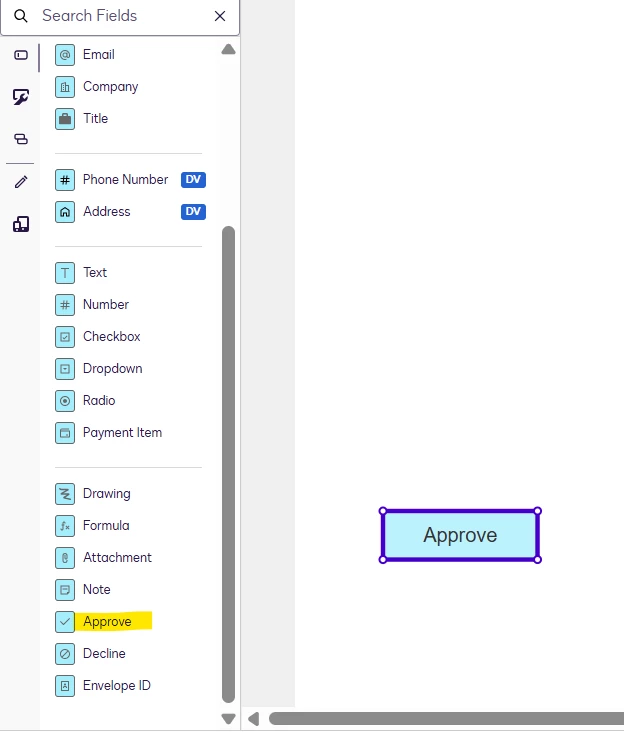
Currently, there is no specific feature that automatically provides proof of document reception just by simply opening the document without any further action. If the law requires proof that the tenant has received and accessed the document without requiring a signature, one workaround is to use an “Approve” field in the document. After they open and review the document, they can click the “Approve” button to acknowledge receipt. This click will complete the envelope, and the sender will receive a summary showing the date and time the document was approved, serving as proof of reception or acknowledgement. The "Approve" field does not add any text to the document itself, but rather records the action in the history.
I hope this helps. If you found this response helpful, feel free to give it a like or mark it as the best answer. Let us know if you have any further questions
Note: Some advanced features and options are supported only in specific Docusign plans. Your account plan might not support some of the options discussed in this help topic. Please contact your account administrator for more information about the options available for your account. Alternatively, visit our Plans and Pricing webpage for more details on the features included with your plan. Compare eSignature plans & pricing
Best Regards,
Jenny | Docusign Community Moderator
If this helped,like 👍and mark it as “Best Answer” so others can find it, too!
You could send the document using “receives a copy” - the recipient does not need to sign, and you receive a notice stating the document was sent.
However, if you have to have a receipt saying that the recipient opened and viewed the document, you may want to have them sign - “receives a copy” does not prove they opened or read the document.
I hope you're doing well. I'm following up on the above solution provided. Could you please confirm whether it addresses your question? If it did, can you please mark it as Best Answer ✅" to assist other users with similar inquiries and improve its visibility. Let us know if we can help with anything else. Wishing you a smooth rest of your day!
If my tenant do not sign or reply to the document, the law says it is accepted by tenant. But I need to prove that the tenant received and opened the document. A proof of receipt
You could send the document using “receives a copy” - the recipient does not need to sign, and you receive a notice stating the document was sent.
However, if you have to have a receipt saying that the recipient opened and viewed the document, you may want to have them sign - “receives a copy” does not prove they opened or read the document.
good luck
mr1
Why not create a sign field or initial field to open the document, and the sender will receive in the summary a date and time the document was opened.
I hope you’re doing well. Thank you for reaching out to the Docusign Community!
Currently, there is no specific feature that automatically provides proof of document reception just by simply opening the document without any further action. If the law requires proof that the tenant has received and accessed the document without requiring a signature, one workaround is to use an “Approve” field in the document. After they open and review the document, they can click the “Approve” button to acknowledge receipt. This click will complete the envelope, and the sender will receive a summary showing the date and time the document was approved, serving as proof of reception or acknowledgement. The "Approve" field does not add any text to the document itself, but rather records the action in the history.
I hope this helps. If you found this response helpful, feel free to give it a like or mark it as the best answer. Let us know if you have any further questions
Note: Some advanced features and options are supported only in specific Docusign plans. Your account plan might not support some of the options discussed in this help topic. Please contact your account administrator for more information about the options available for your account. Alternatively, visit our Plans and Pricing webpage for more details on the features included with your plan. Compare eSignature plans & pricing
Best Regards,
Jenny | Docusign Community Moderator
If this helped,like 👍and mark it as “Best Answer” so others can find it, too!
Ask the software department to create a field that will be outside the document, that the receipient must CLIC just to open it . And the summary will indicate Date and Time it have been CLICED.
Many people could use this fonction in there business.
Thank you for your feedback—it’s appreciated. We recognize these limitations.
If you haven’t already, you might consider submitting an idea post on our dedicated ideas page ( https://community.docusign.com/ideas). It’s a great way to highlight specific enhancements and helps ensure these suggestions are considered for future development.
You can login or register as either a Docusign customer or developer. If you don’t already have a Docusign customer or developer account, you can create one for free when registering.
You can login or register as either a Docusign customer or developer. If you don’t already have a Docusign customer or developer account, you can create one for free when registering.
 Back to Docusign.com