Hello. I’ve sent a document to a couple to sign. The husband has successfully signed via his email address; however, the wife is having issues completing hers. When she clicks the ‘Review Documents’ link in her email, she says she is being directed to a page to log in to DocuSign or create an account. I’ve set up text message authentication so, after clicking the email link, she should be prompted to have a code sent to her phone. She shouldn’t be required to log into DocuSign or set up an account. Has anyone experienced this before? Is there a fix for this? Thanks.
Solved
Help with Client Signing Issue
Best answer by mr1
Hi
In reading another post in the forum - this could also be something to check:
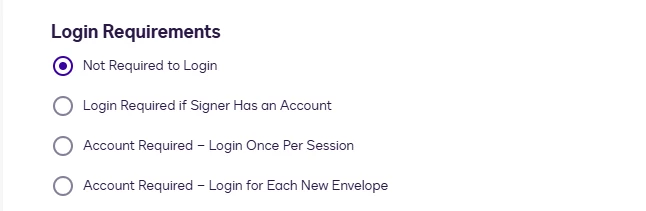
If recipients are being asked to log in during signing, it may be due to the login requirements set in your account’s security settings. Please go to Admin > Security Settings > under Log in Requirements and select “Not Required to Log in”

If you do not have admin access, please reach out to your admin to make this change.
original post:
mr1
Sign up
Already have an account? Login
You can login or register as either a Docusign customer or developer. If you don’t already have a Docusign customer or developer account, you can create one for free when registering.
Customer Login/Registration Developer Login/RegistrationDocusign Community
You can login or register as either a Docusign customer or developer. If you don’t already have a Docusign customer or developer account, you can create one for free when registering.
Customer Login/Registration Developer Login/RegistrationEnter your E-mail address. We'll send you an e-mail with instructions to reset your password.
Back to Docusign.com



