Thank you for reaching out to the Docusign Community! Your presence here is greatly valued, and we're all about sharing knowledge and supporting each other.
I understand your question about how to schedule an export in Docusign Retrieve. Absolutely, here to help!
You can schedule exports for a specific date, time, and frequency.
Note: If you use the Windows Task Scheduler to schedule exports, you must specify the path to the network drive when you create the export. See step 4 in the topic Create Exports for details.
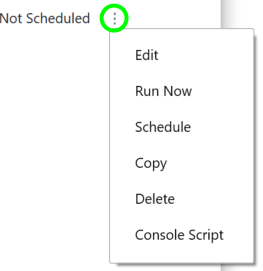
Select the three vertical dots next to a saved setting in the Saved Settings view.
As for your previous attempt, where the status did not change to scheduled, we sincerely apologize. Kindly reattempt the abovementioned steps, then let us know how it goes. We would also recommend to Open a case in the Docusign Support Center if the issue persists so a specialized expert can assist you directly and troubleshoot, potentially through screensharing.
I hope you find this helpful. If you believe this response effectively addresses your question, please click Best Answer ✅" to help other users with similar questions and locate it more easily. Let us know if you need help or if anything comes up, we're here for you.
Sincerely,
Melanie | Docusign Community Moderator Helpful? Mark it as "Best Answer" to help others too!
Thank you for reaching out to the Docusign Community! Your presence here is greatly valued, and we're all about sharing knowledge and supporting each other.
I understand your question about how to schedule an export in Docusign Retrieve. Absolutely, here to help!
You can schedule exports for a specific date, time, and frequency.
Note: If you use the Windows Task Scheduler to schedule exports, you must specify the path to the network drive when you create the export. See step 4 in the topic Create Exports for details.
Select the three vertical dots next to a saved setting in the Saved Settings view.
As for your previous attempt, where the status did not change to scheduled, we sincerely apologize. Kindly reattempt the abovementioned steps, then let us know how it goes. We would also recommend to Open a case in the Docusign Support Center if the issue persists so a specialized expert can assist you directly and troubleshoot, potentially through screensharing.
I hope you find this helpful. If you believe this response effectively addresses your question, please click Best Answer ✅" to help other users with similar questions and locate it more easily. Let us know if you need help or if anything comes up, we're here for you.
Sincerely,
Melanie | Docusign Community Moderator Helpful? Mark it as "Best Answer" to help others too!
@Melanie.Panguito, Thank you for providing the steps above. However, I still don’t see the status changed to scheduled. I will open a support case. Thanks!
You can login or register as either a Docusign customer or developer. If you don’t already have a Docusign customer or developer account, you can create one for free when registering.
You can login or register as either a Docusign customer or developer. If you don’t already have a Docusign customer or developer account, you can create one for free when registering.
 Back to Docusign.com