Question

Docusign is not valide for INPI France - not eIDAS

  • May 5, 2026
  • 7 replies
  • 87 views

Forum|alt.badge.img+1

Hello 
I subscribed to Docusign in order to sign an INPI document as it was said it is eIDAS compliant.
But INPI refused the document.
what can I do please?

Bests,
 

7 replies

Forum|alt.badge.img+15
  • Community Moderator
  • May 7, 2026

Hello ​@ms98267,

Thanks for reaching out to the Docusign Community!

I received your message. Thank you for providing the envelope ID. Could you please try the following steps:

  1. Enable the setting described here: Envelope Download

  2. Re‑download the files, making sure to download the Certificate of Completion and the signed document separately (do not combine them).

  3. Attempt validation again on INPI.

If validation still fails, we recommend opening a support case and including: 

  • A copy of the signed document you downloaded

  • The validation report from INPI

Additionally, please validate the document using the EU Validator and let us know whether it succeeds there compared to INPI.

If you get stuck or have more questions, we’re here.


Best Regards,
Jenny  | Docusign Community Moderator
If this helped, feel free to mark it as "Best Answer" so others can find it too!


Forum|alt.badge.img+1
  • Author
  • New Voice
  • May 7, 2026

Hello ​@Jenny.Martin 
test were not successful
below also the EU validator report that failed.


Forum|alt.badge.img
  • Newcomer
  • May 11, 2026

I am having the exact same problem on the INPI site, it does list Docusign as issuing compliant eiDAS signatures and I’ve been going round in circles, ending with the same ‘invalid signature’ message.

I’m not sure I understand the message chain shown here - are the ‘Indeterminate’ test results shown the last response? Has anything been resolved, or will anything be resolved at some point? I’ve signed up to a subscription to see if that helped but it made no difference so I’m now out of pocket too.


Forum|alt.badge.img+15
  • Community Moderator
  • May 11, 2026

Hello ​@ms98267 ​@Sue Hamon,

Thanks for the update. In this case, the best step is to submit a support case so the team can review your situation and assist further.

👉 Open a case in the Docusign Support Center


Best Regards,
Jenny  | Docusign Community Moderator


Forum|alt.badge.img+15
  • Community Moderator
  • May 18, 2026

Hello ​@ms98267,

We trust that all is well. We’d like to know if the suggested solution was helpful. If yes, we would greatly appreciate it if you could mark it as "Best Answer", to help other community members find trusted answers.
Let us know if you need further assistance. We’re here for you!

Best Regards,
Jenny | Docusign Community Moderator


Forum|alt.badge.img
  • Newcomer
  • May 19, 2026

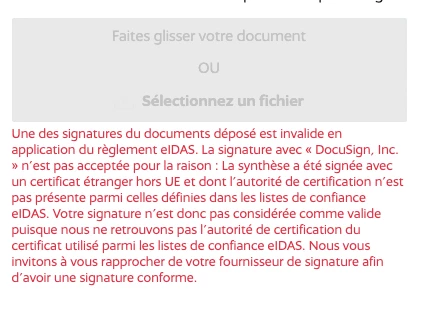
Hi, just for an update. I did submit a support case and I was guided through the process step by step with successful outcome. I attach a screen grab of the instructions here to help anyone else in the same situation.


Forum|alt.badge.img+15
  • Community Moderator
  • May 19, 2026

Hello ​@Sue Hamon,

Thanks for the update! I’m glad to hear you were able to resolve the issue.

Please feel free to mark your answer as the “Best Answer” so it can help others who may encounter the same concern.

If you have any other questions or run into further issues, feel free to reach out. Have a great day!


Best Regards,
Jenny | Docusign Community Moderator


