I sent out a real estate sales contract to the buyer. The buyer asked me to change the closing date. I deleted that document from the packet and inserted a replacement document. Now I need to put in the initial and signing locations and resend the entire packet. Is this possible? Or do I have to just resent the entire packet and redo all the signing and initial locations?
After an envelope be sent it’s possible to change their content (remove/add documents) and change the recipients (change/add/remove) while the document was not signed.
To do that, go the Manage page to find the specific envelope, select it then use the option Correct, the envelope will change the status for Correcting. While the envelope is in Correcting status, nobody will be able to sign it.
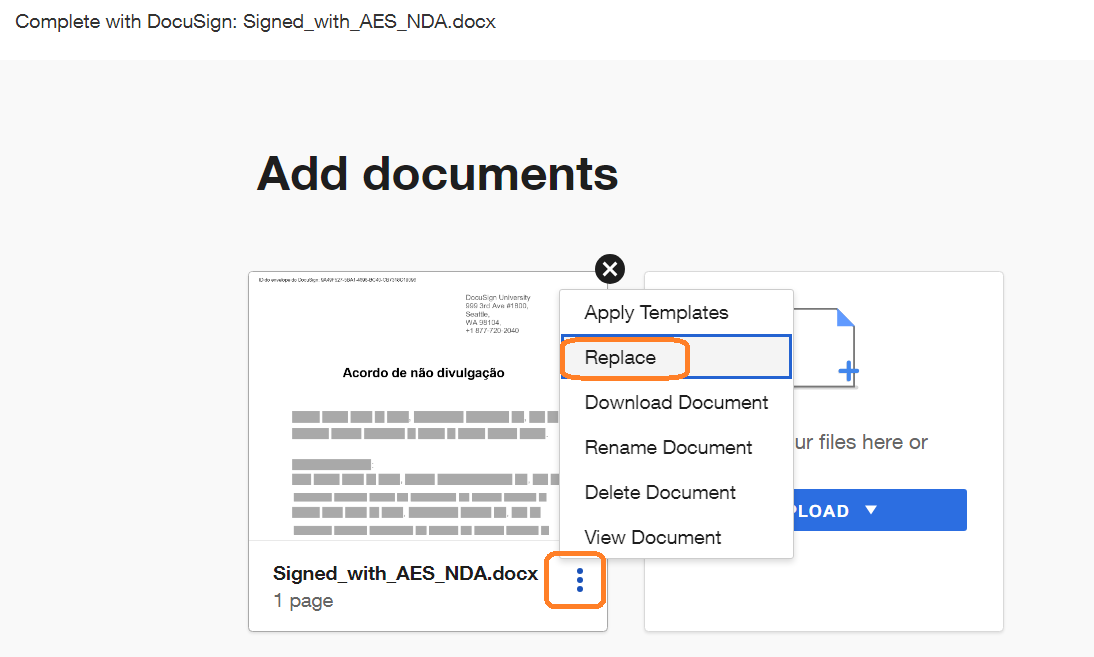
Now, you can add/remove the non signed document(s), add/remove/change any recipient, go to the document page and add the Sign Here and others fields in the new added document. In general when you remove a document from the envelope all the fields to the signers are removed so you need to add them again. To avoid that, instead remove the document you can Replace it with other document. In the Envelope you can click in the 3 dots menu then select Replace, see the figure:
After replacing the document, you can add/remove any recipient if needed then go to the next page where you can see the new document and add or repositioning the fields to the recipients.
After doing everything you need, just click in the right bottom corner in the button Correct to finish the correction. Now the envelope can be signed by the recipients. You’re using the same envelope and the signers can use the same link received in the email notification to sign the document.
I hope that helps!
Alexandre
Your feedback is very appreciated! You can give a Like and mark this answer as the "Best Answer" for your issue. DocuSign University http://dsucustomers.docusign.com
After an envelope be sent it’s possible to change their content (remove/add documents) and change the recipients (change/add/remove) while the document was not signed.
To do that, go the Manage page to find the specific envelope, select it then use the option Correct, the envelope will change the status for Correcting. While the envelope is in Correcting status, nobody will be able to sign it.
Now, you can add/remove the non signed document(s), add/remove/change any recipient, go to the document page and add the Sign Here and others fields in the new added document. In general when you remove a document from the envelope all the fields to the signers are removed so you need to add them again. To avoid that, instead remove the document you can Replace it with other document. In the Envelope you can click in the 3 dots menu then select Replace, see the figure:
After replacing the document, you can add/remove any recipient if needed then go to the next page where you can see the new document and add or repositioning the fields to the recipients.
After doing everything you need, just click in the right bottom corner in the button Correct to finish the correction. Now the envelope can be signed by the recipients. You’re using the same envelope and the signers can use the same link received in the email notification to sign the document.
I hope that helps!
Alexandre
Translate
Your feedback is very appreciated! You can give a Like and mark this answer as the "Best Answer" for your issue. DocuSign University http://dsucustomers.docusign.com
I’d appreciate if you give a Like and mark this as the Best Answer.
Thank you,
Alexandre
Translate
Your feedback is very appreciated! You can give a Like and mark this answer as the "Best Answer" for your issue. DocuSign University http://dsucustomers.docusign.com
How are you? I'm checking in to see if you still need assistance. If yes, kindly reply here with more context or confirm if the issue has been resolved.
If you run into any problems, we're happy to help with those here. Wishing you a smooth rest of your day!
Ma. Cassandra | Docusign Community Moderator Mark as “Best Answer” if this helped clarify things.
Hello @donyavafanejad Thank you for reaching out, and welcome to the Docusign Community! Corrections to a Docusign envelope are not possible, as it is likely in a terminal state (Completed, Declined, or Voided) rather than "In Process." Modifications are permitted only on envelopes that have not yet been fully executed. Other potential factors include using a free account, lack of sender privileges, or adding an attachment by a recipient.
You can login or register as either a Docusign customer or developer. If you don’t already have a Docusign customer or developer account, you can create one for free when registering.
You can login or register as either a Docusign customer or developer. If you don’t already have a Docusign customer or developer account, you can create one for free when registering.
 Back to Docusign.com