Conversation Starter
June 26, 2025
Solved

SSO integration between docusign to SAP BTP

  • June 26, 2025
  • 12 replies
  • 372 views

Hello Team 

I am trying to setup sso between Docusign and SAP BTP .As a first step we got a demo account with admin access .I tried creating the domain with sap.com and started getting this error .Since this is the first step before configuring the Identity Provider I am not sure how to proceed further.If I give any other domain like fandoraxyz.com it works .SInce SSO should happen through the email  in this case .user@sap.com without the sap.com domain we won’t be able to proceed .Can we get some reference documentations to look here?I am referring to this steps. Is there any other work arounds .Please suggest .
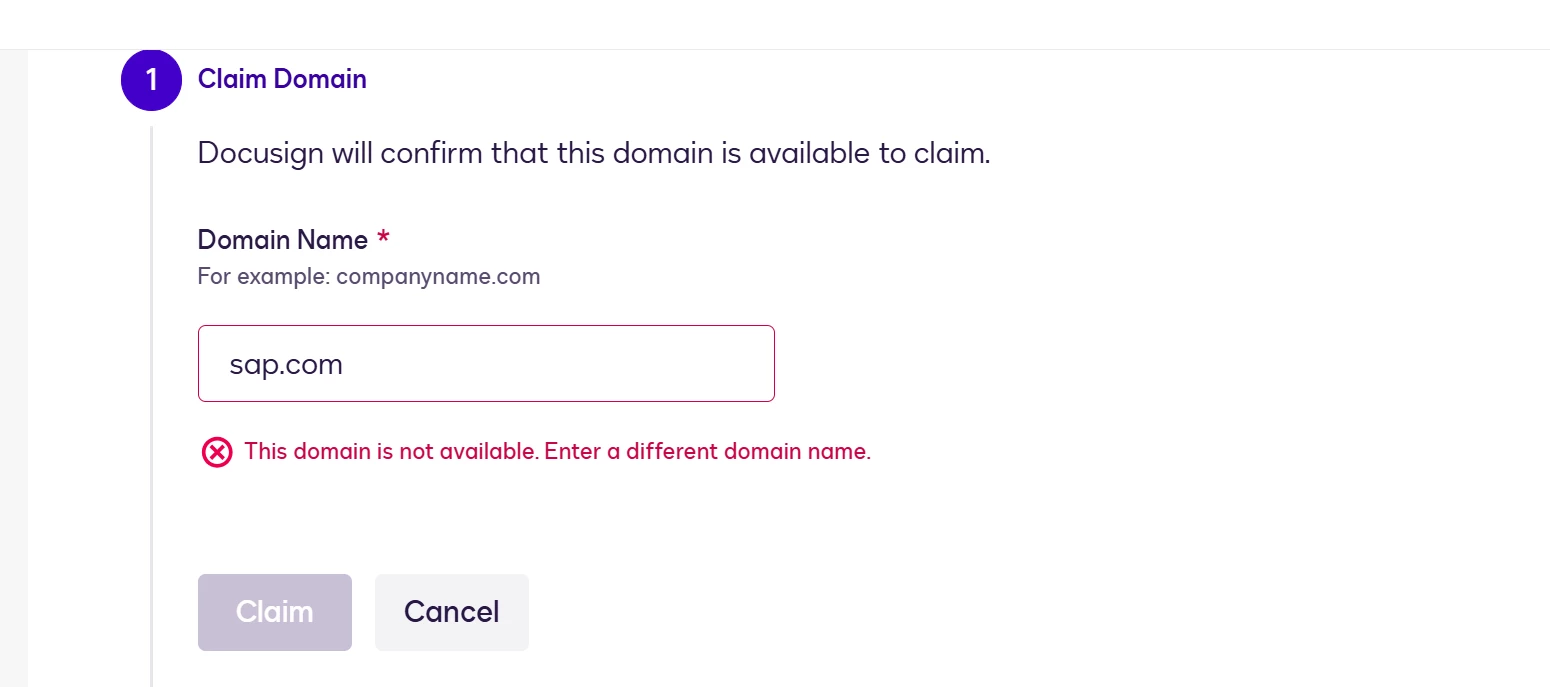

 

Setting up SSO


Best answer by Vinicius.Rodrigues

Hi ​@praducg !

In this step, you must inform the domain that you’d like to claim. Just to clarify, let me suppose I work for Fontara Company, and my corporate email is vinicius@fontara.com. In this field, I would claim the fontara.com domain.

About the error, it means that the domain provided was already claimed by the owner of this domain.


Take a look at this article for more information about this specific step: Claim a Domain


Please, let me know if I was able to help you with this question. If so, could you please select click on the "Select as Best" option? Thank you!

12 replies

Vinicius.Rodrigues
Docusign Employee
Docusign Employee
June 26, 2025

Hi ​@praducg !

In this step, you must inform the domain that you’d like to claim. Just to clarify, let me suppose I work for Fontara Company, and my corporate email is vinicius@fontara.com. In this field, I would claim the fontara.com domain.

About the error, it means that the domain provided was already claimed by the owner of this domain.


Take a look at this article for more information about this specific step: Claim a Domain


Please, let me know if I was able to help you with this question. If so, could you please select click on the "Select as Best" option? Thank you!

"Select as Best" below if you find my answer is a valid solution to your issue and mark it as resolved.
praducgConversation StarterAuthor
Conversation Starter
June 30, 2025


Thanks Vinicius. 


Vinicius.Rodrigues
Docusign Employee
Docusign Employee
July 1, 2025

Hi ​@praducg !

Unfortunately, I can't help you as I don't have access to the information needed to troubleshoot, nor provide private information through this channel. This information, including the reason for the failure, is restricted to specific teams (including Docusign Customer Support).


In this case, I would recommend that you open a ticket with the team so they can assist you in more detail. Let me know if you need help opening this ticket!

I'm sorry I couldn't help you more deeply with this issue!

"Select as Best" below if you find my answer is a valid solution to your issue and mark it as resolved.
praducgConversation StarterAuthor
Conversation Starter
July 1, 2025

Sure I am opening a separate support ticket.Thanks.

Docusign Employee
July 8, 2025

Hi there ​@praducg,

I hope you're doing well. I'm just checking in to see if the solution provided has been helpful in resolving your issue or at least pointed you in the right direction. If it has, could you please consider marking it as the Best Answer ? This will help others with similar questions find the solution more easily.

If there's anything else we can assist you with, please don't hesitate to let us know. We're here to help. Wishing you a smooth rest of your day! 


Regards,

Melanie | Docusign Community Moderator
If this helped, feel free to click "Best Answer"!

praducgConversation StarterAuthor
Conversation Starter
July 21, 2025

Hello ​@Vinicius.Rodrigues ​@Melanie.Panguito ,


Appreciate your followup and sorry for the late response . After doing further  research I am able to get the integration thing working . I have few generic question for you .

  1. Does docusign support OIDC protocol for SSO?SAML I am able to get it working but OIDC is recommended over SAML hence checking.
  2. SAP BTP uses IAS(Identity authenticaiton service) to authenticate users for all SAP systems .Post SSO , does docusign allows to access their api’s using the client token for example here if I generate our IAS token using client id and secrets  will I be able to access the docusign rest api’s since SSO is already integrated .i.e can I authorize users to docusign system using our token or docusign always needs a authorization code grant or jwt token etc to call the api’s. I believe you also might not have much idea on this but checking to see Incase if you have done  any other client integrations have a similar use case ,then please share some reference links .
Vinicius.Rodrigues
Docusign Employee
Docusign Employee
July 22, 2025

Hello ​@Vinicius.Rodrigues ​@Melanie.Panguito ,


Appreciate your followup and sorry for the late response . After doing further  research I am able to get the integration thing working . I have few generic question for you .

  1. Does docusign support OIDC protocol for SSO?SAML I am able to get it working but OIDC is recommended over SAML hence checking.
  2. SAP BTP uses IAS(Identity authenticaiton service) to authenticate users for all SAP systems .Post SSO , does docusign allows to access their api’s using the client token for example here if I generate our IAS token using client id and secrets  will I be able to access the docusign rest api’s since SSO is already integrated .i.e can I authorize users to docusign system using our token or docusign always needs a authorization code grant or jwt token etc to call the api’s. I believe you also might not have much idea on this but checking to see Incase if you have done  any other client integrations have a similar use case ,then please share some reference links .

Hi ​@praducg !
I did a quick search of our internal documents and public support articles, but I didn't find anything on this topic. What I did find is that this type of configuration is part of the client software (SAP) and needs to be configured with one of the authentication method options accepted by Docusign (see more information in Authenticate).


In this case, I would recommend contacting SAP support directly to review this topic. Typically, SAP provides the first level of support for its customers directly.

"Select as Best" below if you find my answer is a valid solution to your issue and mark it as resolved.
praducgConversation StarterAuthor
Conversation Starter
July 22, 2025

Sure ​@Vinicius.Rodrigues  I opened a support ticket .Will keep you posted but for #1 you have any insight ?

  • Does docusign support OIDC protocol for SSO?SAML I am able to get it working but OIDC is recommended over SAML hence checking.
Vinicius.Rodrigues
Docusign Employee
Docusign Employee
July 24, 2025

Sure ​@Vinicius.Rodrigues  I opened a support ticket .Will keep you posted but for #1 you have any insight ?

  • Does docusign support OIDC protocol for SSO?SAML I am able to get it working but OIDC is recommended over SAML hence checking.

Hi ​@praducg !
Sorry if I wasn’t clear, but this was the question that I don’t know. I’ve tried to search by OpenID Connect (OIDC) on our Support Center and also on our Developer Center, but I found 0 answers.

"Select as Best" below if you find my answer is a valid solution to your issue and mark it as resolved.
Docusign Employee
August 1, 2025

Hello ​@praducg,

I hope you're doing well. I'm just checking in to see if the above solution/guidance provided has been helpful and pointed you in the right direction. If it has, could you please consider marking it as the Best Answer ? This will help other members with similar questions find the topic more easily.

Let us know if you need further assistance. 


Regards,

Melanie | Docusign Community Moderator
If this helped, feel free to click "Best Answer"


