Newcomer
February 3, 2025
Solved

Second version template and button from 1st version

  • February 3, 2025
  • 2 replies
  • 86 views

Quick one,  I am working on Docusign in our test environment and completed the build.


I have this button that was initially created through “Application Forms” Template and was working fine.


I created another template “Application Forms V2” and replaced the templated ID in the old button and chose not to create a new button.


Why do I get this prompt ?
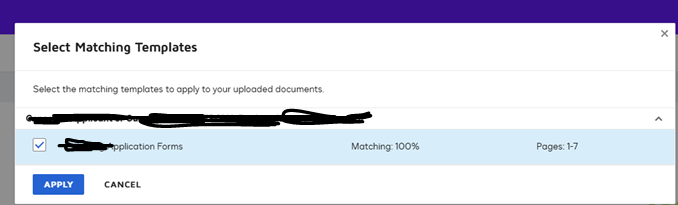
That wipes out the fields from the actual template if I chose to click CANCEL on the above prompt.

This is prompting me to use the “Application Forms” which is the older version.

    Best answer by Michael.Rave

    @nayana revanna 

    The screenshot provided it related to the “Template Matching” feature, which seems to detect the template.

    If you don’t want to remove the V1 template from the Docusign account, you should exclude it from template matching and should include the V2 template in for template matching in the Docusign eSignature Web App.

    2 replies

    Michael.Rave
    Docusign Employee
    Docusign Employee
    February 3, 2025

    @nayana revanna 

    The screenshot provided it related to the “Template Matching” feature, which seems to detect the template.

    If you don’t want to remove the V1 template from the Docusign account, you should exclude it from template matching and should include the V2 template in for template matching in the Docusign eSignature Web App.

    "Select as Best" below if you find my answer is a valid solution to your issue and mark it as resolved.
    Docusign Employee
    February 11, 2025

    Hi ​@nayana revanna,

    I hope you are doing well.

    I want to confirm if you were able to solve your issue by utilizing the suggested solution or if the information provided was useful. If so, please mark it as the best answer by clicking “Select as Best” to make it easier for other users to find. Otherwise, let me know and I will gladly help you address the situation as soon as possible.


    Best regards,

    Christopher | Docusign Community Moderator

    "Select as Best" below if you find the answer a valid solution to your issue.

