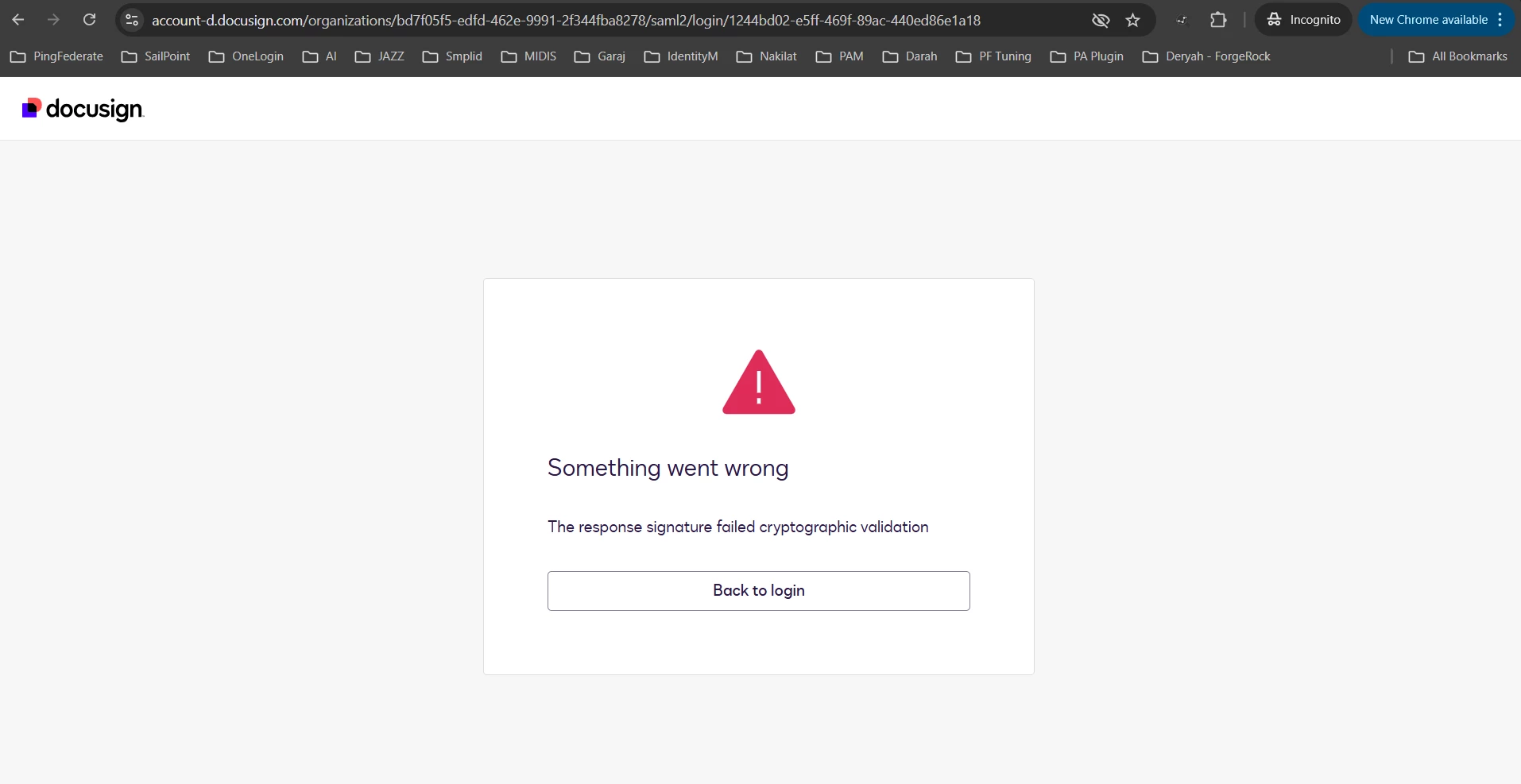
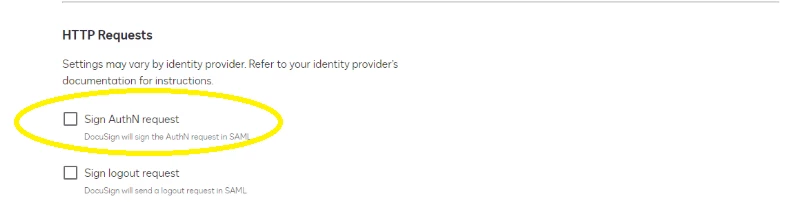
Thank you for getting back to me. The error message suggests that the wrong SSL certificate was uploaded into your IdP. Looking at the IdP configuration, it appears that it instructed us to sign our AuthN requests with our own certificate. Looking through the PingFederate guide you shared on this thread, I don't see instructions on where to upload our certificate. If we sign the AuthN request, and the IdP doesn't have a copy of the SSL certificate we're using to sign it, then it's gonna reject the request with this error. Therefore, I suspect this will resolve if you disable "Sign AuthN request" on our side. 👉 Set Up an Identity Provider
Hope it helps. Please note that we have available resources for setting up SSO and Identity Providers. Still, if technical assistance is required, this may require Technical 2 or Technical 3 Support, depending on complexity, so if you have an enhanced plan with Docusign, we would suggest opening a support case. Thank you, and have a great day! 😊
Regards,
Melanie | Docusign Community Moderator If this helped clarify things, feel free to Like👍and click "Best Answer"
Thanks for reaching out to the Docusign Community — we're glad to have you here!
From what I understand, you're encountering an issue while configuring SAML SSO using IdP PingFederate in Demo environment. We apologize, and we're here to provide guidance to help you move forward.
Could you share more details regarding the error message you're receiving and step-by-step description of the actions you were taking when the issue appeared? Additionally, may you confirm if the email address you are using here in the Community is the same as the email address associated with your Docusign Administrator account?
We look forward to your update. Here if you need us!
Regards,
Melanie | Docusign Community Moderator If this helped clarify things, feel free to Like👍and click "Best Answer"
Thanks for reaching out to the Docusign Community — we're glad to have you here!
From what I understand, you're encountering a login issue after configuring SAML SSO using IdP PingFederate in Demo environment. We apologize, and we're here to provide guidance to help you move forward.
May you confirm if the email address you are using here in the Community is the same as the email address associated with your Docusign Administrator account?
We look forward to your update. Here if you need us!
Regards,
Melanie | Docusign Community Moderator If this helped clarify things, feel free to Like👍and click "Best Answer"
Imported the metadata from the IdP (PingFederate).
Pasted the required URL into the SP (DocuSign).
Mapped the attributes in the contract as follows: surname, givenName, emailAddress, SAML_NAME_FORMAT. The SAML Name Format was mapped to this value (as text) in PingFederate: urn:oasis:names:tc:SAML:2.0:nameid-format:persistent.
Extended the same attributes in the IdP (PingFederate).
Imported the certificate used in the IdP and exported it into DocuSign. After exporting, it also showed as active.
Lastly, tested the IdP URL.
Alternatively, I also tried fully importing the metadata directly into the IdP using XML, but it still threw the same error.
Yes, the email is the same as the one I am using. Actually, my client does not have much knowledge on the SSO side, and since this is only the PROD environment, I am testing it in the Trial account from my side. We also have the UAT environment.
I have checked the certificate multiple times; however, I want to mention that this is a self-signed certificate from the IdP (PingFederate) side.
Thank you for getting back to me. The error message suggests that the wrong SSL certificate was uploaded into your IdP. Looking at the IdP configuration, it appears that it instructed us to sign our AuthN requests with our own certificate. Looking through the PingFederate guide you shared on this thread, I don't see instructions on where to upload our certificate. If we sign the AuthN request, and the IdP doesn't have a copy of the SSL certificate we're using to sign it, then it's gonna reject the request with this error. Therefore, I suspect this will resolve if you disable "Sign AuthN request" on our side. 👉 Set Up an Identity Provider
Hope it helps. Please note that we have available resources for setting up SSO and Identity Providers. Still, if technical assistance is required, this may require Technical 2 or Technical 3 Support, depending on complexity, so if you have an enhanced plan with Docusign, we would suggest opening a support case. Thank you, and have a great day! 😊
Regards,
Melanie | Docusign Community Moderator If this helped clarify things, feel free to Like👍and click "Best Answer"
You can login or register as either a Docusign customer or developer. If you don’t already have a Docusign customer or developer account, you can create one for free when registering.
You can login or register as either a Docusign customer or developer. If you don’t already have a Docusign customer or developer account, you can create one for free when registering.
 Back to Docusign.com