One of our users left so we closed the email address
We now have people asking for the documents they signed, are they still stored somewhere?
If so please can you advise where I might find them?
The shared access option does not appear in the Actions tab and I don’t seem to be able to transfer the envelopes. The user is also not appearing the in legacy list in the shared access folder although access was previously shared
Thank you for engaging with the Docusign Community. We are pleased to have you here.
I understand your concern regarding envelope access from a closed user’s account. We apologize for the inconvenience, and I’ll be glad to help you with this. I have encountered a similar inquiry to the one you previously posted. I have replied and provided the same information regarding shared access and transfer envelopes.
Please note that the Shared Access feature is available only to active users. A deleted or closed user's account does have the transfer envelopes as an option.
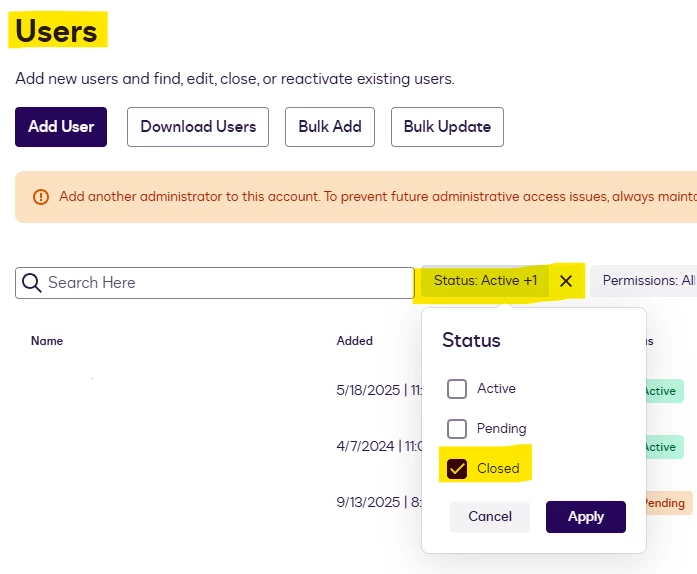
You can view closed users' accounts by navigating to Admin > Users, then clicking Status Filter and selecting Closed. Then Apply.
Once you have located the user, click the Actions button and select Transfer Envelopes. You may follow the instructions in the article on how to Transfer Envelopes and Templates Between Users. Kindly refer to the images below for your guidance.
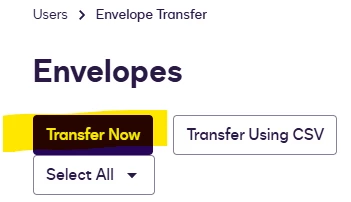
After selecting the envelope to transfer, please click the “Transfer Now” to open the user selection option.
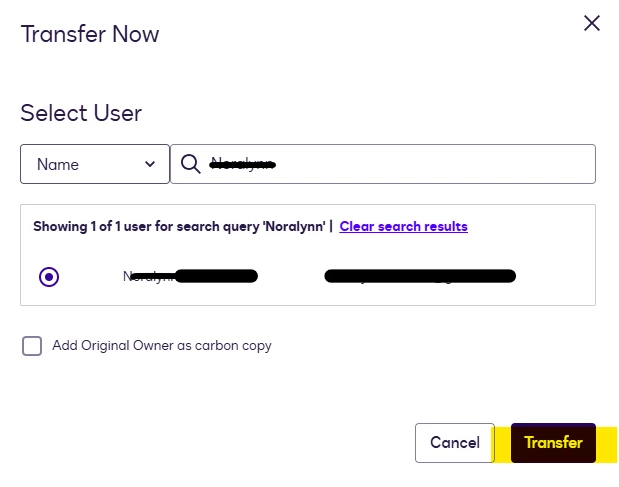
You can type the user's name or email and press “Enter” to generate results for you to select.
If my response helped solve your question, could you click the “Best Answer ✅” button below the post? That helps others in the Community find trusted answers faster.
One of our users left so we closed the email address
We now have people asking for the documents they signed, are they still stored somewhere?
If so please can you advise where I might find them?
The shared access option does not appear in the Actions tab and I don’t seem to be able to transfer the envelopes. The user is also not appearing the in legacy list in the shared access folder although access was previously shared
Enterprise pro is not available in my country and that sucks. Anyone with enterprise account and can add me has a user please send me a MESSAGE I am willing to split invoice payment if need be. Thanks for your assistance
Thank you for engaging with the Docusign Community. We are pleased to have you here.
I understand your concern regarding envelope access from a closed user’s account. We apologize for the inconvenience, and I’ll be glad to help you with this. I have encountered a similar inquiry to the one you previously posted. I have replied and provided the same information regarding shared access and transfer envelopes.
Please note that the Shared Access feature is available only to active users. A deleted or closed user's account does have the transfer envelopes as an option.
You can view closed users' accounts by navigating to Admin > Users, then clicking Status Filter and selecting Closed. Then Apply.
Once you have located the user, click the Actions button and select Transfer Envelopes. You may follow the instructions in the article on how to Transfer Envelopes and Templates Between Users. Kindly refer to the images below for your guidance.
After selecting the envelope to transfer, please click the “Transfer Now” to open the user selection option.
You can type the user's name or email and press “Enter” to generate results for you to select.
If my response helped solve your question, could you click the “Best Answer ✅” button below the post? That helps others in the Community find trusted answers faster.
Thank you for connecting with the Docusign Community. We are pleased to welcome you.
We are sorry that you are unable to subscribe to an Enterprise Pro plan as mentioned in your post. We would like to confirm the country you are currently residing in so we can check on our end.
We also recommend contacting our Docusign Sales support to check for any possible options, and they can also recommend a suitable plan based on your needs.
You can login or register as either a Docusign customer or developer. If you don’t already have a Docusign customer or developer account, you can create one for free when registering.
You can login or register as either a Docusign customer or developer. If you don’t already have a Docusign customer or developer account, you can create one for free when registering.
 Back to Docusign.com