Solved

Doc Gen Word Template Table filter using xpath

  • May 14, 2025
  • 7 replies
  • 84 views

Forum|alt.badge.img+2

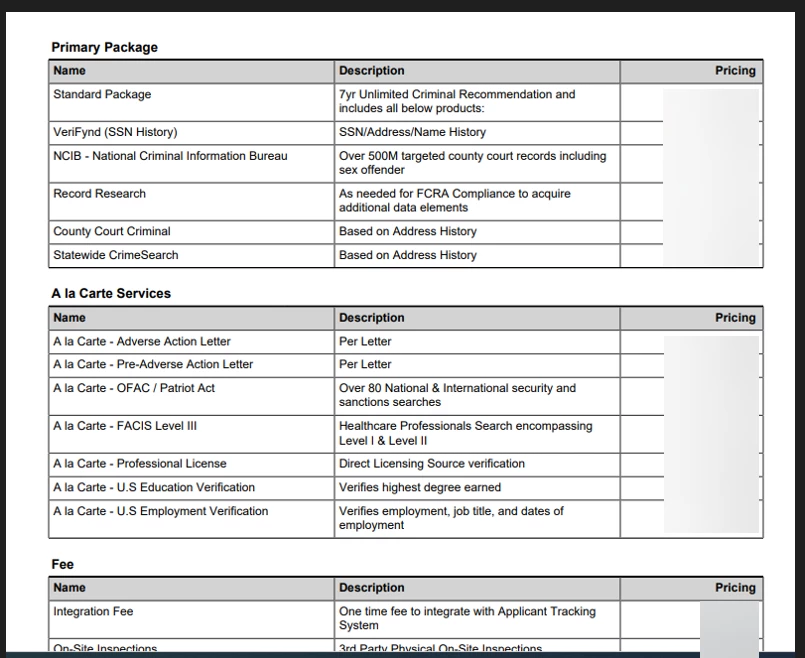
Hello! I have the attached table working, however, it displays all quote lines under each group (screenshot “output”) instead of displaying only the quote lines that are displaying under each group (screenshot “expectedoutput”). Please help!
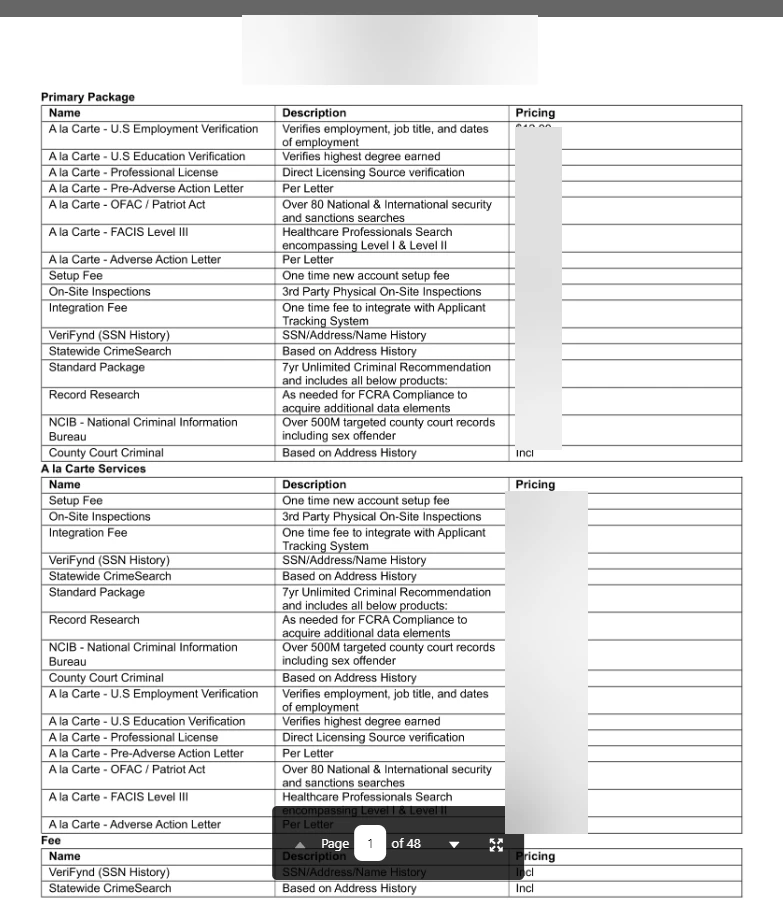


Output
Expected Output


<# <Group Select ="/SBQQ__Quote__c//SBQQ__LineItemGroups__r" By="./Name"/> #>

<# <Content Select="./GroupName" /> #>

Name

Description

Pricing

<# <TableRow Select=".//SBQQ__LineItems__r" /> #><# <Content Select="./QT_Product_Name__c"/> #>

<# <RichText Select="./SBQQ__Description__c"/> #>

<# <Content Select="./Net_Unit_Text__c"/> #>

<# <EndGroup/> #>

Best answer by Melanie.Panguito

Hey ​@astocker,

I am sorry for the late response. This custom Gen syntax is out of our scope and needs hand-holding implementation guidance. I recommend coordinating with your Docusign Account Executive if your account has one to set up a meeting with an Engagement Manager to scope a Professional Services engagement for the CPQ and custom Gen syntax implementation. I sincerely apologize. Let us know if we can help with anything else. Wishing you a smooth rest of your day! 


Regards,

Melanie | Docusign Community Moderator
If this helped, feel free to click "Best Answer"!

7 replies

Forum|alt.badge.img+15

Hello ​@astocker,

Thank you for reaching out, and a warm welcome to the Docusign Community! We are absolutely delighted to have you here and can't wait to share our knowledge with you.

The only difference we see from our guide to what you provided is within the table: In the table, you listed this - <#<TableRow Select=".//SBQQ_Lineltems #>

Based on our guide, it should be - <# <TableRow Select="./GroupItems/Item" /> #>

The rest look fine.
Article: Use Group Tags in a Word-Based Gen Template

I hope this is helpful. If you consider the response above useful, please click “Select as Best” to mark it as the “Best Answer ✅.” This will assist other users with similar questions in finding it more easily. Let us know if you need further assistance. Thank you!


Best regards,

Melanie | Docusign Community Moderator

"Select as Best" below if you find the answer a valid solution to your issue


Forum|alt.badge.img+2
  • Author
  • Conversation Starter
  • May 20, 2025

@Melanie.Panguito Thanks for the response! I am going to try this out today and report back!


Forum|alt.badge.img+2
  • Author
  • Conversation Starter
  • May 20, 2025

Hello! I made that change, however, now the quote lines do not show up at all. Any ideas?


Forum|alt.badge.img+2
  • Author
  • Conversation Starter
  • May 20, 2025

Is it because we use the red one and not the green?


Forum|alt.badge.img+2
  • Author
  • Conversation Starter
  • May 20, 2025

Schema from group to quote lines


Forum|alt.badge.img+2
  • Author
  • Conversation Starter
  • May 21, 2025

Any ideas ​@Melanie.Panguito? Thanks!


Forum|alt.badge.img+15

Hey ​@astocker,

I am sorry for the late response. This custom Gen syntax is out of our scope and needs hand-holding implementation guidance. I recommend coordinating with your Docusign Account Executive if your account has one to set up a meeting with an Engagement Manager to scope a Professional Services engagement for the CPQ and custom Gen syntax implementation. I sincerely apologize. Let us know if we can help with anything else. Wishing you a smooth rest of your day! 


Regards,

Melanie | Docusign Community Moderator
If this helped, feel free to click "Best Answer"!


