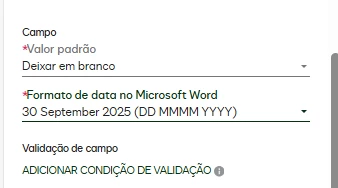
Hello, I’m using a date field in CLM forms and I need the “dd MMMM yyyy” format, but the month name is always displayed in English (e.g., 30 September 2025).
Is there any option to generate the date in a localized full format, so the month name appears in Portuguese (e.g., 30 de Setembro de 2025)? If not, is Docusign planning to support/translate localized date formats in CLM document generation?
Thanks!
Best answer by Servesh
Hi @rodvillani
I believe it’s possible to have this date on document in Portugese with a little C# magic something like updating a date variable and using Merge XML step.
string inputDate = GetVariableValue("InputDate"); // replace InputDate with actual variable var englishCulture = new System.Globalization.CultureInfo("en-US"); var portugueseCulture = new System.Globalization.CultureInfo("pt-PT"); string format = "dd MMMM yyyy";
string result = System.DateTime.Parse(inputDate, englishCulture) .ToString(format, portugueseCulture);
return result;
Not sure if a translation is available at form level.
I believe it’s possible to have this date on document in Portugese with a little C# magic something like updating a date variable and using Merge XML step.
string inputDate = GetVariableValue("InputDate"); // replace InputDate with actual variable var englishCulture = new System.Globalization.CultureInfo("en-US"); var portugueseCulture = new System.Globalization.CultureInfo("pt-PT"); string format = "dd MMMM yyyy";
string result = System.DateTime.Parse(inputDate, englishCulture) .ToString(format, portugueseCulture);
return result;
Not sure if a translation is available at form level.
You can login or register as either a Docusign customer or developer. If you don’t already have a Docusign customer or developer account, you can create one for free when registering.