New Voice
August 28, 2025
Solved

How do I receive a recordId in a CLM workflow that I am passing in the Salesforce Flow Action?

  • August 28, 2025
  • 3 replies
  • 195 views

I am trying to initiate a CLM Workflow from a Salesforce Flow. I am able to initiate the workflow from Flow, but am unable to figure out how to pass a recordId. 

I see that the Salesforce Flow Action “Start DocuSign CLM Workflow” which calls DFSLE__CLMWORKFLOWREQUEST expects a Salesforce recordId because it fails when I put a random string of text or a Docusign ID with the message “An Apex error occurred: System.StringException: Invalid id: cxxxxx” and succeeds when I populate the field with a valid SFID.

I see that I am initiating a workflow in Docusign CLM as I get a record of the workflow’s execution.

But I can not access the recordId in the workflow.

I have tried creating variables with all sorts of name to see if they are populated, but none of them work. (recordId, Record_ID, SalesforceID, id, userId, accountId, contactID etc...)

Does anyone know how I can access this record id from within SF?

Thanks

Gretchen
Best answer by RufusJ

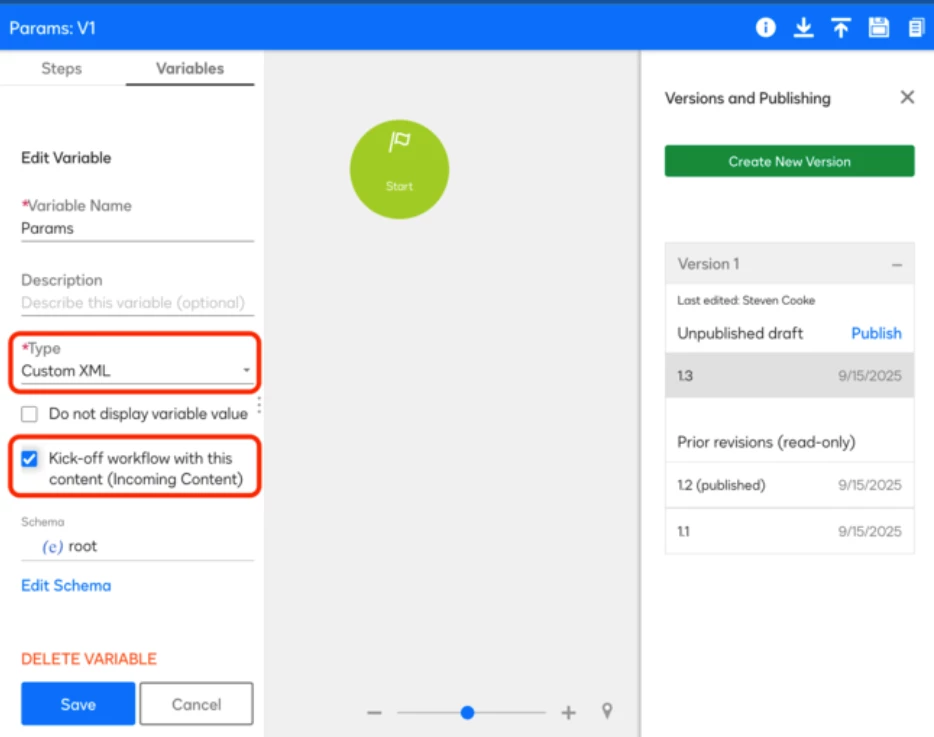
After much back and forth and my manager exerting some pressure, I did get a response from Docusign on this one. To get this Salesforce Flow Action to pass a Record.Id so that Docusign will make it available in the resulting workflow you need have a variable in the workflow called Params and it has to be of type Custom XML and the checkbox “Kick-off workflow with this content (Incoming Content)” must be checked. See the screenshot below.

I’m hoping that the help article will be updated to contain this information. I hope that the screen shot indicating that one can input the {!Account.AnnualRevenue} instead of the recordid is removed as well. 


3 replies

Pawan Gangwani
Hero
Hero
September 1, 2025

Hello ​@RufusJ 

Welcome to the DocuSign Community!

Usually, the Salesforce record ID comes from Salesforce itself when initiating the document generation. The standard approach is to link a text field in the DocuSign CLM intake form to the Salesforce field called "Record ID". Once that’s done, you can reference this field inside the workflow as needed.

Simply put: The record ID is passed from Salesforce into DocuSign CLM during the initiation process and should be captured through a mapped field on the intake form.

Thanks!

👪 DocuSign Community Leaderboard Top 5 contributor
💹 Ranked #3 in the Reply Royalty category in DocuSign Community Wrapped 2024
🤝Let’s LinkedIn and rollPawan Gangwani - EY | LinkedIn

Way to Learn | I'd love your feedback | Hit Like | Mark it Best🌈
RufusJNew VoiceAuthor
New Voice
September 2, 2025

Thanks Pawan.

I am familiar with how to initiate a CLM workflow and pass the record id using an intake form and accessing it from TemplateFieldData in Params in the workflow.

I think I wasn’t clear in my question. I am initiating a Docusign Workflow from a Salesforce Flow using the invokable Apex action mentioned above. The invokable action (which comes with Docusign for Salesforce) has an input of Salesforce RecordId, but I am unable to use this in my Workflow that does get called from the flow. 

I’m assuming there must be a way to capture that recordId in the workflow if it is recognized in the invokable method. 


RufusJNew VoiceAuthorAnswer
New Voice
September 16, 2025

After much back and forth and my manager exerting some pressure, I did get a response from Docusign on this one. To get this Salesforce Flow Action to pass a Record.Id so that Docusign will make it available in the resulting workflow you need have a variable in the workflow called Params and it has to be of type Custom XML and the checkbox “Kick-off workflow with this content (Incoming Content)” must be checked. See the screenshot below.

I’m hoping that the help article will be updated to contain this information. I hope that the screen shot indicating that one can input the {!Account.AnnualRevenue} instead of the recordid is removed as well.


