Troubleshooter
November 3, 2025
Question

Document Generation Only Showing Last Row of Data

Hello,

I am using the Doc Gen step within my workflow to generate a document based on initial form data.

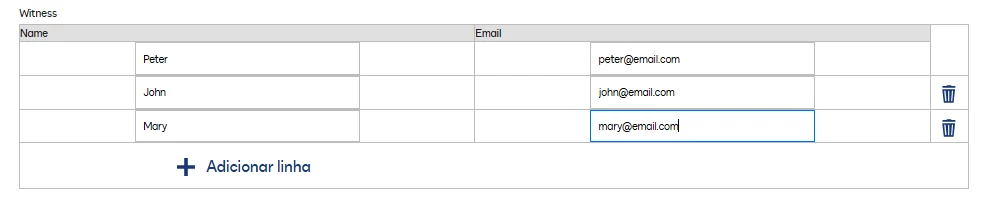
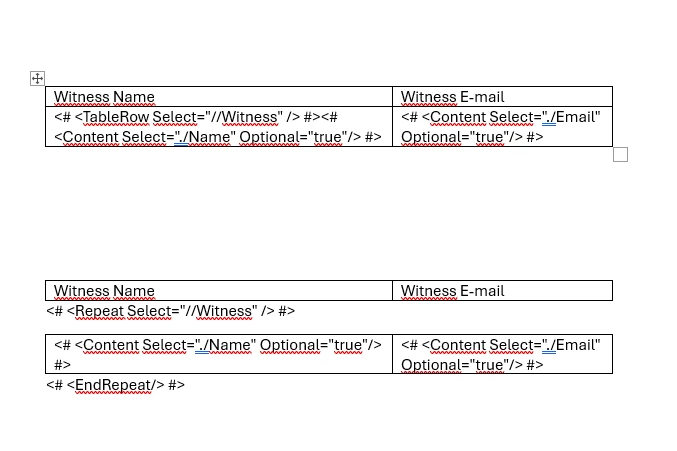
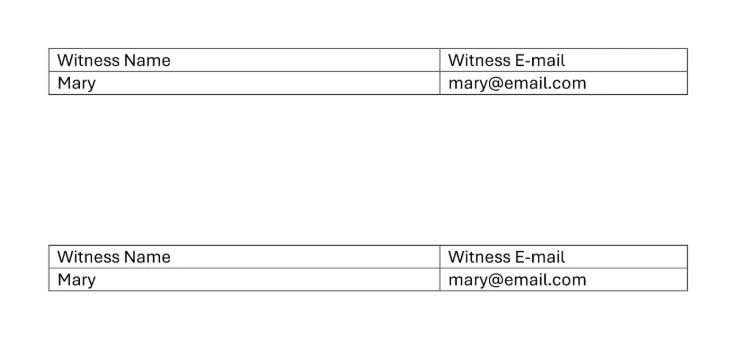
The issue I'm facing is related to data coming from a table in the initial form (multiple entries/rows). When I use the “TableRow Select” or “Repeat Select” tags in my Word template to display this data in a table, only the last row of data entered in the form is showing in the generated document. The previous rows are being overwritten.

For example, if I enter 2 lines of data in the form's table, the generated document only displays the second line.

This is the initial form:
I tried both ways:
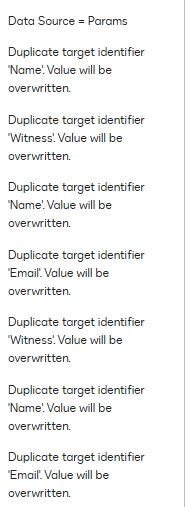
Later, in the WF, the message I get in the Doc Gen step:
 

And the result is:
How can I ensure that the tags properly iterates over ALL rows of my input table data and dynamically creates a new table row for each entry in the generated document, instead of just showing the last one?

Any guidance would be greatly appreciated. Thanks!!

4 replies

Newcomer
September 13, 2026

I am running into the same issue. have you found a solution? 

Translate
Troubleshooter
September 14, 2026

Hello! You can try using the XML Merge Document step instead of this. You only need the template document and the XML variable. It should work. 

Translate
Newcomer
September 15, 2026

Hello, thank you for your reply! 

I tried the XML merge document step and it works but the use case I have is more of a version of the same document needs to be create. the first time user goes through normal generation, the second time he needs to create a version of the same document for another signer where some things change but some are the same (like the table) so I was using the create or upload step, to prompt a task to generate the new document but with some of the information prefilled from the first form that was filled to avoid repetition. Using that step gives me the same error as you described above and I had tried the generate document step that was also giving me the same error as you describe.

Now the xml merge works which could be a workaround, but I wonder if there is any thing that the documentation is not telling us to make the other 2 steps as work as the xml merge.

Translate
Troubleshooter
September 15, 2026

Hey, I think I know what you’re referring to. To bring in the data from all the rows of the table that were previously filled in into the Create or Upload Document step, you need to contact Support and request the “PopulateCustomTablesFromCreateOrUploadDocWorkflow” functionality to be enabled, if it’s not already enabled in your environment (apparently it isn’t). 

Translate