I noticed a “Restart flow” button in the upper right hand corner of the web form screen (after clicking on an existing web form from the templates tab → My Web Forms.) Is it new? What does it do? I couldn’t find anything about it in the last few release notes. Also, I needed to get an activated webform URL, but could only get it after clicking on the “Use” button. Are there release notes on the recent webform updates? Thanks in advance for any guidance. I hadn’t had to make any updates to my webforms since earlier in the year, and noticed some of these changes.
What is "Restart flow" in Webforms? And "Get URL" removed from the three dot ellipse menu?
Best answer by Jenny.Martin
Hello @ValDS— hope you're doing well!
Just wanted to follow up and add a bit more detail to my initial reply, to make sure everything's fully clear on your end:
Restart flow button: The screen you shared is a preview of your web form, used for testing only. "Restart flow" resets the preview by clearing field values and returning to the start of the form. This button does not appear for end users completing your live web form.
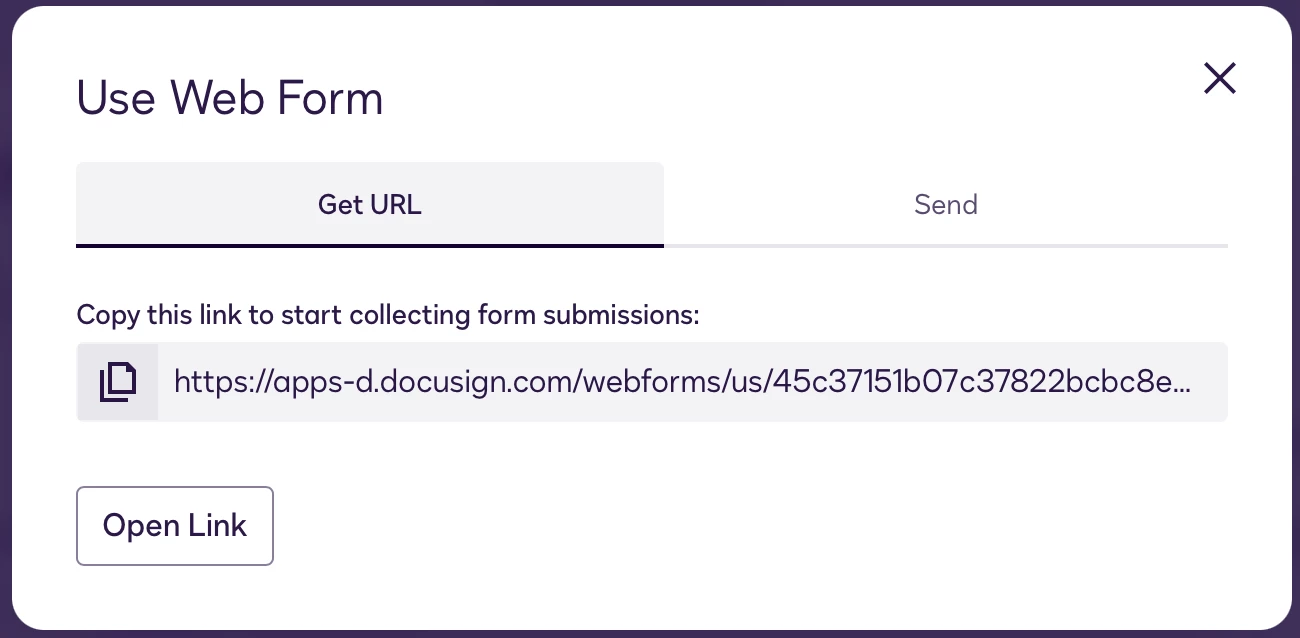
Webform URL: To activate your web form for end users, use the Use button (top right). This now presents two options: Get URL and Send. The Send option was introduced last year; previously, the button was labeled "Get URL" only. This label/option change is likely what you noticed.

The new sending functionality was covered in the release notes at the time of its launch last year. For full details on distributing web forms, please refer to our documentation here: Distributing Web Forms
Let us know if you have any further questions!
Best Regards,
Jenny | Docusign Community Moderator
If this helped, like 👍and mark it as “Best Answer”
Sign up
Already have an account? Login
You can login or register as either a Docusign customer or developer. If you don’t already have a Docusign customer or developer account, you can create one for free when registering.
Customer Login/Registration Developer Login/RegistrationDocusign Community
No account yet? Create an account
You can login or register as either a Docusign customer or developer. If you don’t already have a Docusign customer or developer account, you can create one for free when registering.
Customer Login/Registration Developer Login/RegistrationEnter your E-mail address. We'll send you an e-mail with instructions to reset your password.
Back to Docusign.com




