Active Voice
July 16, 2026
Solved

Docusign Webform Attachment field

  • July 16, 2026
  • 10 replies
  • 72 views

Hi,


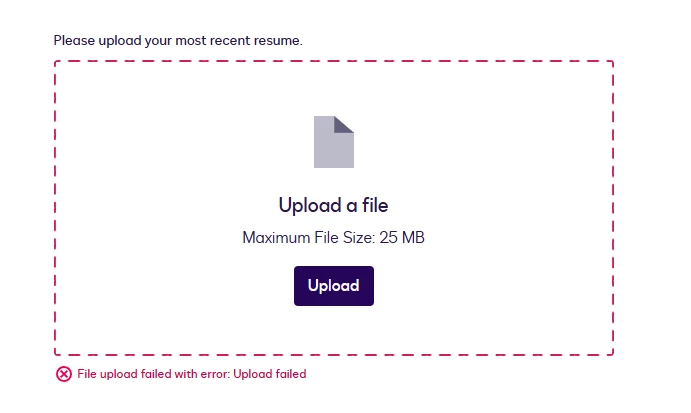
I am trying to create a sample Job Application from through web form. And I added file attachment field, but when I try to test it and upload documents, its always getting error. I did try, word document, PDF file with only 16KB. 


Is there any configuration I need to do?

Thank you in advance for your help.
 

Best answer by Jenny.Martin

Hello ​@TERENA,

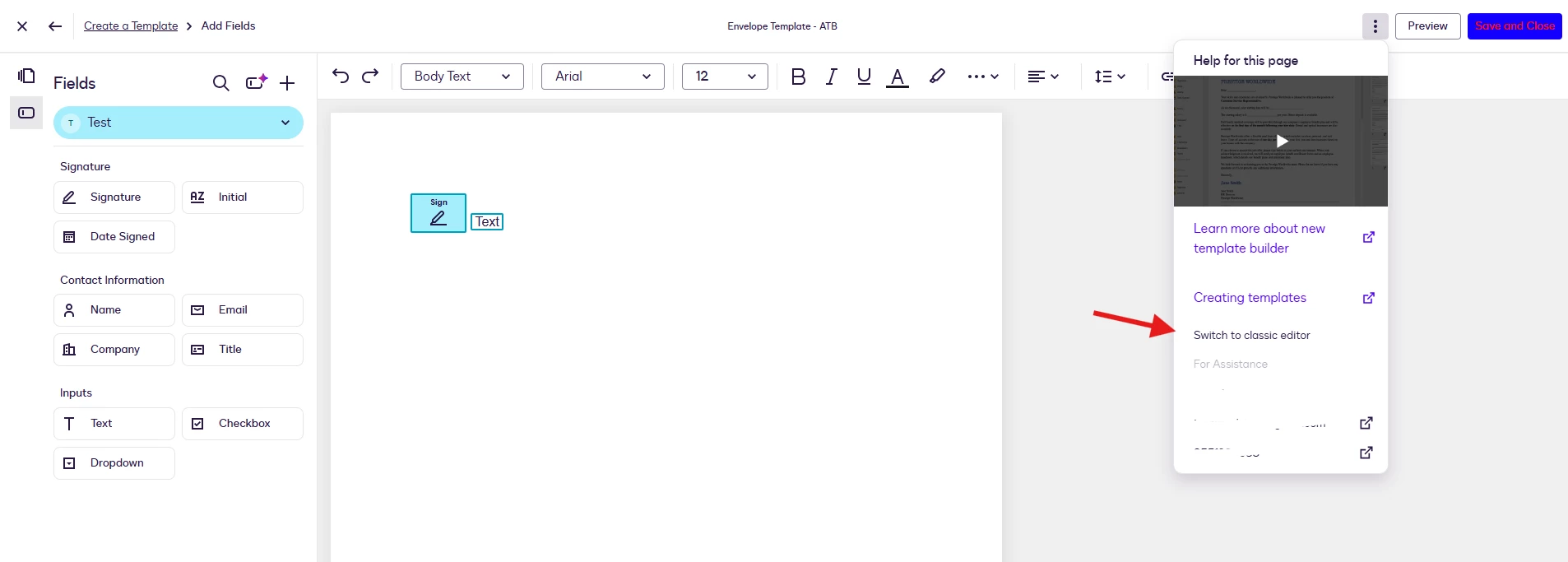
Thanks for sharing the screenshot. You can use the Envelope Template. When creating or editing, make sure to switch to the Classic Editor before adding your fields.

Once the field is added, click Save and Close, then use the template to create the Webform.

Let me know how that goes or if you need anything else!

Best Regards,

Jenny | Docusign Community Moderator

Mark as "Best Answer" if this helped you out!

10 replies

Community Moderator
July 20, 2026

Hello ​@TERENA,

Thanks for reaching out to the Docusign Community, great to have you here!

To confirm, are you using the standalone version of the Web Forms? Please note that attachments are not supported in standalone webforms unless the webform is part of a Maestro workflow. 👉 Build or Update a Web Form with Attachment Fields

If possible, could you provide a copy of the webform configuration (JSON file)? This will allow us to test the setup on our end and investigate further. Could you also share your use case or scenario?

Looking forward to your reply!


Best Regards,

Jenny | Docusign Community Moderator

Mark as "Best Answer" if this helped you out!

Community Moderator
July 28, 2026

Hello ​@TERENA,

I hope everything is going smoothly for you. I just wanted to check in to see if you still need any help. Let us know if you need further assistance. We’re here for you!


Best Regards,

Jenny | Docusign Community Moderator

TERENAActive VoiceAuthor
Active Voice
July 28, 2026

Hi ​@Jenny.Martin 


Thanks for the response. I currently using my demo account for testing purpose before doing it in the production. The purpose of the form is for Job Application for candidates. It will just be a basic filling up details, attaching their resume, submit then notify us. Does it need to be part of a Maestro workflow? Or is there other alternative that we can use it?

Community Moderator
July 29, 2026

Hello ​@TERENA,

Thanks for the additional details.

Yes, instead of creating a standalone webform or building one from scratch, we'd recommend creating a template and using it for your webform. 👉 Template-Based Web Forms


Best Regards,

Jenny | Docusign Community Moderator

Mark as "Best Answer" if this helped you out!

TERENAActive VoiceAuthor
Active Voice
July 29, 2026

Hi ​@Jenny.Martin 


Will I use a “Envelope Template” or “Document Template”? 
I tried to create a test envelope template with Name and Text Box and signature field:


Community Moderator
July 29, 2026

Hello ​@TERENA,

Thanks for sharing the screenshot. You can use the Envelope Template. When creating or editing, make sure to switch to the Classic Editor before adding your fields.

Once the field is added, click Save and Close, then use the template to create the Webform.

Let me know how that goes or if you need anything else!

Best Regards,

Jenny | Docusign Community Moderator

Mark as "Best Answer" if this helped you out!

TERENAActive VoiceAuthor
Active Voice
July 30, 2026

Hi ​@Jenny.Martin 


I was able to make the web form now from an Envelope Template. I created a dummy template and create the Web Form from there. 😊

Thank you...

TERENAActive VoiceAuthor
Active Voice
July 31, 2026

Hi ​@Jenny.Martin,

In addition, may I know what license should my organization have to use this kind of Web Form (where we can send out to external users, upload attachments and notify us)


Thanks.

TERENAActive VoiceAuthor
Active Voice
July 31, 2026

Hi ​@Jenny.Martin ,


I was able to make it work! I created a test envelope template with one label, text and attachment field, and create a Web Form from there.

Thanks for the assistance. :)

Community Moderator
July 31, 2026

Hello ​@TERENA,

Glad to hear it worked! Regarding your question about licensing, both the Web Forms and Attachment features are available with the Business Pro Plan.

If the solution provided resolved your concern, we would greatly appreciate it if you could mark our response as the "Best Answer" to help other community members find trusted solutions more easily. 😊


Best Regards,

Jenny | Docusign Community Moderator