Solved

Docusign IAM webform and template checkboxes

  • March 21, 2026
  • 4 replies
  • 77 views

Forum|alt.badge.img+2

Hi everyone,

I’m using DS IAM with new interface. I am trying to map a Web Form checkbox group to an eSignature envelope template checkbox group but I keep getting this error:

DOCGEN_PROCESSING_FAILURE  
“Checkbox Values can't be blank”

Setup:

Web Form
- API reference name: Checkboxpartenaire
- Options (and API value): Facebook, Instagram, TikTok

Envelope Template
- 3 checkboxes from the same group
- same Data Label: Checkboxpartenaire
- grouped together

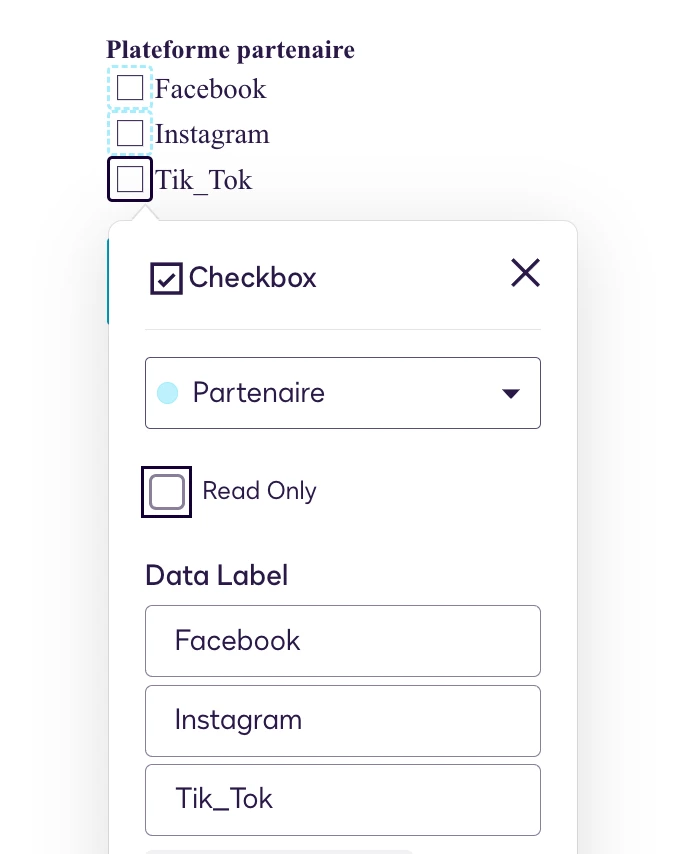
However, in the template editor I only see the Data Label field and no place to define the checkbox option values (Facebook / Instagram / TikTok).

How should checkbox group values be configured in the template so they correctly map from the Web Form? In the example below I was even trying to add the API Value directly but there should be an area to provide both checkbox group API value and each checkbox API value no?

Thanks!


Best answer by Ma.Cubio

Hello ​@Pauslr 

Thank you for reaching out, and welcome to the Docusign Community! We appreciate your question and assure you that we are fully committed to providing you with the best service possible. 

The errors: DOCGEN_PROCESSING_FAILURE and “Checkbox Values can't be blank” occur when mapping a Web Form checkbox group to a template checkbox group, but the template does not provide a way to define individual checkbox option values (e.g., Facebook, Instagram, TikTok). Possible root cause could be the following:

  • The template editor only exposes the Data Label field for checkbox groups, but not the individual API values for each checkbox option.
  • When the envelope is generated, the system expects each checkbox value to be mapped and present (not blank).
  • If the template checkboxes do not have their API values set explicitly, the mapping from the Web Form fails, resulting in the DOCGEN_PROCESSING_FAILURE error.

Based on similar field-mapping issues for checkbox group value configuration, the issue is caused by incorrect field mapping and grouping within the template. The system cannot save data because the fields are not mapped to the correct data paths.

Resolution / Procedure

  1. Template Checkbox Configuration
    • Each checkbox in the template group must be configured with:
      • The same Data Label as the Web Form group (e.g., Checkboxpartenaire).
      • Individual API values matching the Web Form option values (e.g., Facebook, Instagram, TikTok).
  2. Field Properties Panel
    • In the template editor, select each checkbox in the group.
    • In the properties panel, look for a field labeled "Value" or "API Value".
    • Set the value for each checkbox to match the Web Form's API value.
  3. If the Template Editor Does Not Expose API Values:
    • This is a platform limitation.
    • Workaround: Try creating the checkbox group using the Classic Editor or via API/JSON template editing, where individual values can be set.
    • If unavailable, file a support ticket or enhancement request for checkbox group value mapping.

If you found the response to be a useful solution to your question, please “like” and mark it as the best answer by clicking “Select as Best” to make it easier for other users to find. Thank you!

Sincerely,

Ma. Cassandra | Docusign Community Moderator
If this helped, feel free to Like👍and click "Best Answer"

4 replies

Forum|alt.badge.img+14
  • Community Moderator
  • Answer
  • March 28, 2026

Hello ​@Pauslr 

Thank you for reaching out, and welcome to the Docusign Community! We appreciate your question and assure you that we are fully committed to providing you with the best service possible. 

The errors: DOCGEN_PROCESSING_FAILURE and “Checkbox Values can't be blank” occur when mapping a Web Form checkbox group to a template checkbox group, but the template does not provide a way to define individual checkbox option values (e.g., Facebook, Instagram, TikTok). Possible root cause could be the following:

  • The template editor only exposes the Data Label field for checkbox groups, but not the individual API values for each checkbox option.
  • When the envelope is generated, the system expects each checkbox value to be mapped and present (not blank).
  • If the template checkboxes do not have their API values set explicitly, the mapping from the Web Form fails, resulting in the DOCGEN_PROCESSING_FAILURE error.

Based on similar field-mapping issues for checkbox group value configuration, the issue is caused by incorrect field mapping and grouping within the template. The system cannot save data because the fields are not mapped to the correct data paths.

Resolution / Procedure

  1. Template Checkbox Configuration
    • Each checkbox in the template group must be configured with:
      • The same Data Label as the Web Form group (e.g., Checkboxpartenaire).
      • Individual API values matching the Web Form option values (e.g., Facebook, Instagram, TikTok).
  2. Field Properties Panel
    • In the template editor, select each checkbox in the group.
    • In the properties panel, look for a field labeled "Value" or "API Value".
    • Set the value for each checkbox to match the Web Form's API value.
  3. If the Template Editor Does Not Expose API Values:
    • This is a platform limitation.
    • Workaround: Try creating the checkbox group using the Classic Editor or via API/JSON template editing, where individual values can be set.
    • If unavailable, file a support ticket or enhancement request for checkbox group value mapping.

If you found the response to be a useful solution to your question, please “like” and mark it as the best answer by clicking “Select as Best” to make it easier for other users to find. Thank you!

Sincerely,

Ma. Cassandra | Docusign Community Moderator
If this helped, feel free to Like👍and click "Best Answer"


Forum|alt.badge.img+14
  • Community Moderator
  • April 6, 2026

Hello ​@Pauslr 

How are you? I'm just checking in to see if you still need help. If yes, please reply here with more context, or confirm if the issue has been resolved. 

If you run into any problems, we're happy to help with those here. Wishing you a smooth rest of your day!

If you found the response to be a valuable solution to your question, please “like” and mark it as the best answer by clicking “Select as Best” to make it easier for other users to find. Thank you!


Sincerely,

 Ma. Cassandra | Docusign Community Moderator
If this helped. Feel free to Like👍and click "Best Answer."


Forum|alt.badge.img+2
  • Author
  • New Voice
  • April 7, 2026

Hi ​@Ma.Cubio thanks for your help on this topic. I investigated the issue on my side and identified the root cause. The template I was trying to use with the Web Form was created using Document Generation and the new template editor, which appears to be unsupported for Web Forms in IAM.

This explains the error:

“Use of a document generation template is not supported.” So the behavior is expected rather than a configuration issue with checkbox mapping. I recreated the template without Document Generation and used that version for the Web Form instead and it worked 👍.

Could you please confirm whether Document Generation templates created with the new template editor are currently unsupported for Web Forms in IAM, and if there is any planned support for this in a future release?

Thank you.

Best regards,


Forum|alt.badge.img+14
  • Community Moderator
  • April 15, 2026

Hello ​@Pauslr 
Thanks for sharing your findings, you're absolutely correct. Templates created using Document Generation (including the new template editor) are currently not supported for Web Forms in IAM, which is why you encountered the error. This is expected behavior, not a configuration issue.
At this time, Web Forms only support standard templates, so recreating the template without Document Generation (as you did) is the right approach. Regarding future support, there’s no confirmed timeline or public roadmap yet for enabling Document Generation templates with Web Forms.
 

Sincerely,

 Ma. Cassandra | Docusign Community Moderator
If this helped. Feel free to Like👍and click "Best Answer."