Question

Requirement to Restrict Two Checkboxes to Single Selection with Salesforce Writeback

  • February 11, 2026
  • 1 reply
  • 4 views

Forum|alt.badge.img

We have a requirement to use two checkbox fields in a DocuSign document where only one checkbox can be selected at a time (mutually exclusive selection).
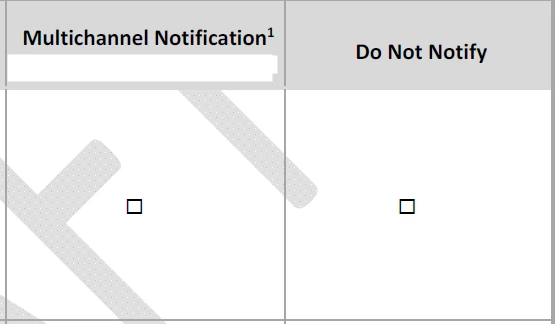


Additionally, the selected checkbox value should be written back to a Salesforce field after the envelope is completed.


Currently, standard checkboxes allow both options to be selected, and we need guidance on how to:


Restrict the selection so that only one checkbox can be checked at a time.


Could you please advise on the recommended configuration to achieve this requirement?


1 reply

Forum|alt.badge.img+15

Hi ​@somanikd22—glad you checked in!

To have the selected checkbox value writeback to a Salesforce field after the envelope is completed, each checkbox needs to be created as merge field with writeback enabled. Then, each DocuSign checkbox must be mapped to its own separate Salesforce checkbox fields in a 1-to-1 manner.

  • DocuSign Checkbox 1 → Salesforce Checkbox 1

  • DocuSign Checkbox 2 → Salesforce Checkbox 2

This setup needs to be created within an Envelope Template Configuration in Salesforce using DAL/EFS.

Here’s the step‑by‑step process:

  1. Start creating an envelope template configuration

  2. Add your document and recipients, then progress to the merge fields step.

  3. On the merge fields step, create two checkbox merge fields, and enable “Allow Writeback” for both.

  4. Continue to the Place Fields (embedded tagging) screen.

  5. Drag both checkboxes onto your form and group them together with the “Exactly 1” validation rule.

For reference: 

Learn About Creating Docusign Envelope Templates in Salesforce

Step 6: Create Salesforce Merge Fields for Your Template

Regarding enforcing a single checkbox selection. Even with the “Exactly 1” validation rule, signers are able to select more than one checkbox during signing. However, when they try to complete the envelope, DocuSign will display an error telling them to select only one, and they won’t be able to finish until they correct it. This is expected behavior for checkboxes in DocuSign. You might consider putting our Note field next to that section to guide signers that only 1 selection will be accepted.

Hope this helps. Let us know if you have questions—we're here for you!


Sincerely,

Melanie | Docusign Community Moderator
If this helped, feel free to Like
👍and click "Best Answer"


