Question

How to set width of a Salesforce Docusign merge field anchor tag without having to resize manually every time

  • February 12, 2026
  • 2 replies
  • 40 views

Forum|alt.badge.img

I’ve created a merge field in Docusign that is to write back to an opportunity field in Salesforce, and have placed the anchor tag in my word document template.  When I go to send the document out for signature, the text field for data to be entered is barely wide enough to notice it’s even there:
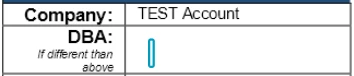
I know I can manually adjust the width of the field before sending, but asking my users to have to do this for every contract that goes out is not reasonable.  How can I set this anchored merge field to be wider by default?

2 replies

Forum|alt.badge.img+15

Hi ​@CLeszka—glad you checked in!

May you please try the steps below:

  • Open a template (new or existing) and go to Field Placement.
  • Click the settings cog next to the field.
  • In Size, set Width and Height (in pixels).
  • Click Save on the field.
  • Optional: You do not need to Save the entire template. Saving the modified field is sufficient.

Hope it helps. Let us know if you need further assistance.


Sincerely,

Melanie | Docusign Community Moderator
If this helped, feel free to Like
👍and click "Best Answer"


Forum|alt.badge.img+14
  • Community Moderator
  • February 24, 2026

Hello ​@CLeszka 

How are you? I'm just checking in to see if you still need help. If yes, please reply here with more context, or confirm if the issue has been resolved. 

If you run into any problems, we're happy to help with those here. Wishing you a smooth rest of your day!

If you found the response to be a valuable solution to your question, please “like” and mark it as the best answer by clicking “Select as Best” to make it easier for other users to find. Thank you!


Sincerely,

 Ma. Cassandra | Docusign Community Moderator
If this helped. Feel free to Like👍and click "Best Answer."

