New Voice
January 19, 2024
Solved

Getting an Error when integrate Docusign with Conga Composer and send Document for Signature using Conga Custom button "There was issue processing the Conga Composer Request".

  • January 19, 2024
  • 15 replies
  • 830 views

I have installed DocuSign e signature for Salesforce and Conga Composer application from App exchange in Salesforce dev org.  And integrating Conga with DocuSign add DocuSign parameter to send Document for Signature using conga custom button. But I have getting an error “There was an issue Processing the conga composer Request”. Why I am getting this error.
DocuSign package in salesforce: DocuSign App launcher
I’m giving below these parameters in conga Custom button. But getting error in Conga  when sending Document for Signature.
https://documentation.conga.com/composer/october-23/salesforce/using-conga-composer-and-docusign-for-salesforce-143899284.html
Please help me on this.
Best answer by Derrick.Tran

Hello @LHKimberley,


If you’re looking to reference one URL button to do both generate a document with Conga Composer and then immediately include this document within DocuSign, that is not supported based on the referenced link above. However, I would recommend following up with Conga support to confirm that statement is true.

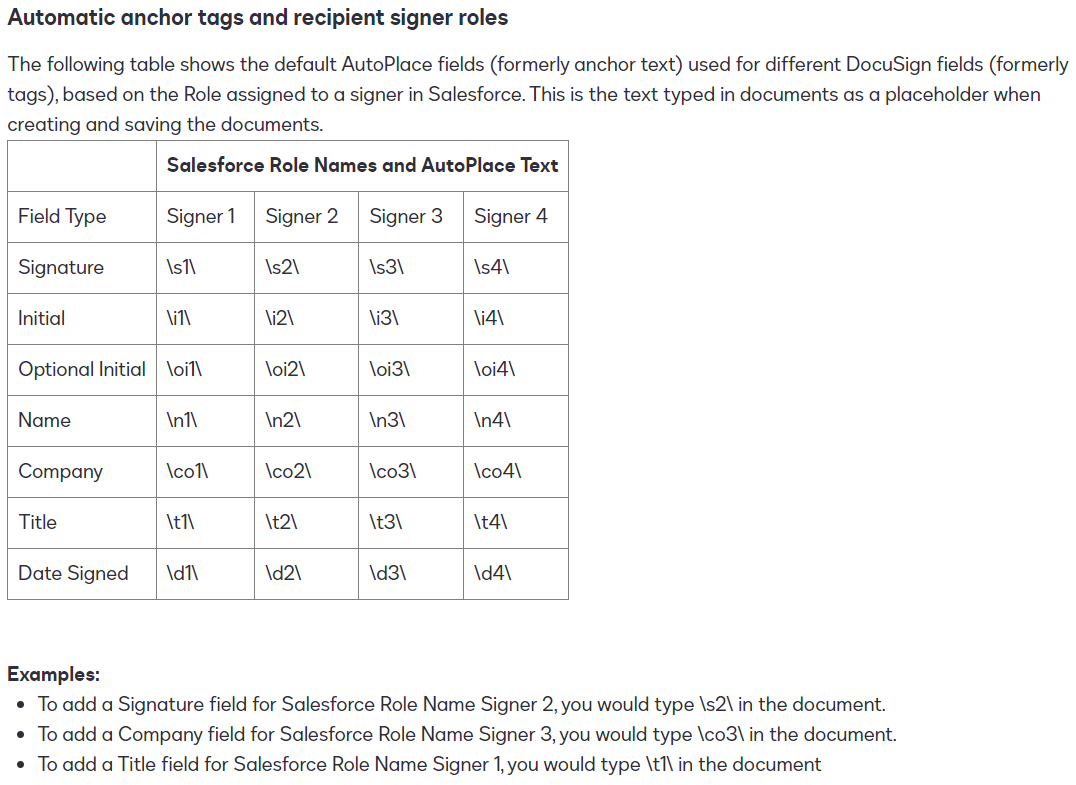
Assuming you use one button to create and save the document as a File. DocuSign is able to able to recognize the anchor text to place the signature. This documentation references that ability. 


Ideally you would want to create an Envelope Template to take the Composer generated document to be sent out for eSignature.

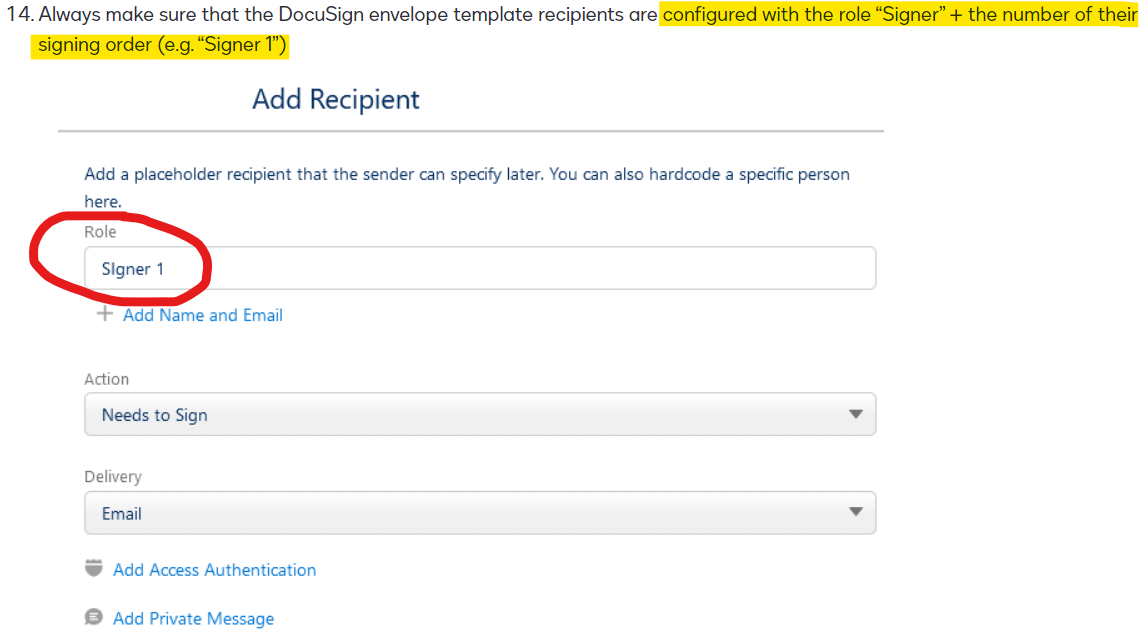
In the Recipients tab, make sure the signing recipient inherits the role of “Signer 1”. The documentation fails to easily highlight this as a requirement when leveraging anchor text:


Here’s how to Add Recipients within your Envelope Template.

15 replies

New Voice
March 22, 2024

@Ankit Verma were you able to resolve your issue? I am experiencing the exact same error.

Derrick.Tran
Docusign Employee
Docusign Employee
March 26, 2024

@Ankit Verma @LHKimberley,


Conga is the most appropriate resource to troubleshoot. However, I have some background of the integration that may help. First step is to identify which DocuSign managed package you have installed. Legacy vs DocuSign Apps Launcher (aka DAL). The legacy managed package has the namespace prefix “dsfs”. The latest DAL has the namespace prefix as “dfsle”.


If you only have the legacy managed package installed and configured, all of these DocuSign Integration Parameters are relevant for your Conga Composer button.


If you only have the latest DAL installed and configured, the DocuSign Integration Parameters listed above will not work. Per Conga’s documentation, you have to create a two step process (Integrating Composer with DocuSign App Launcher Package). First button to create the document with Composer. Then a second button for DocuSign to take the generated document and send for eSignature. You could do this with the standard button from DocuSign or Envelope Templates


New Voice
March 26, 2024

@Derrick.Tran this is very helpful - thank you!


I have the latest DAL installed and have had success with sending via DocuSign if a do not add the the e-signature piece to the Conga solution at all.

The thing that I find frustrating and wonder if I’m missing something, but based on your comment above sounds like there may not be a way around, is that the DocuSign button does not recognize the parameters (s1, etc.) and I have to place the signatures each time I send the Conga-generated document. 

Derrick.Tran
Docusign Employee
Docusign Employee
March 26, 2024

Hello @LHKimberley,


If you’re looking to reference one URL button to do both generate a document with Conga Composer and then immediately include this document within DocuSign, that is not supported based on the referenced link above. However, I would recommend following up with Conga support to confirm that statement is true.

Assuming you use one button to create and save the document as a File. DocuSign is able to able to recognize the anchor text to place the signature. This documentation references that ability. 


Ideally you would want to create an Envelope Template to take the Composer generated document to be sent out for eSignature.

In the Recipients tab, make sure the signing recipient inherits the role of “Signer 1”. The documentation fails to easily highlight this as a requirement when leveraging anchor text:


Here’s how to Add Recipients within your Envelope Template.

New Voice
March 26, 2024

Thank you @Derrick.Tran !


