Question

Failed to Initiate Document Generation in Salesforce

  • January 28, 2026
  • 2 replies
  • 14 views

Forum|alt.badge.img+1

Hi Community,

I’ve raised a case with Docusign also, but I thought I’d post this issue here.

Our users use Docusign within Salesforce to generate and send their quotes to prospects and customers.

However, when logging in today, we all have the same error message:
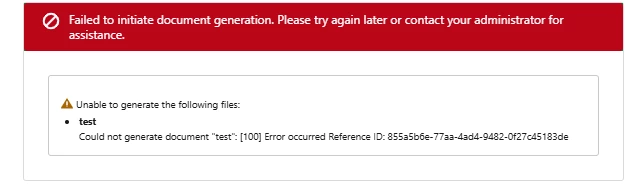
 

My ‘test’ above was one field in a new word document uploaded to Salesforce and I clicked preview, as you do when creating a new Docusign template in Salesforce.

I received this error and, basically, I have no idea what to do next.

Has anybody else experienced this or know how I can fix it?

Thanks

2 replies

Forum|alt.badge.img+13
  • Community Moderator
  • January 28, 2026

Hello ​@JimE 
Thank you for reaching out, and welcome to the Docusign Community! We appreciate your question and assure you that we are fully committed to providing you with the best service possible. 
To further check, please share the support case number with me via private message. Thank you.


Sincerely,

Ma. Cassandra | Docusign Community Moderator


Forum|alt.badge.img+1
  • Author
  • New Voice
  • January 29, 2026

Hi Ma,

Don’t worry - we found what the issue was and have resolved it.
It was a wider issue with Salesforce and not just a Docusign issue.
Typically we didn’t receive an alert from Salesforce about the wider issue, we only noticed that there was something wrong when we couldn’t generate our order forms via Docusign.
Thanks for your response


