Conversation Starter
September 30, 2024
Solved

Using Power Automate to apply a template to an uploaded document

  • September 30, 2024
  • 12 replies
  • 748 views

Hi I am new to DocuSign. 

I am trying to create a flow in Power Automate which will create an envelope using an existing template and then it will add a document to this envelope while applying the template to the document. It will then add recipients and send out the envelope. 


I have created the following flow to accomplish this: 
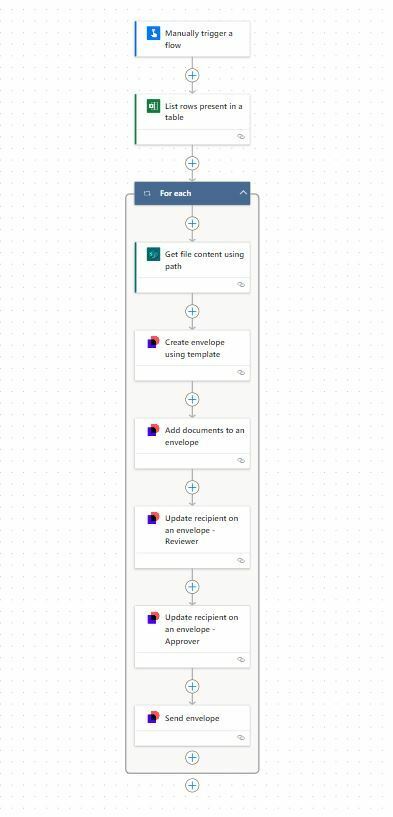


The issue is that the above flow is unable to apply the template to the added document. The final result is that the added document is appended to the sample document that is already there in the template. The fields are there in the sample document however, the added document does not have any fields. So, it seems like the template was not applied to the added document. 


Is there a way to apply the template to the added document such that it has all the fields for the recipient. At the same time the sample document in the template should be removed and replaced by the added document. 


Thanks in advance. 

 

Best answer by Michael.Rave

@nitish555 

Unfortunately, you cannot achieve this with the Docusign Standard Connector for Power Automate, as Composite Templates are not yet implemented. You will need this functionality to upload a document and apply a template. It is possible to do this with a Custom Connector for Docusign in Power Automate and adding the API call to it. I have done this years ago for customers as part of a service engagement.

12 replies

Michael.Rave
Docusign Employee
Docusign Employee
January 27, 2025

@KatieL 

It looks like this envelope has multiple recipients and was signed by a person, then the envelope send to the second person. A reminder was sent and then the envelope was was corrected, but the correction was cancelled.

The sent entries should not be correlated to Power Automate workflows being started, as it will create a new envelope every time when you use the “Create envelope” action.

"Select as Best" below if you find my answer is a valid solution to your issue and mark it as resolved.
Newcomer
April 7, 2025

Could you please explain how this functionality can be achieved using a composite template? 

@nitish555

When using a composite template you can upload a document using the “document” element and then apply a server template using the “ServerTemplate” element to it.

This way you can upload a document from SharePoint, apply the template and fill out all recipients, fields, etc. in a single step in Power Automate. This requires you to set up a Custom Connector for Docusign eSignature, where you implement the “create envelope” endpoint with composite template payload.

Hi @Michael.Rave 

With a little difficulty in setting up OAuth for the API call and figuring out the composite template syntax, I was able to send the envelopes with desired tabs on the uploaded document in Power Automate. 

Thank you so much for your guidance. It was pivotal in helping us crack this. 

Hi,

Is anyone able to provide some instructions on the Custom Connecter solution? Not overly technical but can work my way around this provided enough instruction. Thanks!


