Question

Power Automate - "This User lacks sufficient permissions. User does not have access to the template because it has not been shared with them."

  • January 7, 2026
  • 4 replies
  • 113 views

Forum|alt.badge.img+1

Hello,

Some time ago I’ve developed a Power Automate flow to automatically send envelopes by using template and to a specific recipients. Few days ago I’ve noticed, that flow suddenly started to fail due to the error message:
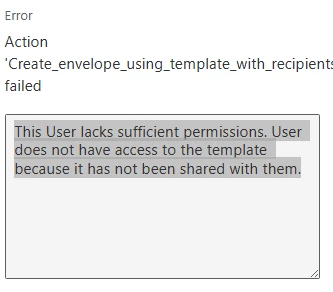


I was not changing anything in Power Automate at all. It just stopped working. I do not have access to the subscription admin panel, but I can guide our administrator to verify what’s wrong. What should I do? What’s the issue? Templates are shared with the account what is being used to send the documents and were before. I can see them during the action configuration, but I can’t use them any longer.

4 replies

Alexandre.Augusto
Docusign Employee
Forum|alt.badge.img+19

Hello, ​@MPSii 


Welcome to the Docusign Community!

It seems the template being used is not shared with the user connecting to the eSignature Template accout.

Your eSignature Admin can go to Templates (menu option), All Templates, find the specific template being used then in the three dots button on the right of the template, click in Share with Users then select the user(s) or group to share the template. Also, the user in the eSignature must have permissions to use Templates. If he/she has a permission profile of DS Admin or DS Sender so they can use templates. That can be verified by you eSignature Admin, under Admin section, Users and Groups, find the user then verify what Permission profile is being used.


Seet the picture:


I hope that helps, if so, I’d appreciate you Like here.


Thank you,

Alexandre


Forum|alt.badge.img+1
  • Author
  • New Voice
  • January 9, 2026

Hello,

My eSignature admin confirmed that templates are shared with my account and all permissions are correct, unfortunately, still the same error.


Forum|alt.badge.img+1
  • Docusign Employee
  • January 20, 2026

Hello,

Regarding the issue you are having with Docusign for Power Automate, I understand that your flow was working previously but has suddenly started failing with the error "This User lacks sufficient permissions. User does not have access to the template because it has not been shared with them," even though your admin has confirmed the templates are properly shared.

This error typically indicates a mismatch between the Docusign account used by your Power Automate connection and the account that has access to the templates. Power Automate flows run using the credentials of the account that established the OAuth connection, not individual user credentials. Even though you can see the templates during flow configuration, the flow executes at runtime under the connection account's permissions.

Could you please try the following:

  1. Verify Your OAuth Connection Account:
    • Go to Power Automate (flow.microsoft.com)
    • Navigate to Data > Connections
    • Find your "Docusign" connection and note which account is shown
    • This is the account that needs template access
  2. Confirm Template Sharing with Connection Account:
    • Log into Docusign with your administrator credentials
    • Go to Templates > All Templates
    • Find the template used in your flow (click three dots ...)
    • Select "Share with Users"
    • Verify the Power Automate connection account is listed with "Use" permission (not just "View")
    • If the connection account is not listed, add it with "Use" permissions and save
  3. Re-authenticate the Connection (if needed):
    • In Power Automate, go to Data > Connections
    • Find the Docusign connection and click the three dots (...)
    • Select "Edit" and then "Fix connection"
    • Complete the authentication process with the account that has template access

Regards,

Andrew


Forum|alt.badge.img+1
  • Author
  • New Voice
  • January 20, 2026

Hello,

I’ve checked everything and today we have another error message:
 

  "errorCode": "USER_LACKS_PERMISSIONS",

  "message": "This User lacks sufficient permissions. User does not have the permision to the CreateEnvelopeFromTemplates method"

I believe it’s another issue with permissions on DocuSign side?

The flow was not touched for a long time, from Power Automate side nothing changed - connection the same, account the same and it was working for years, now it’s not...


