Question

extract attachments from signed envelope

  • March 24, 2026
  • 2 replies
  • 23 views

Forum|alt.badge.img+2

I have an envelope that requires two documents to be attached. 

I have trained an AI model (outside of docusign) to validate the attachments. I need to extract the attached documents as two individual PDF’s.

I have tried the List_documents_from_an_envelope action, but it does not include the attachments. 

e.g. this document requires up to three attachments. 
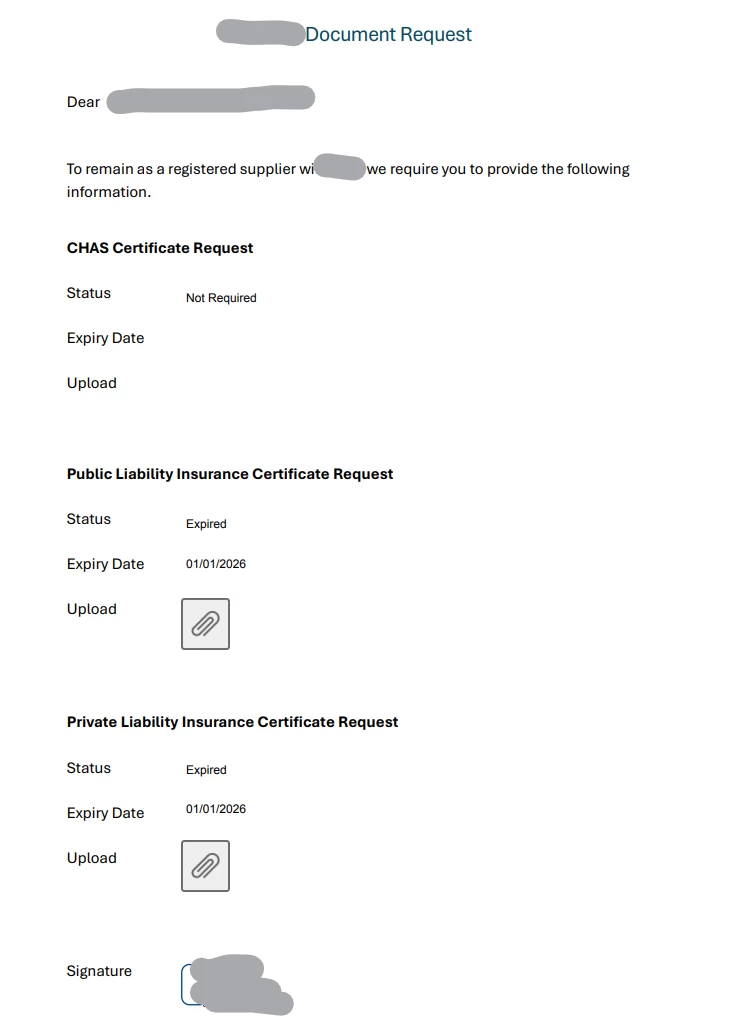


The signed download PDF contains two documents  

Doc 1
1 - Certificate request
2 - Attachment 1 
3 - Attachment 2

Doc 2
1 - Certificate 


when I use the list documents action, I can only see the original form, and the certificate. 
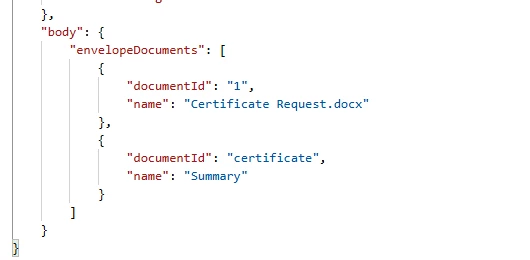

This seems like quite a basic action that other esignature solutions can do?
Unfortunately we may have to look at another provider if this isn't possible. 

2 replies

Forum|alt.badge.img+14
  • Community Moderator
  • March 25, 2026

Hello ​@nick911

Thank you for reaching out, and welcome to the Docusign Community! We appreciate your inquiry and are here to help. However, since we don’t have visibility into your account, we’re unable to investigate this further on our end.

We recommend that your account administrator submit a support case, including your integration key and full details of the issue. This will allow the appropriate team to review and assist you more effectively.

Sincerely,

Ma. Cassandra | Docusign Community Moderator
If this helped, feel free to Like👍and click "Best Answer." 


Forum|alt.badge.img+14
  • Community Moderator
  • April 2, 2026

Hello ​@nick911 

How are you? I'm just checking in to see if you still need help. If yes, please reply here with more context, or confirm if the issue has been resolved. 

If you run into any problems, we're happy to help with those here. Wishing you a smooth rest of your day!

If you found the response to be a valuable solution to your question, please “like” and mark it as the best answer by clicking “Select as Best” to make it easier for other users to find. Thank you!


Sincerely,

 Ma. Cassandra | Docusign Community Moderator
If this helped. Feel free to Like👍and click "Best Answer."


