Existing Functionality

Text field boxes are covering up information on the documents uploaded.

Categories:Agreement Preparation
  • September 11, 2025
  • 2 replies
  • 162 views

Forum|alt.badge.img

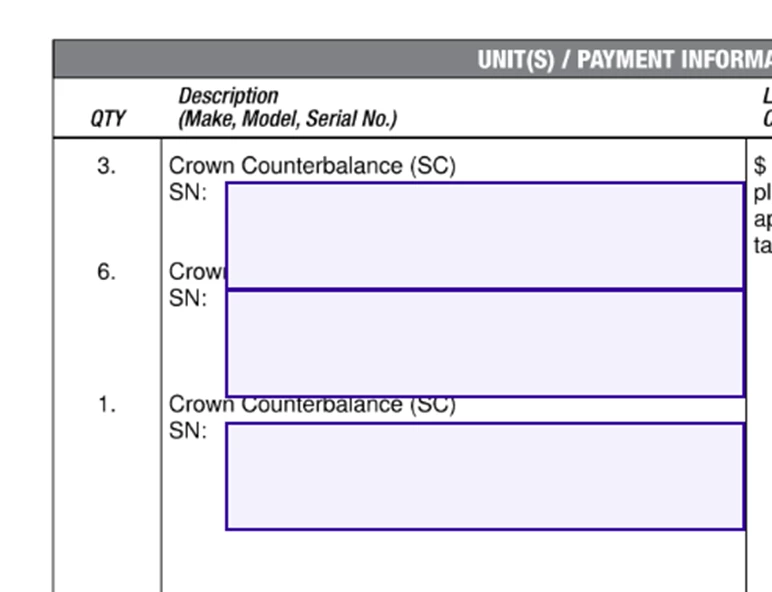
When creating an envelope to send, I put my text boxes in place and resize as necessary, making sure to not cover any information on the document I uploaded.  When my recipients view the document, the boxes are bigger and information on the document I uploaded is covered up by the text boxes resulting in my recipients not being able see the important information. 

“Preview” is an option, but there are days we send 40 envelopes and that would be a lot of extra clicks turning into extra time by the end of the day. 

My suggestion is that if I make a text box a certain size when sending an envelope, that DocuSign keep it that same size when my recipient gets the document.
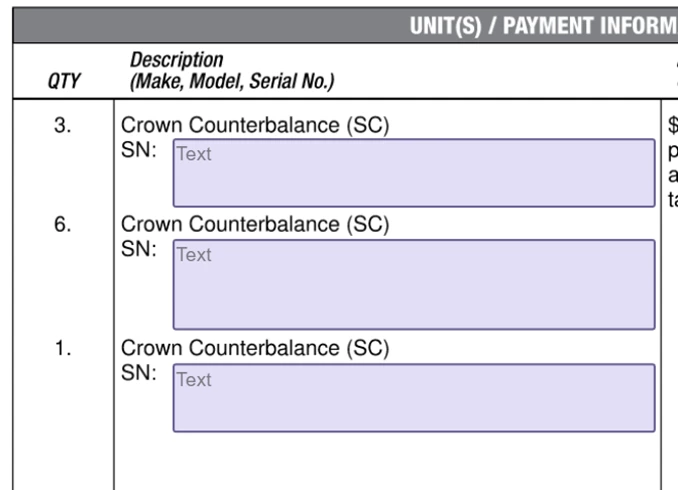
Snip showing the size of the text boxes when I created the envelope.
Snip showing the size of the text boxes when my recipient views the document.  These snips are from the same envelope.


2 replies

Forum|alt.badge.img+14
  • Community Moderator
  • February 27, 2026
Idea SubmittedExisting Functionality

Forum|alt.badge.img+14
  • Community Moderator
  • February 27, 2026

Thanks so much for your idea, ​@KManwell. After review, we found that this request can be accomplished using existing features within Docusign. 

Users can prevent a text field from changing size by enabling the “fixed width” option in the field settings. When this is enabled, the text box will stay the same size even if more text is entered. Instead of expanding to cover other parts of the document, the text will wrap within the box.

You can get more details on that here.
Field Types
Adjust Field Size


