Back to Docusign.com



Idea Submitted
Improve “Next/Send” buttons when using a template document
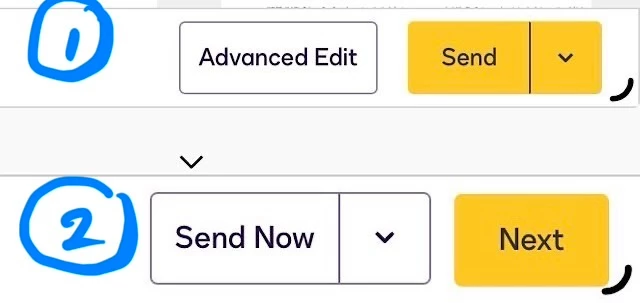
When creating a contract from templates, the first screen is where you input the customer contact info. At the bottom of the screen are two buttons, [Advanced Edit] in white and [Send] in yellow. This is intuitive. When you click advanced edit you then can make additional edits to the contract. At the bottom of this screen the buttons are [Send Now] in white and [Next] in yellow. This is counter intuitive. It would be better if on this second screen the [Next] were on the left and in white, and the [Send Now] were on the right and in yellow, for consistency.
The [Send] buttons should always be in yellow and on the right to avoid unintentionally sending the contract out before it is ready.