Back to Docusign.com



Enforce accessibility standards for brand palettes
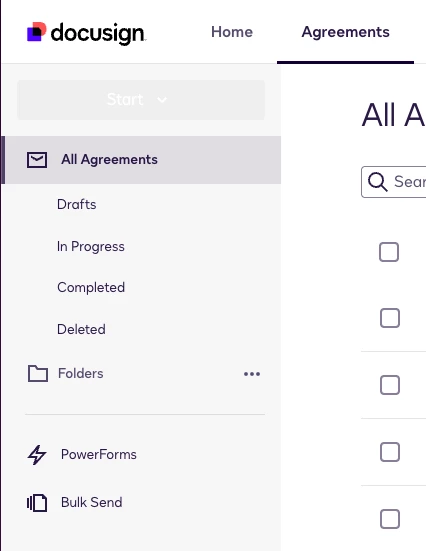
Due to how you’ve incorporated my company’s brand palette, the ‘Start’ button to create a PowerForm is almost completely invisible. I tried Ctrl+F on the page to find ‘New’ or ‘Create,’ which obviously didn’t work, so I had to consult your documentation to find the name of the button before using Ctrl+F ‘start’ to finally locate it. The same goes for other key action buttons on the site - ‘cancel’ looks like the only enabled button, not ‘Ok’. This is a huge accessibility issue, and just bad UX.
It should be straightforward to support a customer's brand color palette while still enforcing accessibility standards. Our brand palette contains many colors that meet those standards, and it should be fairly trivial to auto-reject incompatible colors and request that the admin select a replacement color from the palette. Or even better, auto-select more appropriate alternatives for them.