Existing Functionality

Delay signature to prevent user from signing too early

Categories:eSignature
  • May 29, 2025
  • 5 replies
  • 52 views

Forum|alt.badge.img+1

I couldn't find a solution to this issue on the Docusign Community, so I'm offering a suggestion. We need to prevent signers from signing agreements too early. The current recommendations like "Send Later" or adding a delay aren't helpful because "Send Later" doesn’t allow our recipients to view documents immediately. Adding a delay doesn't work with our use of merge field data, causing errors (see image below).

We suggest Docusign provide an option to add a validation or setting that prevents signatures until a specified time, such as X days or Y hours.
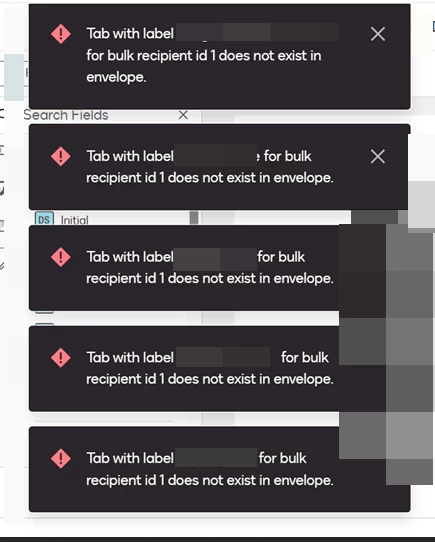
 

Example: Signer should not sign until 2 weeks from when they receive the Docusign envelope for a “consideration period”. If they sign too early we need to void their agreement and send a new one. 

5 replies

Hengfeng Ge
Hero
Forum|alt.badge.img+18

I'm curious, what kind of business scenario will use this function, I haven't encountered it yet, learn about it, thank you!


FreeLink/甫连信息
🌍 DocuSign Partner | Partner Profile
🌟 The only DocuSign Partner globally certified as both a Certified eSignature Administrator and eSignature Technical Consultant
🏆 DocuSign 2024 APAC Reseller Growth Partner of the Year
💡 Ranked #1 in the OG All Star category in DocuSign Community Wrapped 2024
📊 DocuSign Community Leaderboard Top 5 contributor
🚀 Expertise in DocuSign integrations with on-premises systems for leading enterprises across various industries
🔗 Connect with me on LinkedInhttps://www.linkedin.com/in/gehengfeng/


Forum|alt.badge.img+1

I'm curious, what kind of business scenario will use this function, I haven't encountered it yet, learn about it, thank you!


Replying to this comment - our severance agreements require us to present the agreement for employees to consider, but they should not sign before the date denoted in the agreement. 


Hengfeng Ge
Hero
Forum|alt.badge.img+18

@Devin Moore FM 

You can try like this, the first is Needs to view then add a delay what date you want, the finally is needs to sign.  but this is advance workflow and only available in Enterprise edition. 


FreeLink/甫连信息
🌍 DocuSign Partner | Partner Profile
🌟 The only DocuSign Partner globally certified as both a Certified eSignature Administrator and eSignature Technical Consultant
🏆 DocuSign 2024 APAC Reseller Growth Partner of the Year
💡 Ranked #1 in the OG All Star category in DocuSign Community Wrapped 2024
📊 DocuSign Community Leaderboard Top 5 contributor
🚀 Expertise in DocuSign integrations with on-premises systems for leading enterprises across various industries
🔗 Connect with me on LinkedInhttps://www.linkedin.com/in/gehengfeng/


Forum|alt.badge.img+13
  • Community Moderator
  • February 3, 2026
Idea SubmittedExisting Functionality

Forum|alt.badge.img+13
  • Community Moderator
  • February 3, 2026

Thanks so much for your idea, ​@Devin Moore FM. After review, we found that this request can be accomplished using existing features within Docusign.
As ​@Hengfeng Ge mentioned, you can set your recipients to “Needs to View” first, and then add a delay as to when your recipients need to sign the document.
 

You can get more details on that here.
Add a Delay Between Recipients
Recipient Roles

