Is there a way to search/filter Requests by a certain status, i.e., we have a status for attorney review for each of our attorneys. This status is used when a request is assigned to them for their review. Once their review is complete, the status is updated to a different status. What I am looking for is an option to search Requests that have been assigned to a specific attorney. Is this a possibility?
Thank you for reaching out here in the Docusign Community. It’s great to have you here. We understand that you would like to search for requests or envelopes sent to a specific attorney.
To check this, log in to your account and run an Envelope Report to filter by recipient name and status.
Follow these steps:
Go to the Reports tab on the navigation bar.
Select Envelope > Envelope Reports on the left panel.
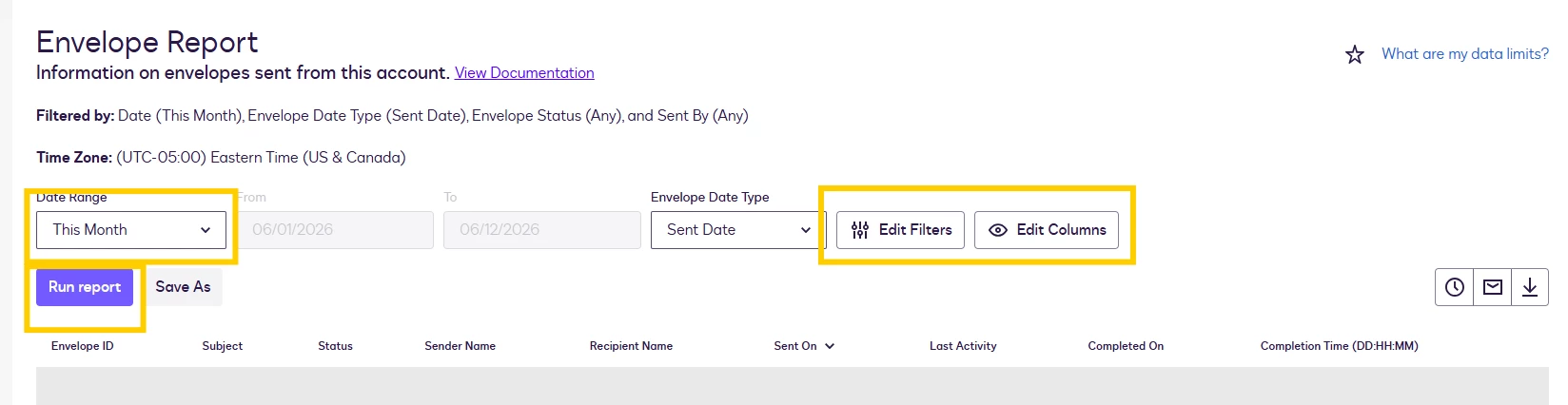
Customize your Date Range.
Click Edit Filters and filter by the Recipient Name or other details.
You may also click on Edit Columns and check for other data.
Click Run Report
The dashboard displays all collated envelopes by signer (attorney) and their status. For a step-by-step guide, please review our Reports article: Using Reports
I hope this helps! Let me know if you have any further questions.
Best Regards.
Luke | Docusign Community Moderator If this helped, mark it as "Best Answer" so others can find it too!
Thank you for reaching out here in the Docusign Community. It’s great to have you here. We understand that you would like to search for requests or envelopes sent to a specific attorney.
To check this, log in to your account and run an Envelope Report to filter by recipient name and status.
Follow these steps:
Go to the Reports tab on the navigation bar.
Select Envelope > Envelope Reports on the left panel.
Customize your Date Range.
Click Edit Filters and filter by the Recipient Name or other details.
You may also click on Edit Columns and check for other data.
Click Run Report
The dashboard displays all collated envelopes by signer (attorney) and their status. For a step-by-step guide, please review our Reports article: Using Reports
I hope this helps! Let me know if you have any further questions.
Best Regards.
Luke | Docusign Community Moderator If this helped, mark it as "Best Answer" so others can find it too!
You can login or register as either a Docusign customer or developer. If you don’t already have a Docusign customer or developer account, you can create one for free when registering.
You can login or register as either a Docusign customer or developer. If you don’t already have a Docusign customer or developer account, you can create one for free when registering.
 Back to Docusign.com