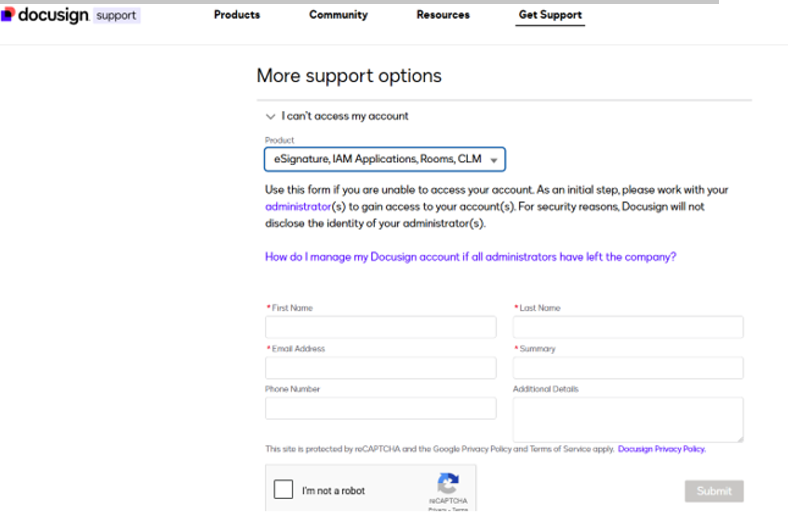
For the past few days me and my team have been trying to create a free Docusign developer account but every time we click the “Get Started” button, nothing happens.
We have tried on multiple devices (laptop, desktop, phone) and in different browsers but we are all getting the same result. There are no errors displayed, the “Get Started” button just greys out for a second then nothing happens.
Thank you for reaching out, and a warm welcome to the Docusign Community! We are absolutely delighted to have you here and can't wait to share our knowledge with you.
I understand the frustration you must be feeling with the Developer account issue, and I apologize for the delay in getting back to you. Let's work together to resolve this.
Could you please try this link: Docusign Developer Account? Can you please perform the following troubleshooting:
Check if the browser needs to be updated.
Log out and Log back into the account.
Clear history and cache/cookies and set it to "All time."
Try a different browser(s).
Try to use Incognito.
Different Internet network such as on a mobile device using data with Wi-Fi disabled.
Try a different device.
Enable/disable VPN if applicable.
Could you please confirm if this is your first time creating a Developer account? Other customers I've assisted with this issue found multiple Docusign accounts associated with the email address in Pending Activation; an Organization claims the work email address used; or doesn't allow using the emails outside their work tools.
@Hadasa,
The workaround to submit a case is without logging into a production account by using the “I can’t access my account” option at the bottom of the page and providing complete details of the issue in the Case description.
Domain claiming is done by an Organization admin at Admin>Organization>Domains which also shows the list of claimed domains. Thanks for the follow-up and keep us posted on your progress, please.
Regards, Jerry
Translate
Jerry Withers, Senior Partner Specialist, Docusign
Once again .. thank you Jerry for your prompt reply ..
Now I tried the link and got what I think is a ‘Pay Wall’ see attached. (To book a ticket doi I need to get past here?)
I then navigated to ‘The DocuSign Home Page’ … Went to clicked on Admin (for the first time). Now I saw lots of links but not Organization, so I could check for KFH, image 2. Am I in the right place?
Now it looks like my ‘free account’ has expired. unfortunately, our DocuSign project is just starting even though my account was opened last year :(.
@Davies Again, I appreciate the follow-up. The ticketing system requires a login. For your eSign account, you will want to use the button on the left, then enter your credentials. This may be helpful https://support.docusign.com/s/articles/How-Do-I-Open-a-Case-in-the-DocuSign-Support-Center?language=en_US. Support can help you identify your account status and availability of Organization Management features. Looking at your screenshot, I would guess Org Admin is not enabled for your account, so other troubleshooting steps would apply. Its possible the domain was claimed in some other account and they can spot that while you and I can’t. Regards, Jerry
Translate
Jerry Withers, Senior Partner Specialist, Docusign
🌍 DocuSign Partner | Partner Profile 🌟 The only DocuSign Partner globally certified as both a Certified eSignature Administrator and eSignature Technical Consultant 🏆 DocuSign 2024 APAC Reseller Growth Partner of the Year 💡 Ranked #1 in the OG All Star category in DocuSign Community Wrapped 2024 📊 DocuSign Community Leaderboard Top 5 contributor 🚀 Expertise in DocuSign integrations with on-premises systems for leading enterprises across various industries 🔗 Connect with me on LinkedIn: https://www.linkedin.com/in/gehengfeng/
Translate
Welcome to the DocuSign Community! Your feedback is highly valued. If you find my response helpful, please give it a "Like" and consider marking it as the "Best Answer" to assist others with similar issues.
You can login or register as either a Docusign customer or developer. If you don’t already have a Docusign customer or developer account, you can create one for free when registering.
You can login or register as either a Docusign customer or developer. If you don’t already have a Docusign customer or developer account, you can create one for free when registering.
 Back to Docusign.com