Newcomer
September 9, 2026
Question

How do we test using docusign from sharepoint to a developer environment?

  • September 9, 2026
  • 3 replies
  • 48 views

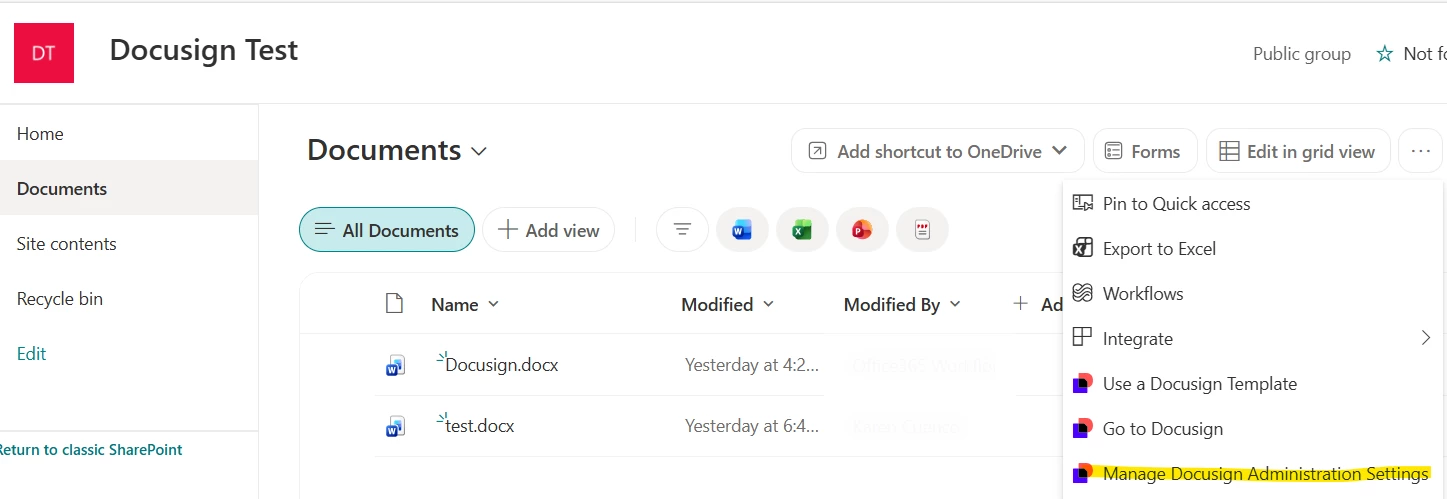
WE have installed the Docusign Sharepoint Site Edition to a test Sharepoint site. When we try to connect this to the developer docusign admin portal via "Manage Docusign Administration Settings" in the SharePoint document library, it goes to the production link (https://account.docusign.com/oauth/….) not https://account-d.docusign.com/ which is the developer docusign portal. With this how can we grant consent a docusign developer environment to a sharepoint site?
 

3 replies

New Voice
September 10, 2026

There is a drop-down menu to select between PROD and DEMO in the settings page. You can change there the environment that their SharePoint will connect with.
It can be changed from PROD to DEMO and back without problem, including after the initial connection.

As to the second, the Grant Consent step is purely on the SharePoint side and the Docusign server they are currently connected to is irrelevant regarding said Grant Consent.

Community Moderator
September 10, 2026

Hi ​@Kcuenco1234, 

Thank you for reaching out here in the Docusign Community! It’s great to have you here. 

​@marieelia is right! 
 
The Grant Consent step is purely on the SharePoint end and whether it connects to PROD or DEMO on the Docusign side will have no impact.

You can change what environment it connects to in that same "Manage Docusign Administration Settings" menu with the drop-down button called "Environment" 

I hope this helps! Let us know if you have any further questions. 

Best Regards, 
Luke | Docusign Community Moderator
If this helped, you can select “Best Answer” so other users can see it too!

Community Moderator
September 28, 2026

Hi ​@Kcuenco1234, 

I hope you are doing well! I just wanted to check if you still need assistance with this post. 

Don’t hesitate to let us know if you do. We’re here to help! 

Best Regards, 
Luke | Docusign Community Moderator
Please select “Best Answer” if you find this conversation helpful.

