Question

Document template checkbox data label

  • November 22, 2025
  • 2 replies
  • 25 views

I added to a document template a checkbox, and when i edit a data label, it don’t save the new label. There’s anything i might need to edit additionally?

After edit the Data Label and save it, it return to the original value “Checkbox 1a31da89-4ae0-49…...”. I validated and i’m not using the Data Label anywhere. Any Data Label that i entered is reverted to the original value.
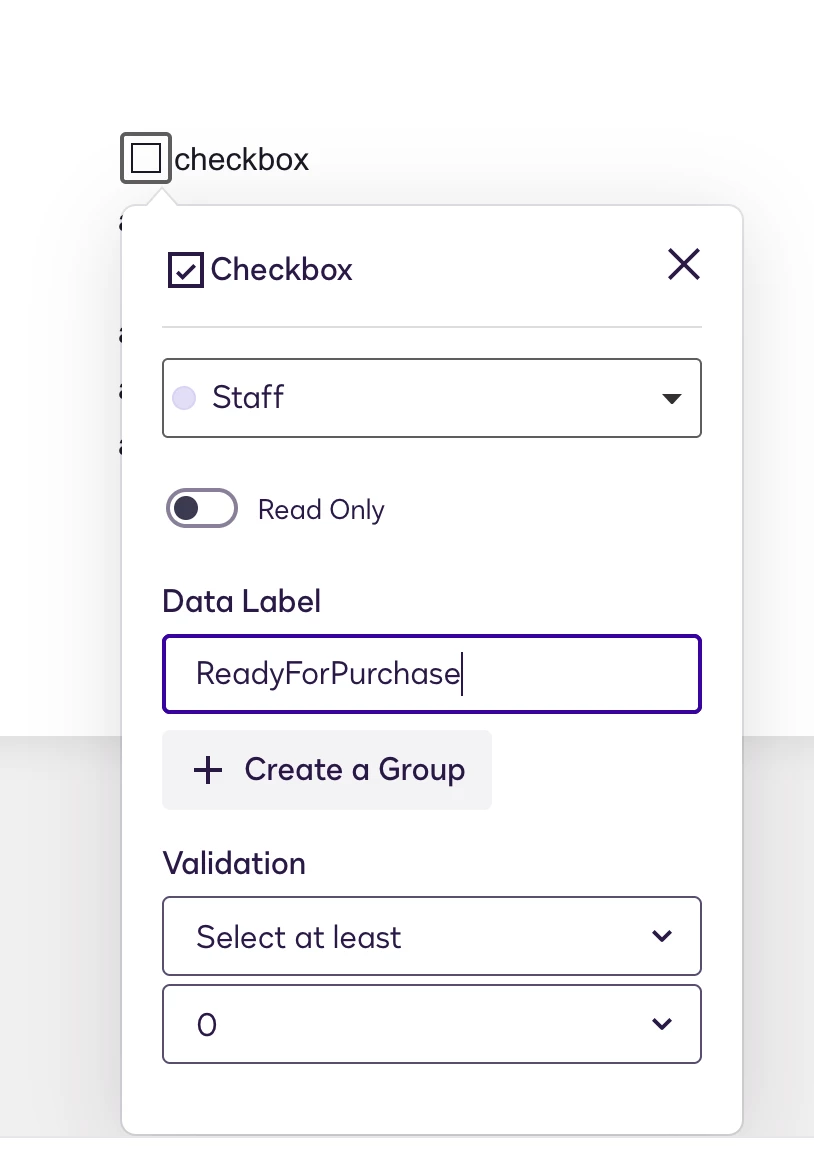
 

2 replies

Forum|alt.badge.img+11
  • Community Moderator
  • November 24, 2025

Hello ​@josuedelgado 

Thank you for reaching out here in Docusign Community.

Please follow the steps provided in this link Document Custom Fields

Document Custom Fields in DocuSign allow senders to add standardized, reusable fields to documents within an envelope.

These fields are placed at the document level, not per recipient, and are typically used for information that should remain the same across all recipients such as internal notes, transaction IDs, client names, or reference numbers.

Once added, these custom fields can automatically populate each time you use a template or prepare a new envelope, helping ensure consistency and reducing manual entry.

You can also set properties like read-only, required, or hidden depending on how you want the field to behave.

If you found the response to be a useful solution to your question, please mark it as the best answer by clicking “Select as Best” to make it easier for other users to find.

Best regards,
Marco | Docusign Community Moderator
"Select as Best" below if you find the answer a valid solution to your issue!


Forum|alt.badge.img+11
  • Community Moderator
  • December 1, 2025

Hello ​@josuedelgado,

I hope you are doing well. 

I want to confirm if you were able to solve your issue by utilizing the solution suggested or if the information provided was useful.

If so, please mark it as the "Best Answer ✅" by clicking “Select as Best” to make it easier for other users to find.

Otherwise, let me know and I will gladly help you address the situation as soon as possible.

Best regards,
Marco | Docusign Community Moderator

